
A smart home can contain dozens of connected devices.
Security cameras upload video.
Video doorbells send notifications.
Smart TVs stream high-resolution content.
Phones, tablets, laptops, game consoles, speakers, thermostats, appliances, smart displays, and home automation hubs all compete for network access.
The problem is that buying faster internet does not automatically create better Wi-Fi throughout the home.
A fiber connection may deliver gigabit speeds to the router while a camera in the backyard struggles to remain connected.
A smart lock may work perfectly near the router but become unreliable at the far end of the house.
A video call can still freeze upstairs even when the internet connection itself is fast.
This is where mesh Wi-Fi becomes important.
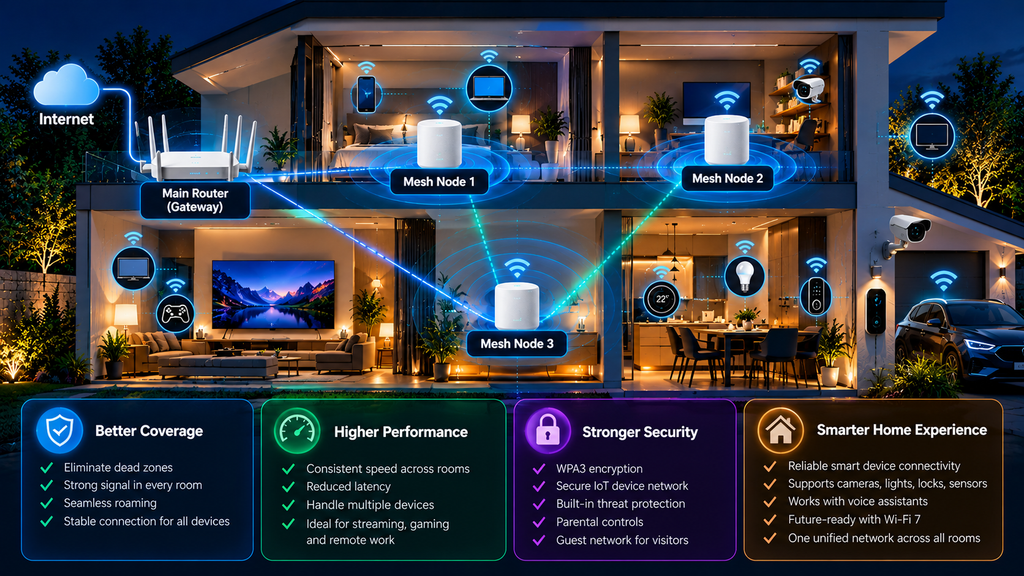
Instead of relying on a single wireless router to cover an entire home, a mesh system uses multiple coordinated access points, often called nodes, to extend consistent Wi-Fi coverage across different rooms and floors.
In 2026, the technology is becoming even more capable as Wi-Fi 7, 6 GHz spectrum, Multi-Link Operation, faster wired backhaul, WPA3 security, and smarter network management become increasingly common.
But a mesh system is not automatically better simply because it has more nodes or advertises extreme speeds.
Placement, backhaul quality, building materials, device compatibility, security, and network design matter just as much.
This guide explains how mesh Wi-Fi works in 2026, whether Wi-Fi 7 is worth buying, how 2.4 GHz, 5 GHz, and 6 GHz affect smart homes, how to place mesh nodes correctly, when wired backhaul is worth using, and how to build a network that remains fast, secure, and reliable as the number of connected devices grows.
Table of Contents
Mesh Wi-Fi for Smart Homes in 2026: Quick Overview
| Question | General Answer |
|---|---|
| What is mesh Wi-Fi? | A network that uses multiple coordinated access points to provide broader and more consistent Wi-Fi coverage. |
| Is mesh Wi-Fi the same as a range extender? | No. Mesh systems are designed to operate as one coordinated network, while traditional extenders often provide a simpler repeating function. |
| Does every smart home need mesh Wi-Fi? | No. Small apartments and compact homes may work perfectly with one well-positioned router. |
| Is Wi-Fi 7 useful for smart homes? | It can improve capacity, latency, backhaul performance, and future readiness, but most individual IoT devices do not require Wi-Fi 7 speeds. |
| What is Multi-Link Operation? | A Wi-Fi 7 capability that can use multiple wireless links to improve throughput, latency, and reliability in supported devices. |
| Is 6 GHz better than 5 GHz? | It offers more clean spectrum and very wide channels but generally has shorter practical range through walls. |
| Is 2.4 GHz still important? | Yes. Many smart-home devices use 2.4 GHz because of its range and broad compatibility. |
| What is wired backhaul? | Connecting mesh nodes with Ethernet instead of relying entirely on wireless links between nodes. |
| Is wired backhaul better? | When practical, it usually provides the most predictable performance and frees wireless capacity for client devices. |
| How many mesh nodes do I need? | Enough to remove coverage gaps, but not so many that nodes interfere unnecessarily. |
| Is WPA3 important? | Yes. WPA3 provides stronger modern Wi-Fi security when supported by the network and client devices. |
| Should IoT devices use a separate network? | A guest or dedicated IoT network can improve management and reduce unnecessary access to sensitive devices. |
| Does faster Wi-Fi increase internet speed? | Only up to the speed available from your internet connection and the capabilities of the devices involved. |
1. What Is Mesh Wi-Fi?
A traditional home network usually starts with one router.
That router creates a wireless signal around a central location.
If the home is small and the router is positioned well, this can work perfectly.
The problem begins when the signal must travel through:
- Multiple floors
- Thick concrete
- Brick walls
- Metal structures
- Long hallways
- Large outdoor areas
The farther a device is from the router, the weaker the connection usually becomes.
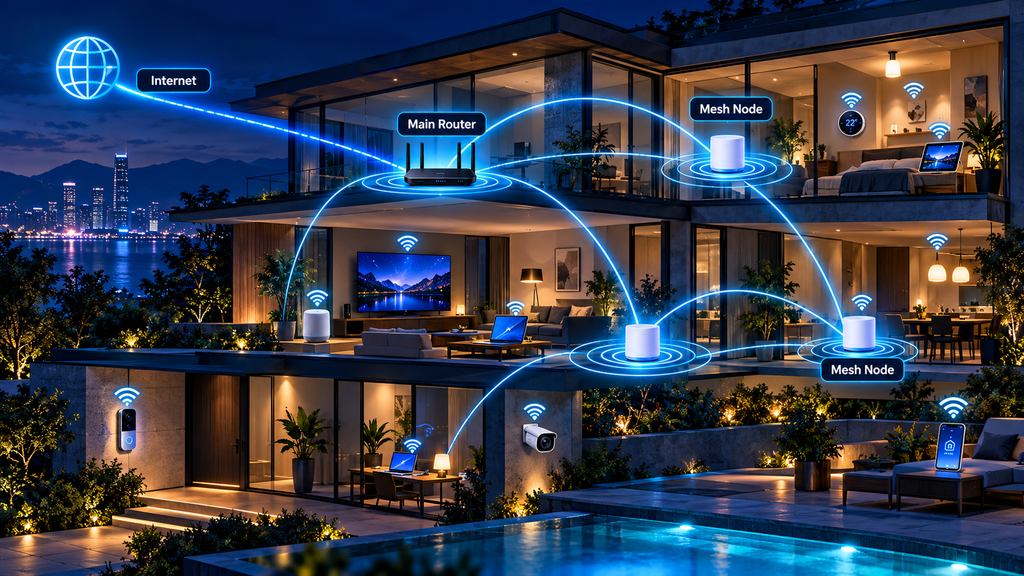
A mesh Wi-Fi system addresses this problem by using multiple coordinated access points.
One unit typically connects to the modem or internet gateway.
Additional units are placed elsewhere around the home.
Together, they provide a larger wireless coverage area.
Instead of thinking of mesh as several independent routers, think of it as:
one network distributed across several locations.
2. Mesh Wi-Fi vs. a Traditional Router
A high-quality standalone router may outperform a poorly designed mesh system.
Mesh is primarily about coverage and consistency, not simply maximum speed.
A traditional router works best when:
- The home is relatively small
- The router can be placed centrally
- Walls are not unusually difficult for Wi-Fi
- There are few coverage dead zones
Mesh becomes more useful when:
- The home has multiple floors
- Rooms are separated by dense walls
- Outdoor coverage matters
- Cameras or IoT devices are spread widely
- One router cannot reach every important location reliably
The key benefit is flexibility.
Instead of forcing one access point to cover everything, the network can place connectivity closer to where devices actually operate.
3. Mesh Wi-Fi vs. Range Extenders
Traditional Wi-Fi extenders repeat an existing wireless signal.
They can be useful for simple coverage problems, but they may introduce compromises.
Some older extender setups create separate network names.
Others reduce available throughput because the same radio must receive and retransmit traffic.
A modern mesh system is generally designed from the beginning for multi-access-point operation.
The nodes coordinate functions such as:
- Client steering
- Channel selection
- Network configuration
- Roaming
- Backhaul management
The result can be easier to manage than several independent access points or extenders.
4. What Is Wi-Fi EasyMesh?
Wi-Fi EasyMesh is an industry approach designed to help compatible multi-access-point Wi-Fi devices operate as a coordinated network.
Instead of every manufacturer using completely different methods for mesh coordination, EasyMesh provides a standardized framework.
A typical EasyMesh network includes:
- A controller
- One or more agents
The controller coordinates network decisions.
Agents provide additional Wi-Fi coverage.
The goal is improved interoperability and easier expansion.
However, certification does not mean every combination of products will deliver identical performance.
Firmware, radio design, antennas, processor performance, and manufacturer-specific optimization still matter.
For many users, buying compatible nodes from the same product family remains the simplest approach.
5. Why Smart Homes Benefit From Better Wi-Fi Coverage
Many smart-home devices use very little bandwidth.
A door sensor does not need hundreds of megabits per second.
A thermostat does not need Wi-Fi 7 speeds.
But smart-home devices often need something more important:
reliable connectivity.
Consider a security camera.
If the connection is unstable, it may:
- Miss recordings
- Delay notifications
- Reduce video quality
- Disconnect completely
A smart home therefore benefits from a network designed for consistent coverage rather than just impressive speed-test numbers.
6. Wi-Fi 7 in 2026
Wi-Fi 7 represents a major evolution of Wi-Fi technology.
Important capabilities include:
- Wider 320 MHz channels where supported
- Multi-Link Operation
- 4K QAM
- Improved spectrum efficiency
- Greater capacity
- Lower latency potential
These improvements can be especially useful in homes with:
- Many simultaneous users
- Multi-gigabit internet
- High-speed local storage
- Multiple 4K or 8K streams
- Gaming
- Wireless VR or AR
- Large file transfers
- High-performance wireless backhaul
However, a smart light bulb does not suddenly become better because it connects through a Wi-Fi 7 router.
The largest benefits often appear at the network infrastructure level.
7. What Is Multi-Link Operation?
One of the most important Wi-Fi 7 technologies is Multi-Link Operation, or MLO.
Historically, a Wi-Fi device generally communicated through one primary wireless link at a time.
MLO allows supported Wi-Fi 7 devices and access points to make use of multiple links in more flexible ways.
Depending on the implementation, this can improve:
- Throughput
- Latency
- Reliability
- Load balancing
For mesh networking, these capabilities can also be useful for high-performance wireless communication between compatible nodes.
But MLO requires support on both sides.
A Wi-Fi 7 router cannot force an older Wi-Fi 5 device to behave like a Wi-Fi 7 device.
8. What Are 320 MHz Channels?
Wi-Fi 7 can support channels up to 320 MHz wide in regions where suitable 6 GHz spectrum is available.
Wider channels provide more room for data.
A useful analogy is a road.
A narrow road carries fewer vehicles at once.
A wider highway can move more traffic.
But there is an important limitation.
Extremely wide channels are most valuable when:
- Spectrum is available
- Interference is low
- Devices support the feature
- Signal conditions are strong
A huge channel does not solve weak coverage.
9. What Is 4K QAM?
Wi-Fi 7 also introduces 4096-QAM, commonly described as 4K QAM.
It can transmit more information within each radio symbol than earlier modulation schemes.
Under excellent signal conditions, this can improve peak data rates.
The important phrase is:
under excellent signal conditions.
Higher-order modulation becomes less useful as signal quality deteriorates.
This is another reason node placement matters.
A router with advanced modulation cannot overcome poor radio conditions indefinitely.
10. Understanding 2.4 GHz, 5 GHz, and 6 GHz
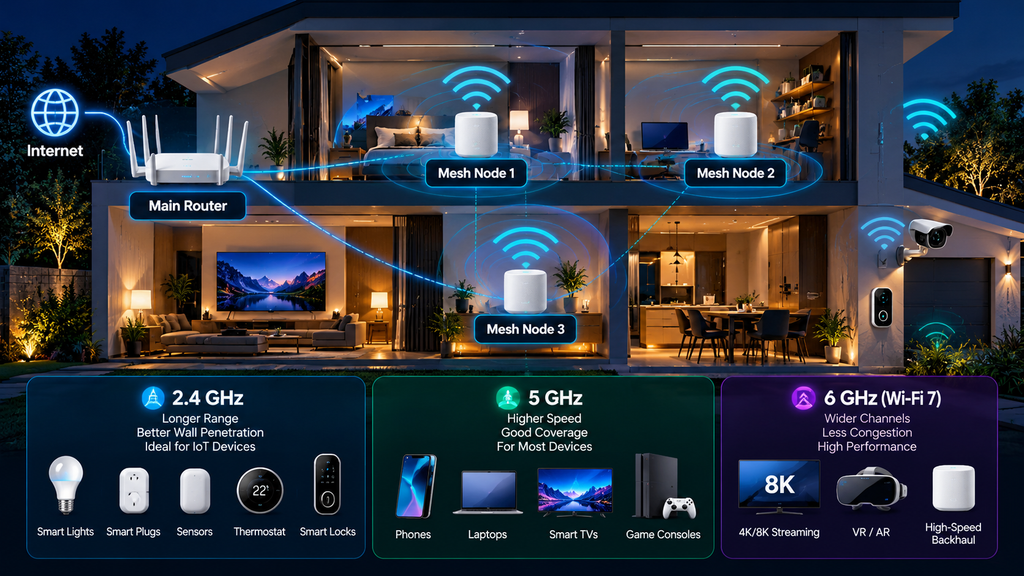
Modern mesh systems may use three major Wi-Fi frequency ranges:
2.4 GHz
5 GHz
6 GHz
Each has different strengths.
There is no single “best” band for every device.
A good mesh system uses the bands intelligently.
11. Why 2.4 GHz Still Matters
2.4 GHz is old, but it remains extremely important for smart homes.
Its strengths include:
- Longer practical range
- Better penetration through many obstacles
- Wide compatibility
- Support in enormous numbers of IoT devices
Many devices still use 2.4 GHz, including:
- Smart plugs
- Cameras
- Appliances
- Sensors
- Lights
- Thermostats
Its weakness is congestion.
Bluetooth, neighboring Wi-Fi networks, and other equipment also operate around this spectrum.
2.4 GHz may therefore provide excellent range but limited high-speed capacity.
For many IoT devices, that is perfectly acceptable.
12. Why 5 GHz Is the Workhorse Band
5 GHz often provides a useful balance between speed and coverage.
It is widely supported by:
- Phones
- Laptops
- TVs
- Consoles
- Cameras
- Streaming devices
Compared with 2.4 GHz, it generally provides:
- More available channels
- Higher practical speeds
- Less congestion in many environments
But it typically does not travel through obstacles as effectively as lower-frequency 2.4 GHz signals.
For many homes, 5 GHz remains the primary high-performance Wi-Fi band.
13. What 6 GHz Adds
6 GHz provides newer spectrum for compatible Wi-Fi devices.
Its major advantage is access to additional clean spectrum and wider channels.
This can reduce competition with older Wi-Fi networks.
It is especially useful for:
- Wi-Fi 6E
- Wi-Fi 7
- High-speed mesh backhaul
- Modern laptops
- New smartphones
- High-throughput applications
But higher-frequency signals generally lose strength more quickly through walls and distance than lower-frequency signals.
This creates an interesting mesh design opportunity.
6 GHz may be excellent for fast nearby connections between well-positioned nodes.
It may be less appropriate for a distant smart camera through several walls.
14. Wi-Fi 7 Does Not Eliminate the Need for 2.4 GHz
A common mistake is assuming that a newer Wi-Fi generation makes older bands unnecessary.
That is not how smart homes work.
A Wi-Fi 7 mesh system may still need excellent 2.4 GHz performance because dozens of smart devices depend on it.
A good smart-home router should therefore be evaluated across all relevant bands.
Do not buy solely based on the maximum Wi-Fi 7 speed printed on the box.
15. What Is Mesh Backhaul?
Mesh nodes must communicate with each other.
That communication path is called backhaul.
There are two major approaches:
- Wireless backhaul
- Wired backhaul
Backhaul quality can dramatically affect mesh performance.
A satellite node may have an excellent connection to your laptop but still perform badly if its own connection to the main router is weak.
16. Wireless Backhaul
Wireless backhaul allows mesh nodes to communicate without Ethernet cables.
This is convenient.
Installation may require only:
- Connect the main router.
- Place another node elsewhere.
- Plug in power.
- Complete setup in the app.
The disadvantage is that wireless backhaul uses radio spectrum.
If the link between nodes is weak or congested, performance suffers.
High-end tri-band and quad-band mesh systems may use additional radios or bands to improve backhaul capacity.
Wi-Fi 7 can further improve this area through technologies such as MLO.
17. Wired Ethernet Backhaul
If Ethernet wiring is available, wired backhaul is often the most predictable option.
Each mesh access point connects to the network through Ethernet.
This provides several benefits:
- Stable node-to-node communication
- Lower dependence on wireless conditions
- More wireless airtime for client devices
- Easier multi-gigabit performance
For a newly built or renovated home, Ethernet remains an excellent investment.
Wireless technology changes rapidly.
A good Ethernet cable can support several generations of Wi-Fi access points.
18. Is Wired Backhaul Always Necessary?
No.
Modern wireless mesh systems can perform extremely well.
Wired backhaul becomes particularly useful when:
- Walls are thick
- Floors block signals
- Nodes are far apart
- Multi-gigabit performance matters
- Many cameras use Wi-Fi
- Local network traffic is heavy
If cabling is impractical, good wireless node placement becomes even more important.
19. The Most Common Mesh Placement Mistake
Many people place a mesh node directly inside the dead zone.
That sounds logical.
But the node itself still needs a good connection to the rest of the network.
If the location has almost no Wi-Fi, the node has very little signal to work with.
A better strategy is:
Router → strong intermediate node → difficult room
Place the mesh node between the main router and the problem area.
The node should receive a good backhaul connection while extending coverage farther.
20. How Far Apart Should Mesh Nodes Be?
There is no universal distance.
Homes differ too much.
Important factors include:
- Wall material
- Floor construction
- Radio power
- Antenna design
- Interference
- Frequency band
- Furniture
- Node placement
Instead of measuring distance alone, think in terms of signal quality between nodes.
A mesh app that reports backhaul quality can be very useful.
21. More Mesh Nodes Are Not Always Better
Adding nodes can solve coverage problems.
Adding too many can create unnecessary complexity.
Potential problems include:
- Additional interference
- Poor roaming decisions
- Congested backhaul
- Devices connecting to unexpected nodes
Use the smallest number of nodes that provides reliable coverage.
The goal is not to fill every room with an access point.
22. Mesh Wi-Fi for Apartments
Many apartments do not require mesh at all.
A single high-quality router placed centrally may provide better performance than several unnecessary nodes.
The bigger challenge may be interference from neighboring networks.
Before buying mesh, try:
- Moving the router
- Raising it off the floor
- Avoiding cabinets
- Checking channel congestion
- Using 5 GHz or 6 GHz for compatible devices
Mesh becomes useful when the apartment has difficult concrete walls or an unusual layout.
23. Mesh Wi-Fi for Large Homes
Large multi-floor homes are natural candidates for mesh.
A practical arrangement could be:
Main router on middle floor
Node near upper-floor living area
Node near ground-floor or backyard area
But the correct layout depends on building construction.
Homes with reinforced concrete may require Ethernet or additional nodes.
Open-plan homes may need fewer.
24. Outdoor Smart Devices
Outdoor devices introduce another challenge.
Examples include:
- Security cameras
- Video doorbells
- Smart gates
- Garage controllers
- Pool equipment
- Garden devices
- Outdoor speakers
Indoor walls already reduce signal.
Exterior walls may be even more difficult.
If outdoor connectivity is important, plan for it intentionally.
Options include:
- Mesh node near an exterior wall
- Ethernet-connected outdoor access point
- Weather-rated access point
- Better 2.4 GHz coverage
Do not assume an indoor router will automatically cover an entire property.
25. Smart Cameras Put More Pressure on Wi-Fi
Many smart devices send tiny amounts of data.
Cameras are different.
Video may generate continuous or repeated upstream traffic.
Multiple cameras can therefore expose weaknesses in:
- Wi-Fi coverage
- Upload capacity
- Router processing
- Backhaul
- Internet bandwidth
For homes with several high-resolution cameras, network design matters more.
Strong coverage near cameras can also reduce retransmissions and improve battery life in some wireless devices.
26. Internet Speed vs. Wi-Fi Speed
These are different things.
Suppose your internet plan provides:
500 Mbps
Your local Wi-Fi connection between a laptop and router might support far more than that.
Internet traffic is still limited by the 500 Mbps connection.
But local traffic can benefit from faster Wi-Fi when transferring data between:
- Computers
- NAS devices
- Media servers
- Local backup systems
- Security recorders
Do not assume that buying a 10 Gbps-capable mesh system makes a 500 Mbps internet plan faster.
27. When Multi-Gigabit Ethernet Matters
Many premium Wi-Fi 7 mesh systems include:
- 2.5 GbE
- 5 GbE
- 10 GbE
These ports can be useful for:
- Multi-gigabit fiber
- NAS systems
- Wired backhaul
- High-end desktops
- Network video recorders
For basic internet browsing and IoT use, 10 GbE may be unnecessary.
Choose port speeds based on realistic requirements.
28. Smart Home Capacity Matters More Than Peak Speed
A smart-home network may contain 50, 80, or even more connected devices.
Most use little bandwidth.
The challenge is often managing many connections reliably.
Important factors include:
- Router CPU
- Memory
- Radio design
- Firmware
- Airtime management
- IoT compatibility
- Backhaul
A router advertising a huge theoretical speed is not automatically the best choice for a large smart home.
29. Mesh Wi-Fi and Matter
Matter and mesh Wi-Fi solve different problems.
Wi-Fi provides network connectivity.
Matter provides an interoperability framework for compatible smart-home devices.
A Matter device may connect through:
- Wi-Fi
- Ethernet
- Thread
Matter does not replace Wi-Fi.
Likewise, Wi-Fi 7 does not replace Matter.
They can work together.
30. Mesh Wi-Fi and Thread
Thread is another technology often discussed in smart homes.
Thread creates a low-power IPv6-based mesh network designed for devices such as:
- Sensors
- Locks
- Lights
- Thermostats
Thread is not the same as Wi-Fi mesh.
A Thread device typically communicates through a Thread Border Router to reach the broader IP network.
Some modern routers, hubs, speakers, and smart displays may include Thread Border Router functionality.
This can make smart-home infrastructure increasingly integrated.
31. Do Smart Devices Need Their Own Wi-Fi Network?
Separating IoT devices can be useful.
A dedicated IoT or guest network can:
- Improve organization
- Limit access to sensitive computers
- Simplify troubleshooting
- Reduce unnecessary device-to-device communication
But isolation must be configured carefully.
Good network segmentation is also part of a broader home cybersecurity strategy.
Some smart-home devices need local communication with phones, hubs, or controllers.
If the network blocks everything, features may stop working.
The goal is controlled access, not random isolation.
32. WPA3 and Mesh Wi-Fi Security
Modern mesh systems should support strong Wi-Fi security.
WPA3-Personal improves password-based Wi-Fi authentication and provides stronger protections than older security standards.
Some homes still contain older IoT products that support only WPA2.
This can create compatibility decisions.
A modern mesh system may offer:
- WPA3
- WPA2/WPA3 transition mode
- Separate IoT network
Avoid outdated WEP security entirely.
If an old device cannot support reasonable modern security, consider whether replacing it is preferable to weakening the entire network.
33. The Router Admin Password Is Different From the Wi-Fi Password
This distinction is important.
The Wi-Fi password allows devices to join your wireless network.
The router administrator password controls the router itself.
Both should be strong and unique.
If someone obtains administrative access to the router, they may be able to change:
- DNS settings
- Wi-Fi passwords
- Security options
- Connected-device rules
- Firmware settings
Protecting the router management account is therefore critical.
34. Keep Mesh Firmware Updated
A mesh system is part of the home’s security infrastructure.
Firmware updates may address:
- Vulnerabilities
- Stability
- Device compatibility
- Performance
- Radio behavior
Automatic updates can make maintenance easier.
Before buying a mesh platform, investigate the manufacturer’s history of:
- Software updates
- Security patches
- Product support
A router should not be evaluated only by its hardware specifications.
35. Disable Features You Do Not Need
Some routers include optional features such as:
- Remote administration
- WPS
- UPnP
- Cloud management
- File sharing
- Third-party integrations
Convenience can sometimes increase attack surface.
If a feature is unnecessary, consider disabling it.
FTC consumer guidance specifically recommends reviewing features such as remote management, WPS, and UPnP rather than leaving them enabled automatically.
36. DNS, Parental Controls, and Security Services
Modern mesh systems increasingly include network-level services.
These may include:
- Malicious-site blocking
- Parental controls
- Device profiles
- DNS filtering
- Traffic analysis
- Intrusion detection
Some are free.
Others require subscriptions.
Before buying, determine whether essential security or parental-control features remain available without a monthly payment.
37. Cloud Management vs. Local Management
Many mesh systems are managed through cloud-connected smartphone apps.
This can make setup very easy.
Advantages include:
- Remote management
- Automatic updates
- Easy device identification
- Simplified support
But it also increases dependence on:
- Manufacturer servers
- Internet connectivity
- User accounts
Advanced users may prefer systems that retain strong local administration options.
There is no universally correct model.
Understand what happens if the vendor’s cloud service becomes unavailable.
38. What Happens When the Internet Goes Down?
Wi-Fi and internet access are not the same thing.
Your local Wi-Fi network may continue operating even if the ISP connection fails.
Local devices may still communicate depending on how the system is designed.
However, cloud-dependent services may stop working.
Possible failures include:
- Remote camera viewing
- Cloud voice assistants
- External notifications
- Cloud automation
- Remote router control
A smart home becomes more resilient when important local functions do not depend entirely on the cloud.
39. Power Outages Matter Too
Every mesh node needs power.
During a power outage, the network may fail even if battery-powered smart devices remain operational.
A UPS can temporarily protect:
- Internet modem
- Main router
- Mesh node
- Ethernet switch
- Smart-home hub
You do not necessarily need backup power for every node.
Protect the most important network components first.
40. How to Choose a Mesh Wi-Fi System in 2026
Do not start with the advertised maximum speed.
Start with your home.
Consider:
Home Size
A small home may need one router.
A larger home may need two or three nodes.
Construction
Concrete, stone, metal, and dense walls can reduce wireless performance.
Internet Speed
A 300 Mbps plan has different requirements from 5 Gbps fiber.
Wired Ethernet
Existing Ethernet dramatically expands your options.
Smart Devices
Count cameras, doorbells, televisions, laptops, phones, and IoT devices.
Wi-Fi Generation
Wi-Fi 7 offers the strongest future-facing feature set, while good Wi-Fi 6 and Wi-Fi 6E systems can still provide excellent performance.
6 GHz Support
Useful for modern devices and high-capacity backhaul, but coverage planning remains important.
Ethernet Ports
Check both quantity and speed.
Security
Look for WPA3, automatic updates, and strong administration controls.
Subscription Requirements
Understand which features require recurring payments.
Support Life
A networking platform is a long-term purchase.
Software support matters.
41. Should You Buy Wi-Fi 7 or Save Money With Wi-Fi 6?
It depends on your situation.
A good Wi-Fi 6 mesh system may remain perfectly suitable for:
- Moderate internet speeds
- Basic streaming
- Smart-home devices
- Typical web use
Wi-Fi 7 becomes more attractive when:
- Buying a new premium system
- Planning to keep it for many years
- Using multi-gigabit internet
- Using many newer devices
- Running wireless backhaul
- Moving large files locally
- Seeking lower latency and greater capacity
Do not replace a perfectly functioning Wi-Fi 6 system simply because Wi-Fi 7 exists.
Upgrade when there is a problem or a clear benefit.
42. A Practical Mesh Wi-Fi Setup for a Smart Home
A balanced modern setup might look like:
Internet modem or ONT
↓
Main Wi-Fi 7 mesh router
↓
2.5 GbE or faster switch
↓
Ethernet backhaul
↓
Mesh node upstairs + mesh node near outdoor area
Client devices can then connect according to their capabilities.
For example:
2.4 GHz
- Smart plugs
- Basic sensors
- Older IoT devices
5 GHz
- Cameras
- TVs
- Phones
- Laptops
6 GHz
- Wi-Fi 6E/7 laptops
- New smartphones
- High-performance backhaul
Meanwhile, Thread-based sensors can operate through a Thread Border Router and Matter can coordinate compatible smart-home products at the application layer.
The result is not one universal wireless technology.
It is a layered network where each technology performs the job it handles best.
Reliable home networking can also support connected EV chargers and smart charging features.
43. Five Mesh Wi-Fi Mistakes to Avoid
Mistake 1: Putting Nodes Inside Dead Zones
Nodes need a strong connection too.
Mistake 2: Buying Too Many Nodes
More hardware can mean more interference.
Mistake 3: Ignoring Backhaul
A weak node-to-node connection limits everything downstream.
Mistake 4: Buying Only for Advertised Speed
Coverage, firmware, ports, and security matter just as much.
Mistake 5: Forgetting IoT Compatibility
A high-end Wi-Fi 7 router still needs to work reliably with older 2.4 GHz smart devices.
44. The Future of Mesh Wi-Fi in Smart Homes
The future of home networking is moving toward greater coordination.
Routers are increasingly becoming more than internet gateways.
They can act as:
- Wi-Fi access points
- IoT management systems
- Security platforms
- Thread Border Routers
- Matter controllers
- Parental-control systems
- Network monitoring platforms
At the same time, Wi-Fi 7 technologies can make high-speed wireless links more flexible.
The long-term goal is not simply faster Wi-Fi.
It is a network that can automatically make better decisions about:
- Which band to use
- Which access point a device should connect to
- How traffic should be prioritized
- How interference should be handled
- Which devices should communicate
- How security rules should be applied
For smart homes, reliability and automation may ultimately matter more than headline speed.
Frequently Asked Questions
What is mesh Wi-Fi?
Mesh Wi-Fi uses multiple coordinated access points to extend wireless coverage across a home while operating as a unified network.
Is mesh Wi-Fi better than a normal router?
Not always. Mesh is most useful when one router cannot provide reliable coverage throughout the property.
Is Wi-Fi 7 worth it in 2026?
For new premium installations, multi-gigabit internet, wireless backhaul, and long-term use, Wi-Fi 7 can be attractive. Existing Wi-Fi 6 systems may not need immediate replacement.
Do smart-home devices need Wi-Fi 7?
Most individual IoT devices do not. The benefit of Wi-Fi 7 is more often improved network capacity, backhaul, and performance for high-bandwidth devices.
What is Multi-Link Operation?
MLO is a Wi-Fi 7 feature allowing compatible devices to use multiple wireless links more flexibly for better throughput, latency, or reliability.
Does Wi-Fi 7 use 6 GHz?
Wi-Fi 7 can use 2.4 GHz, 5 GHz, and 6 GHz where supported. Availability and permitted channel widths depend on regional spectrum rules.
Is 6 GHz faster than 5 GHz?
It can provide wider channels and cleaner spectrum, but practical performance depends on distance, obstacles, device capability, and regional spectrum availability.
Is 2.4 GHz obsolete?
No. It remains extremely important for smart-home devices because of its compatibility and useful range.
What is Ethernet backhaul?
Ethernet backhaul connects mesh nodes with network cables rather than relying entirely on wireless connections.
Is Ethernet backhaul better?
It generally provides more predictable performance and reduces wireless backhaul demands when cabling is available.
How many mesh nodes should I buy?
Use enough nodes to provide good coverage without unnecessary overlap. There is no universal number because building size and construction vary.
Should a mesh node be placed in a dead zone?
Usually no. Place it where it still receives a good connection while extending coverage toward the weak area.
What is Wi-Fi EasyMesh?
Wi-Fi EasyMesh is a standardized framework designed to coordinate compatible multi-access-point Wi-Fi devices into a unified network.
Is Matter the same as mesh Wi-Fi?
No. Matter is a smart-home interoperability standard. Wi-Fi provides network connectivity.
Is Thread the same as Wi-Fi mesh?
No. Thread is a separate low-power IP-based mesh technology commonly used by smart-home devices.
Should smart devices be placed on a separate network?
A dedicated IoT or guest network can improve security and management, provided required local communication remains available.
Should I use WPA3?
Use WPA3 when supported. Older devices may require WPA2 compatibility or a separate network.
Does mesh Wi-Fi make my internet faster?
It can improve the speed available in previously weak locations, but it cannot make your ISP connection faster than the plan provides.
What matters more: speed or coverage?
For most smart homes, reliable coverage and consistent connectivity are more important than maximum theoretical speed.
Final Thoughts
Mesh Wi-Fi for smart homes in 2026 is about much more than eliminating a weak signal in one bedroom.
The home network has become infrastructure.
Security cameras depend on it.
Smart locks depend on it.
Video doorbells depend on it.
Smart televisions, laptops, phones, appliances, hubs, and automation platforms all depend on it.
Wi-Fi 7 can provide major improvements through technologies such as:
Multi-Link Operation + 320 MHz channels + 4K QAM + improved spectrum efficiency
But new technology cannot compensate for poor network design.
A badly positioned Wi-Fi 7 node can perform worse than a properly positioned older access point.
The most effective approach is therefore practical:
Start with coverage.
Plan the backhaul.
Use Ethernet where practical.
Keep 2.4 GHz available for IoT devices.
Use 5 GHz for general high-performance connectivity.
Take advantage of 6 GHz where compatible equipment and local regulations allow it.
Use WPA3 when possible.
Keep router firmware updated.
Separate or control IoT access where appropriate.
And most importantly:
do not buy networking equipment based only on the largest speed number printed on the box.
For a smart home, the best network is the one users stop thinking about because cameras stay online, automations respond correctly, streaming remains smooth, and every important device maintains a reliable connection.
Sources
- Wi-Fi Alliance — Wi-Fi CERTIFIED 7
- Wi-Fi Alliance — Wi-Fi CERTIFIED EasyMesh
- Wi-Fi Alliance — Wi-Fi CERTIFIED WPA3 Security
- Wi-Fi Alliance — Wi-Fi Easy Connect
- National Institute of Standards and Technology — NIST IR 8425A: Recommended Cybersecurity Requirements for Consumer-Grade Router Products
- National Institute of Standards and Technology — NIST IR 8425: Profile of the IoT Core Baseline for Consumer IoT Products
- Federal Trade Commission — How To Secure Your Home Wi-Fi Network
- Federal Trade Commission — Securing Your Internet-Connected Devices at Home
- Federal Communications Commission — 6 GHz Unlicensed Spectrum Rules
- Connectivity Standards Alliance — Matter Specifications