

A huge discount does not always mean a huge saving.
Online shoppers in 2026 are surrounded by flash sales, countdown timers, coupon codes, sponsored advertisements, marketplace sellers, influencer promotions, price-comparison pages, and AI-generated marketing content.
Most promotions are legitimate.
But some deals are designed to look much better than they really are.
Others can lead to counterfeit products, misleading listings, fake stores, phishing pages, stolen payment information, or products that never arrive.
The challenge is learning how to separate a genuine bargain from a manipulated price or shopping scam.
This guide explains the most common fake tech deal tactics in 2026 and provides a practical process for checking prices, sellers, websites, reviews, payment methods, warranties, and product authenticity before buying.
Table of Contents
Fake Tech Deals in 2026: Quick Overview
| Warning Sign | What It May Mean | What to Check |
|---|---|---|
| Huge percentage discount | Inflated reference price | Historical selling price |
| Extremely low brand-name price | Counterfeit, used, or fake listing | Model, seller, warranty |
| Countdown timer | Artificial urgency | Whether timer resets |
| New unfamiliar retailer | Fake or short-lived store | Domain, reputation, contact details |
| Perfect reviews | Manipulated or fake feedback | Review patterns and verified purchases |
| Payment outside marketplace | Possible scam | Use official checkout |
| Wire transfer or gift-card request | High-risk payment | Use protected payment methods |
| Strange URL spelling | Spoofed website | Exact domain |
| Sponsored search result | Could lead to imitation site | Verify destination URL |
| Unexpected QR code | Possible phishing or malware | Do not scan unknown codes |
1. The Biggest Discount Is Not Always the Best Deal
Retailers know that large percentages attract attention.
A product labeled:
50% OFF
looks more exciting than one simply priced at $99.
But the percentage is meaningful only when the comparison price is legitimate.
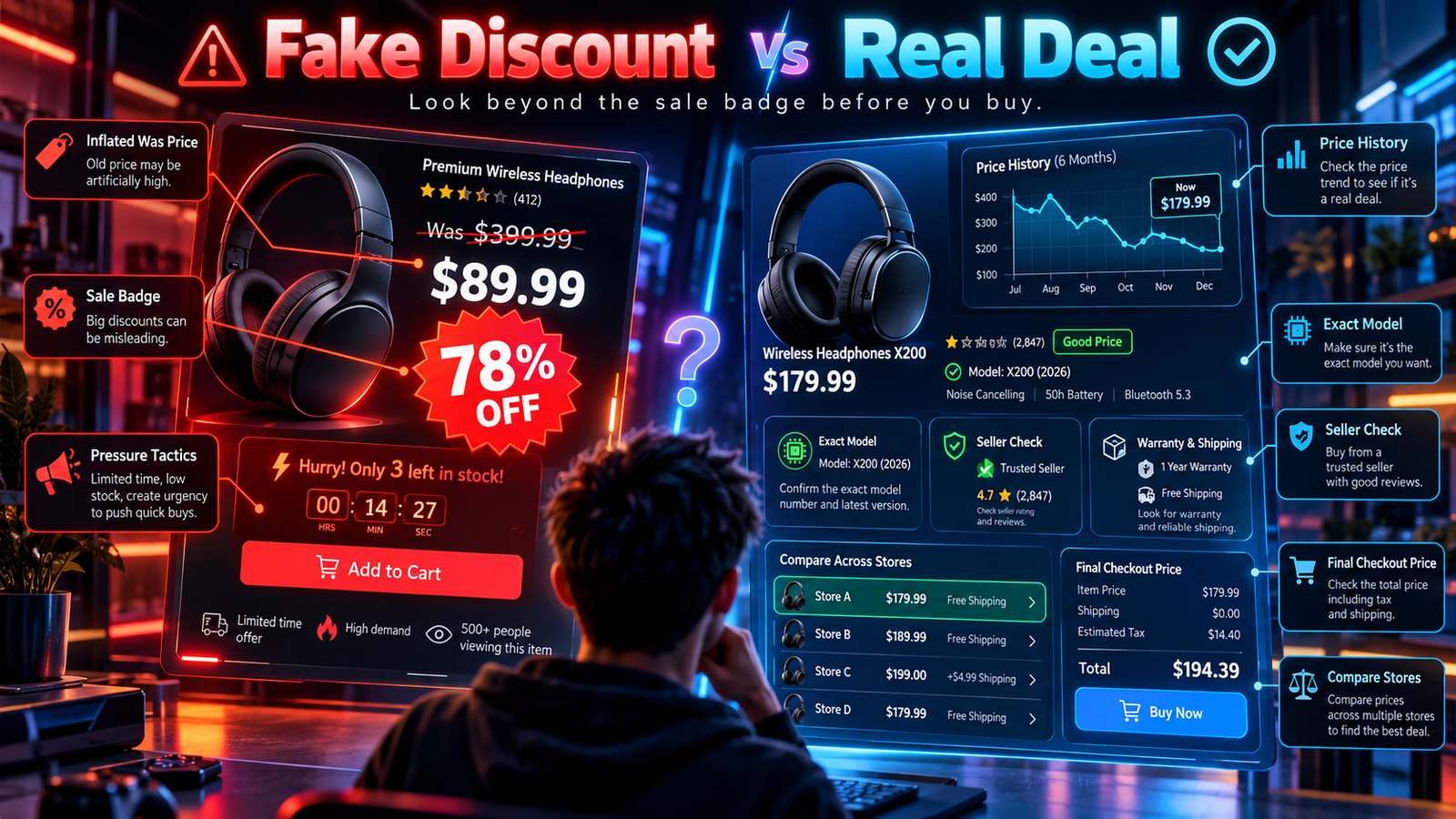
If a product normally sells for $110 but suddenly displays:
Was $199
Now $109
the discount badge looks impressive even though the actual price is close to normal.
Always evaluate the selling price, not the size of the badge.
2. Inflated Reference Prices
One of the oldest pricing tricks is the inflated reference price.
A retailer may compare a current selling price with:
- Manufacturer suggested retail price
- Launch price
- Previous list price
- Rarely used price
- Artificially high reference price
That does not necessarily mean shoppers recently paid that higher amount.
Historical pricing provides much better context.
3. Check the Historical Selling Price
Before buying expensive technology, check how much the exact model has sold for recently.
Look at:
- 30-day price history
- 90-day history
- Six-month history
- Previous major sale prices
This can reveal whether a discount is actually unusual.
A product that reaches $199 every month is not necessarily a once-a-year deal when it returns to $199.
4. Compare the Exact Model Number
Technology companies frequently sell similar-looking products with different specifications.
For example, two laptops may share the same family name while using different:
- CPUs
- GPUs
- RAM
- Storage
- Displays
- Batteries
- Wireless hardware
A cheaper configuration may appear to be a major discount when it is simply a lower-specification version.
Always compare exact model numbers.
5. Watch for Previous-Generation Products
Older technology can provide excellent value.
But sellers sometimes make previous-generation products look like current flagship deals.
Before buying, check:
- Release year
- Processor generation
- Software support
- Connectivity standards
- Warranty
- Current-generation price
An older product is not automatically bad.
It simply needs to be priced accordingly.
6. Fake MSRP and “Was” Prices
Labels such as:
- MSRP
- List Price
- Was
- Regular Price
- Recommended Price
can create strong psychological anchors.
Do not assume the larger number represents the product’s normal recent market value.
Search other reputable stores.
If almost everyone sells the product around the supposedly discounted price, the discount may not be exceptional.
7. Percentage Discounts Can Distract From the Final Price
Shoppers naturally notice:
40% OFF
before noticing the final amount.
Reverse that habit.
Look first at:
What will I actually pay?
Then compare that amount with other stores and historical prices.
8. Coupon Discounts Can Be Conditional
A coupon may look simple but require:
- Minimum purchase amount
- Specific seller
- Specific payment method
- New customer status
- Membership
- App-only checkout
- Selected products
Always confirm that the coupon applies to your exact purchase.
9. “Up to” Discounts Need Careful Reading
Advertisements frequently say:
Up to 70% off
This does not mean every product is 70% cheaper.
The deepest discount may apply to only a small number of products.
Evaluate the exact item you want rather than the campaign headline.
10. Bundles Can Inflate the Claimed Saving
A bundle might advertise:
Laptop + mouse + case + software
“Save $200”
But you may not need the accessories.
The advertised saving may also use full retail prices for inexpensive bundled items.
Calculate how much you would genuinely pay for those extras separately.
11. Free Gifts Are Not Always Free Value
Retailers sometimes include:
- Earbuds
- Cases
- Chargers
- Subscriptions
- Gift cards
The bundle can be useful.
But do not treat every included item as equivalent to cash.
Ask whether you would have purchased it anyway.
12. Countdown Timers Create Urgency
Countdown timers encourage fast decisions.
You may see:
Deal ends in 09:47
A timer may represent a genuine promotion.
But some websites reset timers or continuously run “limited-time” sales.
Refresh the page later or revisit the store to see whether the promotion actually changes.
13. “Only 2 Left” Messages
Inventory warnings can also influence purchasing behavior.
Sometimes they reflect real stock.
Other times they may refer only to inventory allocated to a specific seller, warehouse, or promotional listing.
Do not let scarcity replace product research.
14. Flash Sales Can Reduce Comparison Time
Flash sales work partly because shoppers feel they must act quickly.
Instead of immediately buying:
- Copy the model number.
- Check two competing stores.
- Review recent prices.
- Confirm the seller.
- Check returns.
A few minutes can prevent a costly mistake.
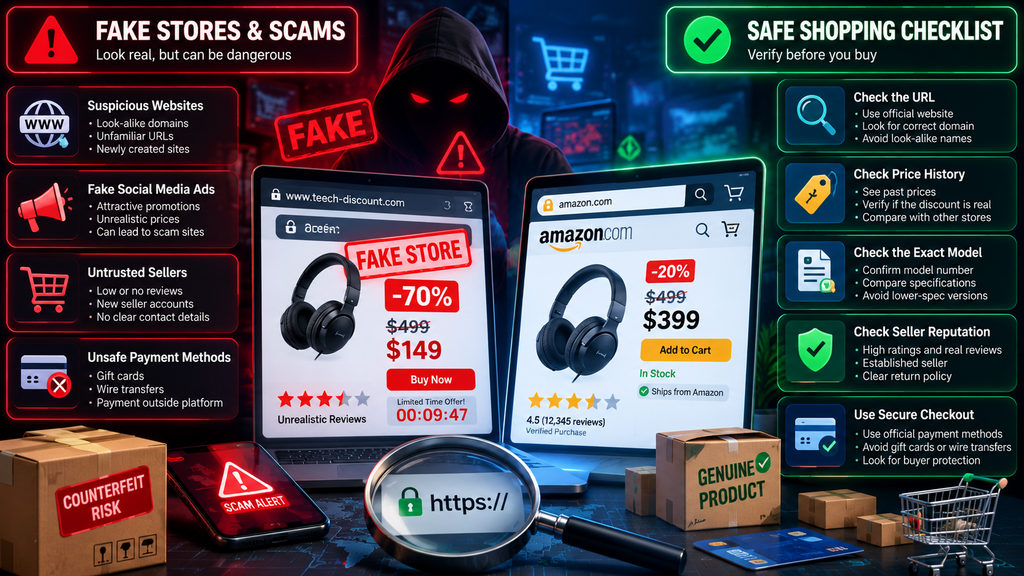
15. Fake Online Stores
Some shopping scams use complete websites designed to look like real retailers.
They may include:
- Product categories
- Shopping carts
- Customer reviews
- Contact pages
- Professional graphics
- Payment forms
A polished website does not prove legitimacy.
The FBI has repeatedly warned that fraudulent shopping websites can imitate legitimate businesses and advertise unusually low prices.
16. Check the Domain Carefully
Scam websites may use domains that resemble legitimate brands.
Examples of suspicious changes include:
- Extra letters
- Missing letters
- Hyphens
- Different domain endings
- Brand name followed by “sale”
- Brand name followed by “outlet”
Read the entire URL.
Do not rely only on the logo.
17. HTTPS Does Not Prove a Store Is Legitimate
A padlock icon means the connection is encrypted.
It does not mean the business behind the website is trustworthy.
Fraudulent websites can also use HTTPS.
Treat encryption as necessary security, not proof of legitimacy.
18. Search the Retailer’s Reputation
Before ordering from an unfamiliar store, search for:
- Company name
- Reviews
- Scam reports
- Complaints
- Customer experiences
Look beyond reviews displayed on the retailer’s own website.
Independent information provides better context.
19. Check Contact Information
A legitimate retailer should normally provide usable contact information.
Review:
- Business name
- Phone
- Address
- Customer service information
Search the address independently.
Scam websites sometimes copy addresses or contact information from unrelated businesses.
20. New Domains Deserve Extra Caution
A recently created website is not automatically fraudulent.
New legitimate businesses appear every day.
But a brand-new domain combined with:
- Extreme discounts
- No established reputation
- Limited contact information
- Unusual payment requests
creates additional risk.
21. Sponsored Search Results Are Not Automatically Safe
A paid search advertisement can appear prominently above normal search results.
That placement does not guarantee that the destination website is legitimate.
The FBI has warned that criminals can use advertisements and look-alike domains to redirect users to fraudulent websites.
For important purchases, consider navigating directly to the known retailer’s website.
22. Social Media Ads Can Lead to Fake Stores
An attractive advertisement on:
- TikTok
- YouTube
- Other social platforms
does not automatically verify the seller.
Fraudulent shops can advertise just like legitimate businesses.
Research unfamiliar stores independently.
23. Brand Impersonation Is Increasingly Sophisticated
Scammers can imitate:
- Retailers
- Manufacturers
- Delivery companies
- Payment providers
- Customer support teams
They may use realistic logos, websites, messages, and even AI-generated media.
In September 2026, the FTC announced it was examining whether digital platforms’ advertising systems may contribute to government and business impersonation scams.
24. AI Can Make Scam Content More Convincing
AI-generated content can help scammers create:
- Professional product images
- Fake spokesperson videos
- Fake testimonials
- Fake customer support messages
- Realistic marketing copy
The FBI warned in 2026 that scammers were using AI-generated video and spoofed websites in fraud schemes.
Professional-looking media should therefore be verified independently.
25. Fake Reviews Can Distort a Deal
A product with thousands of five-star reviews can appear safe.
But reviews can be:
- Purchased
- Automated
- Copied
- Incentivized improperly
- Written without real product experience
The FTC’s Consumer Reviews and Testimonials Rule, effective since October 21, 2024, addresses practices including fake reviews, purchased sentiment, undisclosed insider reviews, and certain forms of review suppression.
26. Look for Review Patterns
Suspicious review patterns may include:
- Many reviews posted in a short period
- Repeated wording
- Extremely generic praise
- Reviews discussing another product
- Sudden rating changes
- Large numbers of short five-star reviews
No single pattern proves manipulation.
But multiple warning signs deserve investigation.
27. Read the Negative Reviews
One-star, two-star, and three-star reviews can reveal:
- Compatibility problems
- Battery issues
- Poor support
- Misleading specifications
- Counterfeit products
- Warranty problems
Do not evaluate a product only by its average score.
28. Look for Detailed User Evidence
Useful reviews often contain:
- Specific usage details
- Real photographs
- Long-term observations
- Compatibility information
- Comparisons with previous models
Detailed reviews generally provide more information than “Great product!” comments.
29. Marketplace Seller Ratings Matter
Amazon, eBay, AliExpress, and other marketplaces can contain many independent sellers.
Before purchasing expensive technology, review:
- Seller rating
- Number of completed transactions
- Recent negative feedback
- Return policy
- Time on platform
A marketplace’s reputation does not automatically apply to every individual seller.
30. Watch for Seller Account Changes
An established seller account is generally more informative than a brand-new account.
However, seller accounts can sometimes change ownership or be compromised.
If recent products or feedback look dramatically different from the seller’s historical activity, investigate further.
31. Never Move Payment Outside the Marketplace
A seller may offer an additional discount if you pay directly.
That can remove important buyer protections.
The FTC specifically advises shoppers not to pay outside a marketplace’s payment system because doing so can eliminate platform protections and make refunds much harder.
Keep transactions inside the official checkout process.
32. Gift Cards Are a Major Warning Sign
Be extremely cautious if a seller requests payment using:
- Gift cards
- Reload cards
- Wire transfer
- Cryptocurrency
These methods can be difficult to reverse.
The FTC advises against using such payment methods with marketplace sellers because recovering money can be extremely difficult.
33. Use Payment Methods With Dispute Options
Protected payment methods can offer additional recourse when:
- Goods never arrive
- A different product arrives
- Unauthorized charges occur
- The seller disappears
Protections vary by country, card issuer, and marketplace.
Understand the rules before paying.
34. Fake Payment Pages
A fraudulent seller may direct you to a payment page that resembles:
- PayPal
- A bank
- A marketplace
- A card processor
Check the URL before entering credentials or payment information.
Do not trust the appearance alone.
35. Fake Delivery Messages
After shopping online, scammers may send messages claiming:
- Delivery failed
- Additional customs payment is required
- Address confirmation is needed
- A package is waiting
These messages can lead to phishing pages.
Open the retailer or shipping provider’s official app or website independently instead of clicking the message link.
36. Unexpected QR Codes Can Be Dangerous
QR codes can direct smartphones to phishing websites just like ordinary links.
The FBI has warned about unsolicited packages containing QR codes designed to collect personal or financial information or trigger malicious downloads.
Do not scan unknown QR codes simply because they arrived in a package.
37. Counterfeit Technology
Counterfeit technology can appear in categories such as:
- Chargers
- Batteries
- Earbuds
- Memory cards
- SSDs
- Cables
- Power adapters
- Accessories
Counterfeits are not only a quality issue.
Poorly manufactured electrical products can create safety risks.
38. Fake Storage Capacity
Storage products deserve special attention.
A fake memory card or USB drive may report:
1 TB
to the operating system while containing far less real storage.
Once the real capacity is exceeded, data can become corrupted.
Test suspicious storage before trusting it with important files.
39. Unrealistically Cheap SSDs
A current high-capacity SSD offered for a tiny fraction of normal market pricing should trigger investigation.
Possible explanations include:
- Counterfeit hardware
- Used product
- Misrepresented capacity
- Unknown components
- Fake listing
Compare with reputable retailers and manufacturer pricing.
40. Charger and Battery Deals Require Extra Care
A poor-quality phone charger may seem like a small risk.
But charging equipment handles electrical power.
For:
- USB-C chargers
- Laptop adapters
- Power banks
- Replacement batteries
favor reputable manufacturers and sellers.
Saving a few dollars is rarely worth increased safety uncertainty.
41. Refurbished Products Can Be Good — If Properly Described
Refurbished technology can provide excellent value.
But verify:
- Refurbishment program
- Warranty
- Battery condition
- Cosmetic grading
- Included accessories
- Return policy
Do not assume every seller uses the word “refurbished” the same way.
42. Open-Box Is Different From Refurbished
Open-box usually suggests packaging has been opened.
Refurbished generally suggests inspection, testing, repair, or restoration.
Used means the product has previously been used.
Those conditions should not automatically carry the same price.
43. Watch for Regional Versions
A smartphone, camera, smartwatch, or laptop may be genuine but intended for another region.
Potential differences include:
- Cellular bands
- Charger
- Keyboard
- Warranty
- Software
- Regulatory support
Check the exact regional model before purchasing.
44. Warranty Claims Need Verification
A listing might advertise:
1-Year Warranty
But ask:
- Manufacturer warranty?
- Seller warranty?
- Third-party warranty?
- Valid in your country?
A warranty is valuable only when you understand who provides it and where it can be used.
45. Hidden Shipping Can Destroy a Deal
A low product price may be offset by:
- Shipping charges
- Import duties
- Taxes
- Currency conversion
- Handling fees
Compare final checkout totals.
Do not compare only listing prices.
46. Cheap International Listings May Have Longer Return Paths
Returning an inexpensive product internationally can be inconvenient.
Before buying, determine:
- Return destination
- Who pays shipping
- Deadline
- Tracking requirements
- Restocking rules
The lowest price may not provide the lowest total risk.
47. Fake “Free Shipping” Can Hide Product Markups
A product advertised with free shipping may simply include the shipping cost in the item price.
Compare total costs across sellers.
Free shipping is useful, but it should not be evaluated separately from the final price.
48. Automatic Subscriptions Can Hide Behind Discounts
Some promotions require:
- Membership
- Trial subscription
- Automatic renewal
- Recurring software plan
Before accepting a discount, check whether you are also authorizing future charges.
Set a reminder if you choose a free trial you may not want to continue.
49. Buy Now, Pay Later Can Make Expensive Tech Look Cheaper
Breaking a $1,200 product into smaller payments does not reduce the purchase price.
Evaluate:
- Total cost
- Interest
- Fees
- Late-payment consequences
Affordability should be based on total financial impact, not only the monthly number.
50. Fake Cashback Offers
A promotion promising unusually large cashback may require:
- Installing an unknown app
- Entering banking details
- Paying an upfront fee
- Completing unrealistic conditions
Verify cashback programs through the retailer, payment provider, or established cashback service.
51. Fake Coupon Websites
Search engines can surface websites claiming to provide working coupon codes.
Some are harmless but outdated.
Others may encourage:
- Browser extensions
- Downloads
- Account registration
- Unnecessary personal information
Use established sources and avoid suspicious downloads.
52. Be Careful With Browser Extensions
Shopping extensions can be useful for:
- Price tracking
- Coupons
- Product comparison
But extensions can also access browsing data.
Review:
- Developer
- Permissions
- Store reviews
- Privacy policy
- Update history
Install only extensions you trust.
53. Fake Software Deals Can Carry Malware
Extremely cheap software licenses can be risky.
Suspicious listings may provide:
- Unauthorized keys
- Pirated software
- Modified installers
- Malware
For important software, purchase through the developer or authorized sellers.
54. “Lifetime” Software Deals Need Context
A lifetime license can sound attractive.
But clarify what “lifetime” means.
It might refer to:
- Product lifetime
- Current major version
- Account lifetime
- Service availability
It does not necessarily guarantee unlimited future upgrades.
55. Verify Marketplace Buyer Protection
Before buying from an unfamiliar seller, understand what the marketplace actually covers.
Check:
- Item not received
- Item not as described
- Return deadlines
- Eligible payment methods
- Excluded product categories
Buyer protection is strongest when you follow the platform’s rules.
56. Save Evidence Before Purchasing
For expensive purchases, save:
- Listing screenshot
- Product description
- Model number
- Price
- Warranty statement
- Seller details
Listings can change later.
Documentation makes disputes easier.
57. Keep Order and Communication Records
Save:
- Confirmation email
- Order number
- Messages
- Tracking information
- Receipts
The FTC recommends keeping records and paying attention to marketplace refund and dispute deadlines.
58. What to Do if a Product Never Arrives
First:
- Check tracking.
- Contact the seller.
- Contact the marketplace.
- Review buyer-protection deadlines.
- Contact the payment provider if necessary.
Do not wait until dispute deadlines expire.
59. What to Do if You Receive a Fake Product
Document:
- Packaging
- Serial number
- Product
- Differences from listing
- Seller communication
Then use the marketplace’s official dispute process.
Avoid sending the product somewhere outside the documented return procedure.
60. What to Do if You Entered Payment Details on a Fake Website
Act quickly.
Contact your bank or card issuer.
Review transactions.
Change affected passwords.
Enable multi-factor authentication where available.
If fraud occurred, report it to the appropriate platform and relevant authorities.
The FBI advises victims of online fraud to contact their financial institution quickly and report suspicious activity through official channels.
61. Be Careful With “Recovery” Scammers
Victims of online scams can sometimes be targeted again.
Someone may claim they can:
- Recover your money
- Trace the scammer
- Release frozen funds
in exchange for a fee.
The FBI warned in July 2026 about fraudsters impersonating IC3 and targeting previous victims with supposed recovery assistance.
Use official reporting channels.
62. A Practical Fake Deal Checklist
Before purchasing a discounted tech product, ask:
Price
- Is the historical price lower?
- Is the reference price realistic?
Product
- Is this the exact model I want?
- Is it current or previous generation?
Seller
- Does the seller have a strong history?
- Are recent reviews consistent?
Website
- Is the URL correct?
- Is the retailer established?
Reviews
- Do the reviews appear natural?
- Are there detailed negative reviews?
Payment
- Am I using official checkout?
- Does the payment method offer dispute options?
Shipping
- What is the final checkout cost?
Warranty
- Who provides it?
- Is it valid in my country?
Returns
- How long do I have?
- Who pays return shipping?
If several answers are unclear, do more research before buying.
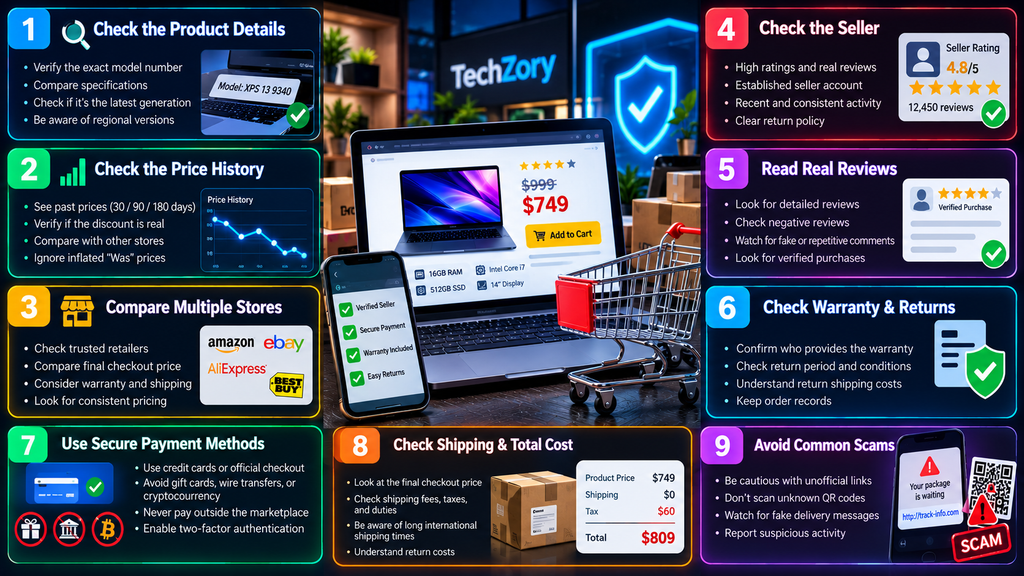
63. The 60-Second Tech Deal Test
When a deal appears unexpectedly, take one minute.
Step 1: Check the exact model.
Step 2: Search the price elsewhere.
Step 3: Check recent price history.
Step 4: Verify the seller.
Step 5: Read the URL carefully.
Step 6: Check returns and warranty.
Step 7: Calculate final checkout cost.
If the deal still looks good, investigate further.
If it begins falling apart under basic checks, skip it.
64. The Best Defense Against Fake Deals Is Patience
Most shopping scams rely on urgency.
They want you to act before checking.
Real technology products usually have multiple sellers.
Another sale will eventually happen.
Another model will launch.
Another discount will appear.
Missing one questionable promotion is usually less costly than rushing into a bad purchase.
Frequently Asked Questions
How can I tell whether a tech discount is fake?
Compare the current price with historical pricing and competing retailers. Do not rely only on the displayed discount percentage.
Can stores inflate prices before a sale?
A high reference price does not necessarily represent the recent normal selling price. Price history and competitor comparisons help reveal whether a discount is genuinely unusual.
Are countdown timers always fake?
No. Some represent legitimate promotions. But if the timer repeatedly resets or the same “limited-time” sale never ends, treat the urgency skeptically.
Are sponsored Google results safe?
Not automatically. Criminals can use advertisements and look-alike domains. Verify the destination URL before entering login or payment information.
Can fake shopping websites use HTTPS?
Yes. HTTPS encrypts the connection but does not prove that the business itself is legitimate.
Are marketplace reviews trustworthy?
Many are genuine, but reviews can be manipulated. Examine detailed feedback, recent negative reviews, review timing, and seller history.
Are AI-generated fake reviews illegal?
In the United States, the FTC’s Consumer Reviews and Testimonials Rule addresses fake or false reviews and other deceptive review practices, including certain AI-generated fake reviews.
Should I pay a marketplace seller directly for an extra discount?
No. Moving payment outside the marketplace can remove buyer protections and make recovering money much more difficult.
Is paying with cryptocurrency safe for marketplace purchases?
Cryptocurrency payments can be difficult or impossible to reverse. Be especially cautious when an unfamiliar seller insists on cryptocurrency, gift cards, or wire transfers.
Are refurbished tech deals safe?
They can provide excellent value when the seller, refurbishment process, warranty, condition, and return policy are clearly documented.
Why are extremely cheap storage devices risky?
Counterfeit or misrepresented storage can report fake capacities and corrupt data once the real storage capacity is exceeded.
What should I do if I think I bought from a scam website?
Contact your financial institution or payment provider quickly, secure affected accounts, preserve transaction evidence, and report the incident through appropriate official channels.
Final Thoughts
Fake tech deals in 2026 are not limited to obvious scam websites.
A misleading deal can begin with an inflated reference price.
It can appear through a sponsored search advertisement.
It can use fake reviews.
It can imitate a legitimate retailer.
It can pressure shoppers with countdown timers.
Or it can offer a genuine-looking product through an unreliable seller.
Technology and AI are making scam content more polished, which makes verification increasingly important.
The safest approach is simple:
Check the exact model.
Review the historical price.
Compare several reputable sellers.
Verify the website and URL.
Read detailed reviews.
Use official marketplace checkout.
Understand warranty and returns.
Calculate the final cost.
And never let a countdown timer make the decision for you.
A real deal should still look good after you verify it.
If the offer only makes sense when you stop asking questions, it probably is not a deal worth taking.
Sources
- Federal Trade Commission — Online Shopping Consumer Advice
- Federal Trade Commission — Buying From an Online Marketplace
- Federal Trade Commission — Consumer Reviews and Testimonials Rule
- Federal Trade Commission — Final Rule Banning Fake Reviews and Testimonials
- FBI Internet Crime Complaint Center — Fraudulent Websites and Malicious Traffic Distribution Systems
- FBI Internet Crime Complaint Center — Spoofed Websites and Look-Alike Domains
- FBI Internet Crime Complaint Center — Unsolicited Packages Containing QR Codes
- FBI Internet Crime Complaint Center — Scammers Impersonating IC3