
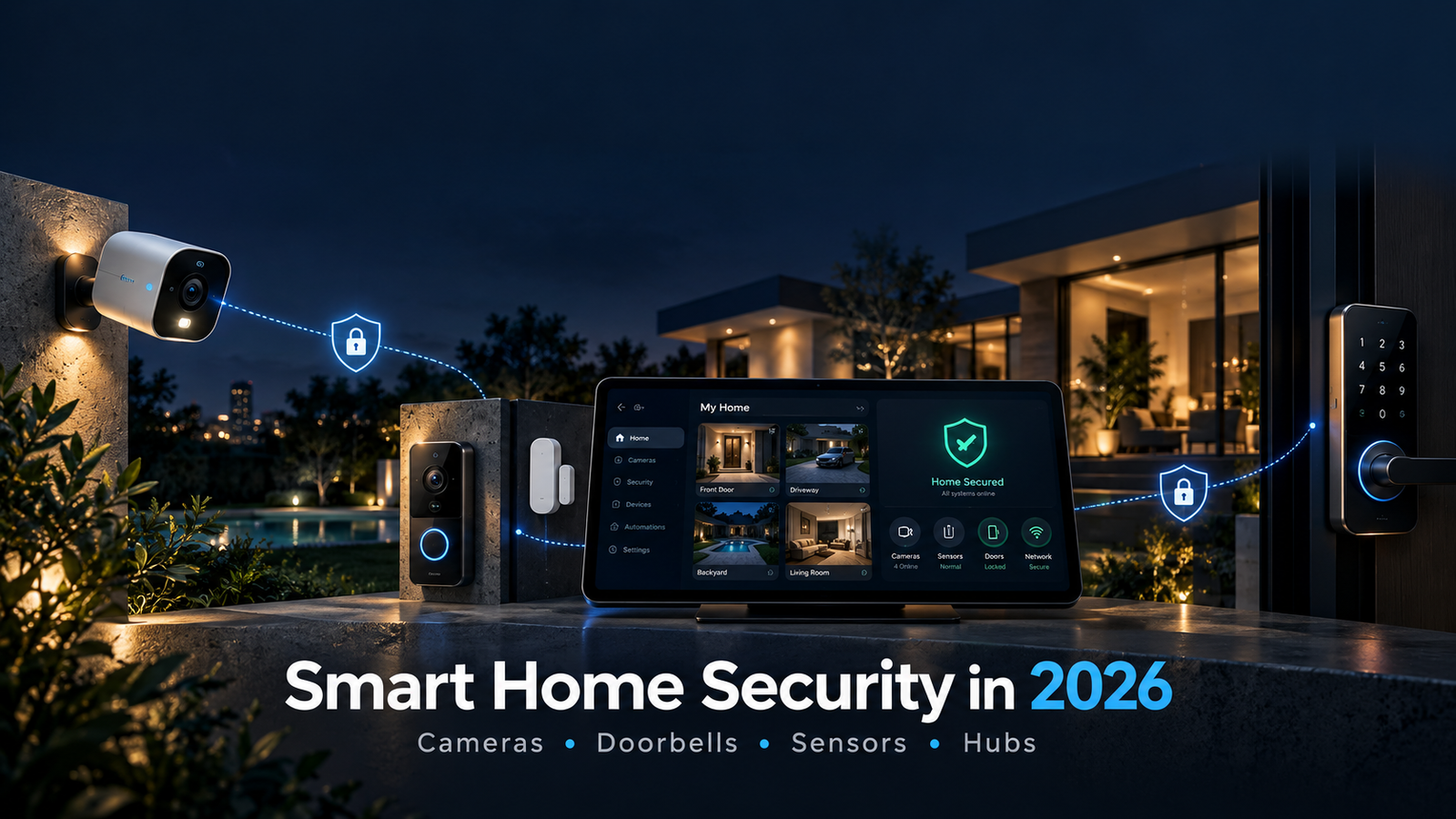
Smart home security has evolved far beyond a single alarm panel mounted near the front door.
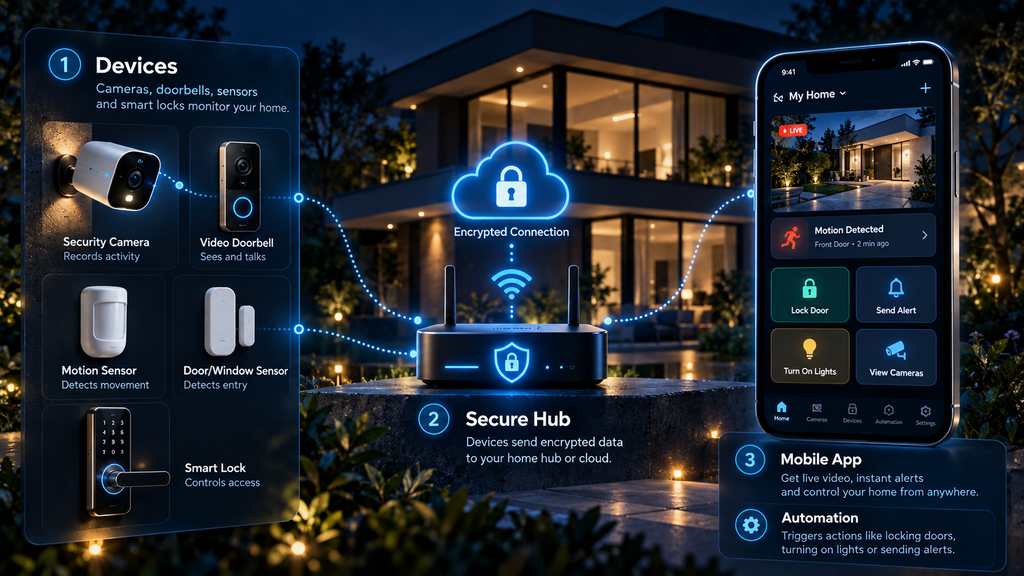
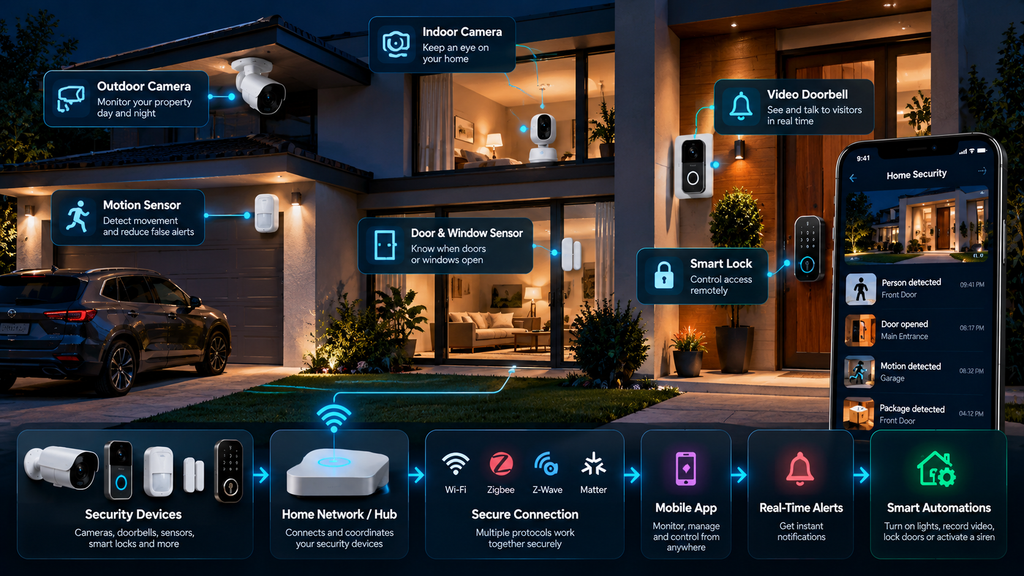
In 2026, a modern home security system can combine connected cameras, video doorbells, motion sensors, contact sensors, smart locks, sirens, hubs, mobile apps, automation, cloud services, and local processing into one coordinated system.
A homeowner can receive an alert when a door opens, check a camera from a phone, speak through a video doorbell, turn on outdoor lighting automatically, verify whether movement was caused by a person or an animal, and trigger an alarm if several sensors detect suspicious activity.
But adding more connected devices does not automatically make a home safer.
A poorly configured camera can expose private video.
An unsupported doorbell can become a cybersecurity risk.
Too many motion alerts can lead users to ignore important notifications.
A cloud outage can disable features that seemed essential.
And a security system built from incompatible devices can become difficult to manage.
The goal of smart home security should therefore be broader than simply buying cameras.
A good system should be:
reliable, secure, easy to manage, privacy-conscious, compatible, and useful during real events.
This guide explains how smart home security works in 2026, the differences between cameras, video doorbells, sensors, and hubs, how Matter is changing interoperability, what to look for before buying, and how to build a safer connected home without creating unnecessary complexity.
Table of Contents
Smart Home Security in 2026: Quick Overview
| Question | General Answer |
|---|---|
| What is smart home security? | A connected security system combining devices such as cameras, video doorbells, sensors, locks, sirens, hubs, and software. |
| Do you need cameras everywhere? | No. Cameras are useful for visual verification, but sensors often provide simpler and more privacy-friendly coverage. |
| What is a video doorbell? | A connected doorbell with a camera, microphone, speaker, motion detection, and mobile notifications. |
| What do contact sensors do? | They detect whether a door or window is opened or closed. |
| What is a smart home security hub? | A central device or platform that coordinates compatible sensors and automations. |
| Does Matter support security cameras? | Yes. Matter 1.5 added support for cameras and video doorbells, with later updates improving camera capabilities. |
| Is Matter required? | No. Many security products still use proprietary ecosystems, Wi-Fi, Bluetooth, Zigbee, Thread, or other technologies. |
| Is local storage better than cloud storage? | Neither is automatically better. Local storage improves independence and privacy, while cloud storage can make remote access and off-site backup easier. |
| Are battery cameras better than wired cameras? | Battery models are easier to install, while wired models generally provide more continuous operation. |
| Should smart security devices receive software updates? | Yes. Update support is one of the most important security considerations when choosing connected devices. |
| Can smart home security prevent every burglary? | No. It can improve monitoring, awareness, deterrence, and response, but it cannot guarantee that crime will not occur. |
| What should users prioritize? | Reliable alerts, secure accounts, update support, good network security, useful camera placement, and simple workflows. |
1. What Is Smart Home Security?
Smart home security refers to connected technology designed to help homeowners monitor, detect, verify, and respond to activity around the home.
A system can be simple.
For example:
video doorbell + mobile app
Or it can be more comprehensive:
cameras + contact sensors + motion sensors + smart locks + siren + hub + automation + remote access
Traditional security systems often focused on a central alarm panel connected to doors, windows, and professional monitoring.
Modern smart home systems expand this concept by adding internet connectivity, mobile control, visual verification, and automation.
The most important difference is not necessarily the sensor itself.
A door sensor has existed for decades.
The difference is what happens after the sensor detects something.
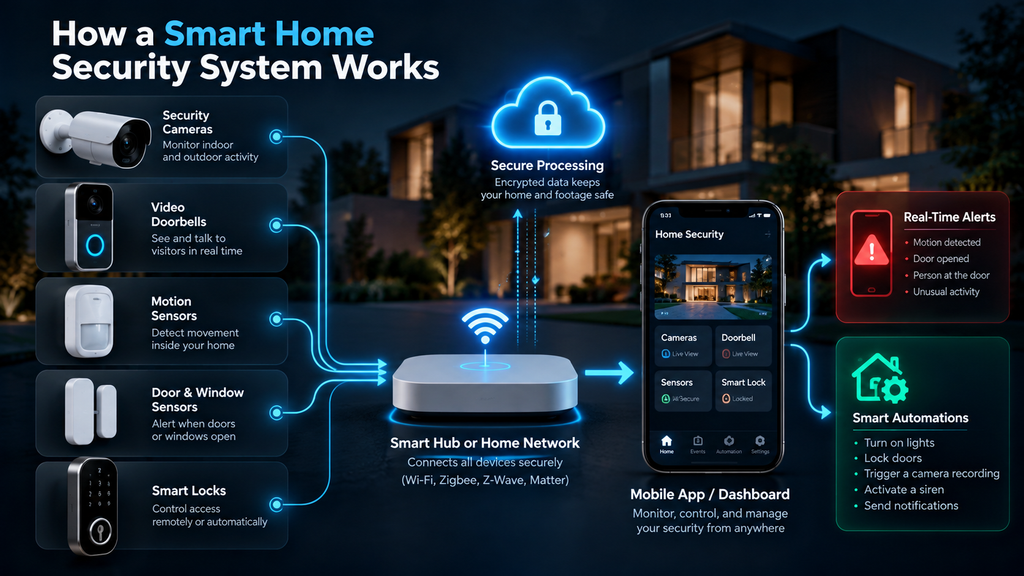
A connected system can:
- Send an instant notification
- Trigger a camera recording
- Turn on lights
- Lock other doors
- Activate a siren
- Start an automation
- Notify a monitoring service
- Allow the homeowner to check the event remotely
Smart home security is therefore best understood as a connected security workflow, not simply a collection of devices.
2. The Main Components of a Smart Home Security System
Most systems use some combination of the following technologies.
Security Cameras
Cameras provide visual monitoring and recorded evidence.
Common locations include:
- Front entrances
- Driveways
- Backyards
- Garages
- Side entrances
- Indoor common areas
Video Doorbells
Video doorbells combine a doorbell, camera, microphone, speaker, and motion detection.
They are designed primarily for monitoring visitors and activity near an entrance.
Contact Sensors
These small sensors detect whether a door or window is open or closed.
They are simple but extremely useful.
Motion Sensors
Motion sensors detect movement inside or outside the home.
Some modern systems attempt to distinguish people, pets, vehicles, or other movement.
Smart Locks
Smart locks allow controlled access through PINs, apps, phones, key cards, biometrics, or traditional keys depending on the model.
Sirens and Alarms
A siren provides an immediate audible response when a security rule is triggered.
Security Hubs
A hub can coordinate multiple devices and protocols.
It may also run automations locally.
Mobile Apps
The app becomes the control center for many modern systems.
Users can:
- View cameras
- Receive alerts
- Arm or disarm sensors
- Manage users
- Change settings
- Review event history
A strong system combines these components in ways that make sense for the home rather than simply installing one of everything.
3. Security Cameras: What They Actually Add
Security cameras are among the most visible smart home security devices.
Their greatest advantage is visual verification.
A motion sensor may tell you that something moved.
A camera may help you understand what caused the movement.
That could be:
- A family member
- A delivery driver
- An animal
- A vehicle
- An unfamiliar person
This context matters.
Without visual verification, users may receive alerts but still not know what happened.
However, cameras also create some of the largest privacy and cybersecurity considerations in a smart home.
They can capture:
- Faces
- Visitors
- Neighbors
- Children
- Employees
- Audio
- Private areas
Camera placement should therefore be thoughtful.
More coverage is not always better.
4. Indoor vs. Outdoor Cameras
Indoor and outdoor cameras may look similar, but they often serve different purposes.
Outdoor Cameras
Outdoor cameras typically need:
- Weather resistance
- Better night performance
- Strong wireless connectivity
- Wider viewing angles
- Outdoor mounting hardware
- Reliable motion detection
They may also include spotlights or sirens.
Indoor Cameras
Indoor cameras can focus more on:
- Entry areas
- Common rooms
- Pets
- Children
- Elderly family members
- Home activity while occupants are away
Privacy becomes especially important indoors.
A camera facing a driveway creates a very different privacy environment from a camera pointing at a bedroom.
Some users prefer indoor cameras with physical privacy shutters or automatic disable modes when someone is home.
5. Wired vs. Battery-Powered Cameras
One of the first decisions when choosing cameras is power.
Battery Cameras
Battery-powered cameras are easier to install.
Advantages include:
- Flexible placement
- No nearby outlet required
- Minimal wiring
- Easier relocation
The trade-offs may include:
- Battery charging
- Reduced recording frequency
- Event-based rather than continuous recording
- Performance changes caused by aggressive power-saving settings
Wired Cameras
Wired cameras receive continuous power.
Advantages can include:
- More reliable long-term operation
- Less maintenance
- Continuous recording options
- Fewer battery-related limitations
The disadvantage is installation complexity.
A homeowner may need power cabling, Ethernet, or professional installation.
For important security locations, reliability is often more valuable than convenience.
6. Wi-Fi Cameras vs. Ethernet and PoE
Many consumer cameras use Wi-Fi.
This makes installation easier, but the camera depends on wireless coverage.
A weak signal can cause:
- Delayed alerts
- Failed recordings
- Reduced video quality
- Disconnections
For homes with many cameras, wired Ethernet can be attractive.
Power over Ethernet, commonly called PoE, can carry both network data and electrical power through one Ethernet cable.
This can simplify permanent installations.
PoE is especially useful for:
- Large homes
- Multiple outdoor cameras
- Network video recorder systems
- Locations where Wi-Fi is weak
Wi-Fi remains more convenient.
PoE often provides stronger reliability.
7. What Resolution Do You Actually Need?
Higher resolution can provide more detail, but resolution is only one part of camera quality.
A camera advertised as 4K may still perform poorly if it has:
- Weak night vision
- Heavy compression
- Poor exposure
- A small sensor
- Bad placement
- Insufficient lighting
For security, the important question is not:
“How many pixels does the camera have?”
It is:
“Can I clearly understand what happened in the conditions where this camera will actually be used?”
A lower-resolution camera with good lighting and positioning may produce more useful evidence than a higher-resolution camera pointing toward glare.
8. Field of View and Camera Placement
A wider field of view captures more of the scene.
But wider is not always better.
Very wide lenses can make people appear smaller and reduce useful detail at distance.
A good camera placement strategy balances:
- Coverage
- Distance
- Angle
- Lighting
- Identification needs
At a front entrance, capturing the face of a visitor may be more important than seeing the entire street.
At a backyard, wider coverage may be more useful.
Camera placement often matters more than specifications.
9. Night Vision in 2026
Many security events occur in low light.
Modern cameras may use:
- Infrared night vision
- Low-light color sensors
- Integrated spotlights
- High-dynamic-range processing
- AI-enhanced image processing
Infrared night vision can work in darkness but may produce monochrome images.
Color night vision may provide additional context but often requires more ambient light.
A built-in spotlight can improve visibility but may also attract attention.
There is no universally best option.
The correct choice depends on the location.
10. What Is a Video Doorbell?
A video doorbell combines several devices into one entrance-focused product.
Typical features include:
- Camera
- Doorbell button
- Microphone
- Speaker
- Motion detection
- Mobile notifications
- Two-way audio
- Recorded clips
The main benefit is convenience.
A homeowner can see who is at the door without physically approaching it.
Video doorbells are also useful for monitoring:
- Deliveries
- Visitors
- Packages
- Unexpected activity near the entrance
Because front doors are high-traffic areas, doorbells can produce many alerts.
Good notification filtering therefore matters.
11. Wired vs. Battery Video Doorbells
Like cameras, video doorbells can be battery-powered or wired.
Battery Doorbells
They are easier to install and can work in homes without existing doorbell wiring.
Potential disadvantages include:
- Battery maintenance
- Reduced pre-event recording
- More aggressive power saving
Wired Doorbells
They are typically more suitable for permanent installation.
Advantages may include:
- Continuous power
- Faster event capture
- More consistent operation
However, compatibility with existing transformers and wiring must be checked.
12. Door and Window Sensors
Contact sensors are among the simplest security devices, yet they often provide excellent value.
A typical sensor has two parts.
One attaches to the door or window.
The other attaches to the frame.
When they separate, the system detects an opening.
These sensors can be used for more than alarms.
They can also trigger:
- Lighting
- Climate automation
- Notifications
- Camera recording
- Smart lock actions
For example:
Front door opens after midnight → hallway lights turn on + camera records + phone receives notification
Simple sensors can therefore become powerful building blocks.
13. Motion Sensors
Motion sensors detect movement within an area.
Traditional systems often use passive infrared technology.
Modern smart home systems may combine multiple data sources to reduce false alerts.
Some devices attempt to distinguish:
- People
- Pets
- Vehicles
- General motion
However, classification is not perfect.
Sunlight, heat sources, moving curtains, insects, or pets can still cause unexpected alerts depending on the sensor and environment.
Correct placement remains essential.
14. Smart Locks and Access Control
Smart locks can improve convenience and access management.
Instead of sharing a physical key, homeowners may create:
- Temporary PINs
- Guest access
- Scheduled access
- One-time access
- Family profiles
This can be useful for:
- Family members
- Cleaners
- Contractors
- Guests
- Short-term visitors
But a smart lock should not sacrifice basic physical security.
Users should evaluate:
- Mechanical lock quality
- Battery backup
- Emergency access
- App security
- Update policy
- Authentication options
Connectivity is useful only if the physical lock remains dependable.
15. What Is a Smart Home Security Hub?
A hub coordinates devices.
Depending on the system, it may support:
- Wi-Fi
- Thread
- Zigbee
- Bluetooth
- Matter
- Proprietary radio protocols
A hub can provide several advantages.
It may:
- Keep automations running locally
- Reduce dependence on cloud services
- Coordinate sensors
- Connect low-power devices
- Integrate multiple systems
Some ecosystems no longer require a dedicated box because hub functionality may be built into:
- Smart speakers
- Routers
- Displays
- Security panels
The concept remains the same.
A hub acts as a coordination layer.
16. Matter and Smart Home Security in 2026
Matter has become increasingly important for interoperability.
The standard is designed to make compatible smart home devices work more consistently across ecosystems.
For security products, one of the biggest changes arrived with Matter 1.5, released in November 2025.
That version added support for cameras and related devices, including video doorbells.
Matter 1.5.1, released in March 2026, introduced targeted improvements for camera streaming and device flexibility.
Matter 1.6, released in June 2026, focused on easier setup, multi-ecosystem experiences, and context-aware control rather than simply adding more device categories.
This means the Matter ecosystem in 2026 is considerably more relevant to home security than it was during the standard’s early years.
But Matter does not mean every feature will automatically be identical across every platform.
A camera may support Matter while still offering additional features through the manufacturer’s own app.
17. Does Matter Replace Wi-Fi, Thread, or Zigbee?
No.
This is a common misunderstanding.
Matter is primarily an application-layer interoperability standard.
Devices still need networking technologies underneath.
A Matter product may communicate through:
- Wi-Fi
- Thread
- Ethernet
Other security products may continue using:
- Zigbee
- Bluetooth
- Proprietary radio systems
Matter does not make all older technologies obsolete.
It provides a common framework that can make compatible devices easier to integrate.
18. Local Storage vs. Cloud Storage
Security cameras need somewhere to store recordings.
Two broad approaches exist.
Cloud Storage
Video is uploaded to remote servers.
Advantages can include:
- Off-site backup
- Remote access
- Easier multi-device management
- Less local hardware
Possible disadvantages include:
- Subscription fees
- Internet dependence
- Privacy concerns
- Vendor dependence
Local Storage
Video may be stored on:
- MicroSD cards
- Hubs
- Network video recorders
- Local servers
- Network-attached storage
Advantages can include:
- Greater local control
- Reduced recurring costs
- Less dependence on internet connectivity
Possible disadvantages include:
- Hardware maintenance
- Storage limits
- Risk of losing recordings if equipment is stolen or damaged
Many users may prefer a hybrid approach.
Important clips can be stored locally with optional cloud backup.
19. Subscription Fees and the Real Cost of Ownership
A camera may appear inexpensive until subscription fees are added.
Some features may require recurring payments, including:
- Cloud recording
- Extended history
- Person recognition
- Package detection
- Rich notifications
- Professional monitoring
Before buying, calculate the total cost across several years.
For example:
device price + subscription + storage + batteries + accessories
A more expensive device with local storage may cost less over time than a cheaper camera with mandatory recurring fees.
Price comparisons should therefore focus on total ownership cost, not only purchase price.
20. AI in Smart Home Security
Artificial intelligence is increasingly used to help cameras and security systems interpret events.
Possible features include:
- Person detection
- Vehicle detection
- Animal detection
- Package detection
- Familiar-face recognition
- Unusual motion alerts
- Natural-language event search
The main advantage is reducing noise.
Instead of receiving:
Motion detected
the system may provide something more useful:
Person detected at front door
However, AI classification can be wrong.
Poor lighting, unusual clothing, distance, weather, and camera angles can affect accuracy.
AI should therefore improve prioritization rather than be treated as perfect judgment.
21. The Problem of Alert Fatigue
A security system that sends constant notifications eventually becomes easy to ignore.
This is alert fatigue.
Common causes include:
- Trees moving
- Passing cars
- Pets
- Shadows
- Insects
- Neighbors
- Delivery activity
Users may start ignoring alerts.
That defeats the purpose of the system.
Better systems allow:
- Activity zones
- Object filtering
- Time schedules
- Sensitivity adjustments
- Person-only alerts
- Different priorities
The goal is not to generate the largest number of notifications.
It is to deliver the most useful ones.
22. Privacy: Where Should Cameras Not Go?
Security cameras should not become unnecessary surveillance tools.
Indoor cameras deserve especially careful placement.
Areas where cameras may be inappropriate include:
- Bedrooms
- Bathrooms
- Private changing areas
- Locations where guests reasonably expect privacy
Homeowners should also consider neighboring properties.
An outdoor camera aimed primarily at a neighbor’s private area can create privacy concerns even if the camera is physically mounted on your property.
Camera angles should focus on legitimate security areas.
23. Microphones and Audio Recording
Many cameras and doorbells record audio.
This can improve security context.
But audio recording may be regulated differently from video depending on jurisdiction.
Users should understand:
- Whether audio is enabled
- Whether recordings are stored
- Who can access them
- Applicable local law
If audio is unnecessary, disabling it can reduce privacy risk.
24. Cybersecurity: The Router Matters
The router is one of the most important components in smart home security.
Nearly every connected device depends on it.
FTC guidance recommends changing default router settings, enabling encryption, keeping firmware updated, and disabling unnecessary remote-management features.
NIST has also published specific cybersecurity requirements for consumer-grade routers because routers form a critical security boundary for connected homes.
A sophisticated camera cannot compensate for a badly secured network.
A broader cybersecurity strategy can also help protect the computers, phones, accounts, and connected devices sharing the same home network.
25. Use Strong Account Security
Many smart security systems are controlled through online accounts.
Protect those accounts carefully.
Good practices include:
- Unique passwords
- Password manager use
- Multi-factor authentication
- Avoiding password reuse
- Reviewing account sessions
- Removing old users
A camera may have excellent hardware security while the user account remains vulnerable because the same password was reused elsewhere.
Account security is part of physical home security once locks and cameras are connected to apps.
26. Keep Every Device Updated
Software updates can fix:
- Security vulnerabilities
- Compatibility problems
- Reliability issues
- Camera performance
- Connection problems
FTC research has highlighted an important consumer problem: many smart-device manufacturers do not clearly disclose how long products will receive software support.
This means update policy should be checked before buying.
A smart camera that works perfectly today may become a poor long-term investment if security updates end quickly.
When choosing between products, ask:
How long does the manufacturer promise to support this device?
This question can be more important than an extra megapixel.
27. What Happens When Support Ends?
An unsupported smart device may continue working.
But that does not necessarily mean it should remain connected indefinitely.
Potential problems include:
- Unpatched vulnerabilities
- App incompatibility
- Cloud-service shutdown
- Broken integrations
- Security certificates expiring
If an important security product stops receiving updates, replacing it may be reasonable even if the hardware still functions.
This is one reason support lifetime should be part of buying decisions.
28. The U.S. Cyber Trust Mark
The United States has also been developing the U.S. Cyber Trust Mark, a voluntary cybersecurity labeling program for consumer wireless IoT products.
The program is intended to help consumers identify products that meet baseline cybersecurity requirements.
The FCC framework includes areas such as:
- Product identification
- Secure configuration
- Data protection
- Access control
- Software updates
- Cybersecurity awareness
The program continued progressing in 2026 with additional Cybersecurity Label Administrators being conditionally approved.
For consumers, cybersecurity labeling may eventually make it easier to compare connected devices based on security practices rather than relying only on marketing claims.
29. Separate IoT Devices From Important Computers
Advanced users may want to place IoT devices on a separate network or VLAN.
A simpler alternative is using a guest or dedicated IoT network if the router supports it.
The idea is to reduce unnecessary communication between:
cameras, smart plugs, TVs, laptops, and sensitive work devices
Network segmentation is not mandatory for every household.
But it can reduce the potential impact of one compromised device.
30. Disable Features You Do Not Use
Many smart devices arrive with numerous features enabled.
Some may include:
- Remote administration
- Cloud integrations
- Microphones
- Voice assistants
- Third-party integrations
- Sharing options
Every feature can increase complexity.
FTC guidance recommends disabling functions that are not needed.
A useful security rule is:
If you do not use it, consider turning it off.
Simple systems are generally easier to secure.
31. Cameras Should Not Be Your Only Security Layer
Cameras are useful, but they are not a complete security system.
A camera may record an event without preventing it.
A more resilient approach combines multiple layers.
For example:
door lock + contact sensor + exterior lighting + camera + alarm
Each component serves a different purpose.
- Lock: physical resistance
- Sensor: detection
- Light: visibility and deterrence
- Camera: verification
- Alarm: response
Layered security is generally stronger than relying on one device.
32. Smart Lighting as a Security Tool
Lighting is often overlooked.
Connected lights can support security by:
- Turning on when motion is detected
- Simulating occupancy
- Illuminating dark entrances
- Supporting camera visibility
For example:
Outdoor motion detected after sunset → porch lights turn on
This can improve both safety and camera performance.
Automation should still have sensible limits.
A light turning on every time a tree moves can quickly become annoying.
33. Building Useful Security Automations
Good automation should be easy to understand.
Examples include:
Front door opens while system is armed → send high-priority notification
Outdoor person detected at night → turn on exterior lights
Everyone leaves home → arm sensors + lock doors
Smoke alarm activates → unlock selected exit + turn on pathway lights
Automations should be tested regularly.
A complicated automation that no one remembers how to manage can become a liability.
34. What Happens When the Internet Goes Down?
Cloud-dependent security systems can lose functionality when internet access fails.
Possible effects include:
- No remote camera viewing
- Delayed alerts
- Lost cloud recording
- Disabled automation
- App control unavailable
A robust system should be designed with failure in mind.
Useful features include:
- Local recording
- Local sensor automation
- Battery backup
- Offline siren operation
- Cellular backup
Ask this before buying:
What still works if my internet connection fails?
The answer reveals how resilient the system really is.
35. What Happens During a Power Outage?
Power outages create another challenge.
Battery-operated sensors may continue working.
Wired cameras, routers, and hubs may shut down.
A small uninterruptible power supply, or UPS, can keep critical networking equipment running temporarily.
Potential backup targets include:
- Router
- Modem
- Security hub
- PoE switch
- Network recorder
Backup planning is especially useful in locations where outages are common.
36. Professional Monitoring vs. Self-Monitoring
Some systems offer professional monitoring.
Others rely entirely on the homeowner.
Self-Monitoring
The user receives alerts and decides what action to take.
Advantages:
- Lower recurring cost
- More control
Disadvantages:
- User must notice alerts
- No dedicated response center
Professional Monitoring
A monitoring center may review alarms and contact emergency services according to the service plan.
Advantages:
- Dedicated response workflow
- Useful when users are unavailable
Disadvantages:
- Subscription cost
- Terms vary by provider
Neither approach is automatically better.
The decision depends on risk, budget, and personal preference.
37. How Many Cameras Does a Home Need?
There is no universal number.
A better approach is to identify security zones.
Start with:
- Main entrance
- Secondary entrance
- Driveway or parking area
- Backyard access
- Garage
- Vulnerable side access
Then decide whether each location needs:
- Camera
- Sensor
- Light
- Lock
A small apartment may only need a doorbell and contact sensor.
A large detached home may need several cameras.
Buying unnecessary cameras creates more cost, maintenance, bandwidth use, and privacy concerns.
38. A Practical Smart Home Security Setup
A balanced system for many homes might include:
Entrance
- Video doorbell
- Smart lock
- Door contact sensor
Exterior
- One or two well-positioned cameras
- Motion-activated lighting
Windows and Secondary Doors
- Contact sensors
Interior
- Motion sensor in common area
- Optional indoor camera when away
Network
- Secure modern router
- Automatic updates
- Separate IoT network if available
Control Layer
- Hub or ecosystem
- Mobile app
- Useful automations
This provides multiple security layers without turning the home into a surveillance facility.
39. What to Look for Before Buying
Before buying a smart security device, check:
Update Policy
How long will the device receive security updates?
Storage
Is storage local, cloud-based, or both?
Subscription
Which features require recurring payment?
Compatibility
Does it work with your current ecosystem?
Matter Support
Is Matter available or planned?
Network Requirements
Does it require strong Wi-Fi, Thread, Ethernet, or a hub?
Privacy
Can microphones, cloud recording, or analytics be disabled?
Authentication
Does the account support multi-factor authentication?
Backup
What happens if power or internet fails?
Export
Can important recordings be saved easily?
These questions are more important than buying based on brand recognition alone.
40. The Future of Smart Home Security
Smart home security is moving toward deeper integration.
A future system may combine:
camera + lock + lighting + environmental sensors + occupancy detection + AI + automation
The security system will increasingly understand context rather than simply react to individual devices.
For example:
A camera sees movement.
The system checks whether the homeowner is present.
It verifies whether the person is familiar.
It checks whether the door is locked.
It adjusts alert priority.
It records the event locally.
This type of contextual automation may become more common as interoperability improves.
Matter 1.6 already reflects this broader direction by improving context-driven control and coordination across ecosystems.
41. Will AI Replace Traditional Alarms?
No.
Traditional security concepts remain important.
AI may help reduce false alerts and improve event classification.
But systems still need:
- Reliable sensors
- Physical locks
- Secure communication
- Sirens
- Human decision-making
AI works best as another layer.
It should not become the only layer.
42. Is Smart Home Security Worth It?
For many households, yes—if the system solves a real problem.
Good reasons to install smart security include:
- Monitoring entrances
- Checking deliveries
- Managing guest access
- Receiving alerts while away
- Improving visibility around the home
- Supporting elderly family members
- Integrating lighting and locks
Poor reasons include:
- Buying devices only because they are new
- Installing cameras everywhere without a clear purpose
- Paying for features that will never be used
A good smart home should become easier to manage.
If security technology creates constant notifications, maintenance, and frustration, the system needs simplification.
Frequently Asked Questions
What is the most important smart home security device?
There is no single most important device. A strong door lock and properly secured entrances remain fundamental. Connected sensors and cameras add monitoring and awareness.
Are security cameras enough for home security?
No. Cameras provide monitoring and evidence, but locks, sensors, lighting, alarms, and good physical security remain important.
Are wired cameras better than battery cameras?
Wired cameras usually provide more consistent power and may support continuous recording. Battery cameras are easier to install and reposition.
Does Matter support cameras in 2026?
Yes. Matter 1.5 introduced camera support, including relevant video-doorbell functionality, with Matter 1.5.1 improving camera performance and flexibility.
What is Matter 1.6?
Matter 1.6 is a 2026 update focused on easier device setup, stronger multi-ecosystem experiences, improved device coordination, and more context-aware control.
Do I need a smart home hub?
Not always. Some devices connect directly through Wi-Fi, while others use a hub, smart speaker, router, or controller for coordination.
Is local storage more private?
Local storage can reduce reliance on external cloud services, but privacy still depends on device security, network configuration, user accounts, and how recordings are accessed.
Should I buy a 4K security camera?
Not automatically. Camera positioning, sensor quality, night vision, lighting, compression, and reliability may matter more than resolution alone.
Should cameras record audio?
Only if audio is useful and appropriate. Users should also understand relevant local privacy and recording laws.
Are smart locks secure?
A good smart lock can provide strong convenience and access control, but users should evaluate both physical lock quality and cybersecurity.
Should I separate smart home devices from my main network?
It can improve security. A guest or dedicated IoT network can reduce unnecessary communication between smart devices and more sensitive computers.
Why are software updates important?
Updates can patch vulnerabilities, maintain compatibility, and keep security features working. Devices that no longer receive updates may become increasingly risky.
What is the U.S. Cyber Trust Mark?
It is a voluntary U.S. cybersecurity labeling program designed to help consumers identify qualifying wireless IoT products that meet baseline security requirements.
Can a smart home security system work without the internet?
Some systems can continue local recording, alarms, and automation, while cloud-based features may stop. This depends on the product design.
Does smart home security guarantee protection against burglary?
No. Smart security technology can improve monitoring, deterrence, awareness, and response, but no system can guarantee prevention.
Final Thoughts
Smart home security in 2026 is becoming more capable, connected, and interoperable.
Cameras can provide visual verification.
Video doorbells can monitor the front entrance.
Contact sensors can detect doors and windows opening.
Motion sensors can identify activity.
Smart locks can improve access control.
Hubs can coordinate everything.
Matter can make devices from different ecosystems easier to combine.
And AI can help reduce the enormous number of meaningless alerts generated by connected devices.
But the smartest security system is not the system with the most technology.
It is the system that remains:
reliable, secure, understandable, maintainable, and useful when something actually happens.
Before buying a camera or sensor, think beyond specifications.
Ask:
How long will it receive updates?
What works without the cloud?
Where is my data stored?
What happens when the internet fails?
Can I control who has access?
Will I actually pay attention to the alerts?
These questions determine the real value of smart security.
A safer smart home should combine modern technology with traditional security principles:
strong physical protection + reliable detection + secure networks + useful automation + responsible human judgment.
That combination matters more than any single camera, doorbell, hub, or AI feature.
Sources
- Connectivity Standards Alliance — Matter 1.5 Introduces Cameras, Closures, and Enhanced Energy Management Capabilities
- Connectivity Standards Alliance — Matter 1.5.1: Enhancing Camera Performance and Expanding Device Flexibility
- Connectivity Standards Alliance — Matter 1.6 Enables More Intuitive Setup, Multi-Ecosystem Experiences, and Context-Driven Control
- Connectivity Standards Alliance — Matter Specifications
- Federal Trade Commission — Securing Your Internet-Connected Devices at Home
- Federal Trade Commission — How Long Will Your Smart Device Get Software Updates?
- Federal Trade Commission — Smart Products Surveyed Fail to Provide Consumers With Information on Software Updates
- NIST — Profile of the IoT Core Baseline for Consumer IoT Products
- NIST — Recommended Cybersecurity Requirements for Consumer-Grade Router Products
- Federal Communications Commission — U.S. Cyber Trust Mark IoT Labeling Program