

Running a startup in 2026 requires more than a good idea.
Founders and small teams need tools for communication, project management, documents, customer relationships, payments, design, development, automation, accounting, scheduling, and website security.
The challenge is not finding software.
There are thousands of platforms competing for startup budgets.
The real challenge is building a practical technology stack without paying for overlapping products, creating unnecessary complexity, or locking the company into expensive systems before they are needed.
This guide examines 15 of the best startup tools in 2026 for founders and small teams.
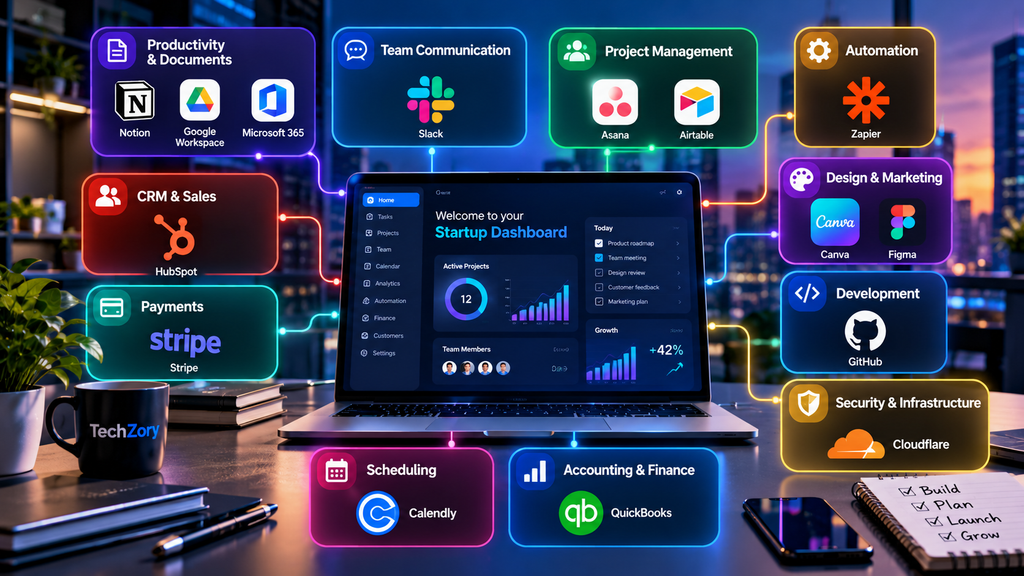
The platforms cover collaboration, productivity, CRM, payments, design, development, automation, finance, scheduling, and infrastructure.
The goal is not to use every tool on this list.
It is to choose the smallest combination that solves your startup’s actual problems.
Table of Contents
Best Startup Tools in 2026: Quick Overview
| Tool | Main Use | Free Option | Best Fit |
|---|---|---|---|
| Notion | Docs, knowledge and planning | Yes | Startup knowledge base and flexible workspace |
| Slack | Team communication | Yes | Fast-moving teams and collaboration |
| Google Workspace | Email and productivity | Trial/Paid | Business email, documents and meetings |
| Microsoft 365 | Office productivity | Paid | Teams using Word, Excel and Microsoft services |
| HubSpot | CRM and sales | Yes | Customer and sales management |
| Stripe | Payments | Usage-based | Online payments and subscriptions |
| Canva | Design and marketing | Yes | Fast visual content creation |
| Figma | Product and UI design | Yes | Product design and prototyping |
| GitHub | Software development | Yes | Code, collaboration and DevOps |
| Zapier | Automation | Yes | Connecting apps and automating workflows |
| Asana | Project management | Yes | Structured project and task management |
| Airtable | Flexible databases | Yes | Operations and structured workflows |
| QuickBooks | Accounting | Plan-dependent | Startup bookkeeping and finance |
| Calendly | Scheduling | Yes | Meetings, sales calls and demos |
| Cloudflare | Security and performance | Yes | Websites, applications and infrastructure |
1. Notion — Documents, Knowledge and Flexible Workspaces
Notion has become one of the most versatile tools available to small teams.
A startup can use it for internal documentation, product requirements, meeting notes, project tracking, company policies, hiring information, content calendars, databases, and lightweight websites.
Its strength is flexibility.
Instead of forcing every team into one workflow, Notion allows pages, databases, tasks, forms, calendars, and structured information to exist inside the same workspace.
In 2026, Notion has also expanded its AI capabilities significantly.
Its Business plan includes more advanced AI features designed to work with information from Notion, connected applications, and the web. The platform also supports offline access, forms, sites, charts, databases, and workspace exports depending on plan level.
For a small startup, the Free or Plus plan may be enough initially.
The biggest risk is turning Notion into an overly complicated internal system before the company actually needs that level of structure.
Best for: Knowledge management, documentation, planning, internal wikis and flexible startup operations.
2. Slack — Fast Team Communication
Email is useful for external communication, but it can become inefficient for rapid internal collaboration.
Slack organizes team conversations into channels, direct messages, shared spaces and integrations.
It is especially useful for distributed teams, engineering groups, customer-support teams and startups that need fast communication across departments.
The free version provides 90 days of searchable message history and support for a limited number of application integrations.
Paid plans expand message history, integrations, group meetings and AI capabilities. Slack’s 2026 plans also include AI features such as conversation summaries, search and workflow assistance at different levels.
Slack works best when a startup establishes clear communication rules.
Without discipline, it can become a constant stream of notifications that reduces productivity.
Use channels intentionally and avoid replacing every structured document or decision with a chat message.
Best for: Team communication, remote collaboration, integrations and fast operational coordination.
3. Google Workspace — Business Email and Everyday Productivity
Google Workspace remains one of the most practical productivity suites for startups.
It combines Gmail, Calendar, Drive, Docs, Sheets, Slides, Meet and other services under a business account.
That makes it possible to manage business email, collaborative documents, spreadsheets, meetings and shared files without assembling separate applications for each task.
Google has also integrated Gemini capabilities across Workspace products.
Current Business plans include varying levels of Gemini access, storage and meeting features. Business Starter provides 30 GB of pooled storage per user, while higher plans expand storage and collaboration capabilities.
For startups that already operate heavily in browsers and cloud applications, Workspace can provide a straightforward foundation for daily operations.
It is often one of the first paid software decisions a new company makes because professional email and shared documents are fundamental requirements.
Best for: Business email, cloud documents, meetings, shared storage and collaborative productivity.
4. Microsoft 365 — Office Productivity for Growing Teams
Microsoft 365 remains particularly relevant for startups that depend on Word, Excel, PowerPoint, Outlook or the broader Microsoft ecosystem.
Excel alone can be extremely important for financial modeling, forecasting, budgeting and operational analysis.
Microsoft 365 also integrates collaboration, cloud storage and business communication through products such as Teams, OneDrive and SharePoint.
Microsoft updated pricing for several business plans in July 2026. Business Basic, Standard and Premium remain the primary packages for smaller organizations, with different combinations of cloud services, desktop applications and security functionality.
Choosing between Microsoft 365 and Google Workspace is often more important than subscribing to both.
A small startup can usually reduce cost and complexity by selecting one primary productivity ecosystem.
Best for: Excel-heavy workflows, Office documents, business email and Microsoft-centered organizations.
5. HubSpot — CRM for Leads, Customers and Sales
A startup may begin by tracking customers in spreadsheets.
That works temporarily.
As the number of leads, conversations and deals increases, a customer relationship management system becomes much more useful.
HubSpot’s CRM provides tools for contact management, pipelines, reporting and sales activity.
Its free CRM includes contact management, deal pipelines, imports, reporting dashboards and AI assistance. Paid tiers add more advanced permissions, automation, customer-agent capabilities, scoring and reporting.
This makes HubSpot especially attractive to startups that want to begin with basic CRM functionality and expand later.
However, startups should watch costs carefully when adding multiple HubSpot products or advanced tiers.
The platform can become much more expensive as sales and marketing requirements grow.
Best for: CRM, sales pipelines, lead tracking, marketing and customer management.

6. Stripe — Payments and Subscription Infrastructure
For many online startups, accepting payments is one of the first technical requirements.
Stripe provides payment processing infrastructure for websites, applications, subscriptions and digital businesses.
Its standard model is usage-based rather than requiring a basic monthly platform subscription for payment processing.
In the United States, Stripe lists standard domestic card pricing at 2.9% plus 30 cents per successful transaction, while pricing differs by country and payment method. Stripe supports international payments, numerous currencies and many payment methods through one integration.
Beyond simple checkout, Stripe offers tools for subscriptions, invoicing, fraud prevention, marketplaces and financial workflows.
A startup should still compare Stripe with local payment providers, particularly when operating in markets where regional methods or banking requirements are important.
Best for: Online payments, SaaS subscriptions, e-commerce and developer-friendly payment infrastructure.
7. Canva — Fast Marketing and Visual Content
Not every startup has a full-time graphic designer.
Canva helps founders and small teams create social graphics, presentations, advertisements, documents, simple videos and marketing materials using templates and drag-and-drop tools.
The free plan provides a large content library and common design capabilities.
Canva Pro adds premium assets, additional brand tools, scheduling, larger storage and advanced editing features, while its Business tier adds more collaboration, administration and brand-management functionality. Canva’s 2026 offering also includes expanded AI features.
Canva is particularly useful when speed matters more than highly customized design.
It can help a startup maintain acceptable visual consistency before it has the budget for dedicated design resources.
For complex product interfaces, however, a specialized tool such as Figma is generally more appropriate.
Best for: Social media, presentations, marketing graphics, lightweight video and brand content.
8. Figma — Product Design and Prototyping
Figma is designed for collaborative digital product design.
Teams can use it to create interfaces, prototypes, component libraries, design systems and developer handoffs.
This makes it particularly valuable for software startups building web or mobile products.
Figma’s Starter plan remains free and includes limited access across its product suite.
Its Professional plan expands to unlimited files and projects within a team, shared libraries and more advanced developer handoff capabilities. Figma has also incorporated AI credits and newer products across its 2026 plans.
One advantage of Figma is that designers, product managers and developers can collaborate around the same source rather than repeatedly exchanging exported images.
A startup may not need the higher organizational tiers until multiple teams or complex design systems appear.
Best for: UI/UX design, prototypes, product development, design systems and developer collaboration.
9. GitHub — Code, Collaboration and Software Development
For software startups, GitHub is often foundational infrastructure.
It provides repositories for source code, version control, issue tracking, pull requests, code reviews, automation and development workflows.
GitHub’s Free plan supports unlimited public and private repositories.
The Team plan adds organizational and collaboration features, while Enterprise adds more advanced administration, security and governance. GitHub currently lists Team at $4 per user per month and Enterprise at $21 per user per month before applicable conditions and promotions.
GitHub is useful even for very small engineering teams because version control and code review reduce the risk of losing work or introducing untracked changes.
As a startup grows, features such as branch protections, automated testing and deployment workflows become increasingly important.
Best for: Software development, source control, collaboration, DevOps and engineering workflows.
10. Zapier — Connect Apps and Automate Repetitive Work
Small teams often perform the same manual tasks repeatedly.
A new lead arrives.
Someone copies it into a CRM.
A confirmation email is sent.
A task is created.
A spreadsheet is updated.
Zapier helps automate these workflows by connecting different applications.
Its platform includes Zaps, Tables, Forms and other workflow-building tools. Paid plans support more advanced multi-step automations, premium applications, webhooks and AI-powered workflow functionality.
For more AI-powered software that can improve everyday workflows, see our guide to the best AI tools for productivity in 2026.
Automation can be extremely valuable for startups because time is usually more limited than software.
However, automating a bad process does not make it good.
Before building complex automations, make sure the underlying workflow is actually necessary and stable.
Best for: No-code automation, connecting SaaS applications, lead workflows and repetitive operational tasks.
11. Asana — Structured Project Management
Not every team can manage projects effectively through chat and documents alone.
Asana provides more structured task and project management.
Teams can organize work by tasks, owners, deadlines, projects, timelines, forms, dashboards and automated rules.
Asana’s free Personal plan is aimed at one or two people, while paid plans add more advanced project management features.
The current Starter plan includes timeline and Gantt views, reporting dashboards, forms, unlimited automations and an allocation of AI Studio credits.
Asana is particularly useful when several people depend on each other to complete work in sequence.
Very small teams may find simpler task systems sufficient, but Asana becomes more valuable as projects become more complex.
Best for: Project management, deadlines, team accountability, launches and cross-functional work.
12. Airtable — Databases Without Traditional Database Complexity
Airtable combines the familiarity of a spreadsheet with the structure of a database.
Startups can use it for product inventories, content pipelines, recruiting, CRM-like workflows, research databases, operations and internal tools.
Its biggest advantage is flexibility.
Different teams can create views and workflows around the same underlying data without needing to build a custom application immediately.
Airtable offers free and paid self-service plans alongside business and enterprise options. Its billing structure includes Team and Business plans, while larger organizations can use sales-led plans.
Airtable can become an important operational system for startups that have outgrown spreadsheets but are not yet ready to develop proprietary software.
The main risk is using it as a replacement for every system in the company.
Best for: Operations, structured data, lightweight internal systems and flexible workflows.
13. QuickBooks — Accounting and Financial Management
Startup founders should establish basic financial discipline early.
Invoices, expenses, revenue, taxes and cash flow become much harder to reconstruct after months of informal tracking.
QuickBooks Online is designed to help businesses manage accounting and financial operations.
Its available plans vary by market and include different levels of bookkeeping, reporting and financial management.
QuickBooks adjusted pricing for several Online plans in August 2026 while leaving some entry-level plans unchanged.
The right accounting tool also depends heavily on country, tax rules, banking integrations and the accountant supporting the company.
For that reason, QuickBooks should be treated as one strong option rather than a universal answer for every startup worldwide.
Best for: Bookkeeping, expense tracking, invoicing, financial reporting and small-business accounting.
14. Calendly — Scheduling Without Email Back-and-Forth
Scheduling meetings can consume surprising amounts of time.
Calendly allows users to share booking links that display available times based on connected calendars.
The free plan provides basic one-to-one scheduling.
Standard adds unlimited event types, multiple calendars, automations, reminders and integrations, while Teams adds round-robin scheduling, lead routing and centralized team features. Calendly’s 2026 plans also include optional AI meeting functionality such as Notetaker and Callie on supported tiers.
Calendly is particularly useful for founders conducting customer interviews, sales calls, demos, investor meetings or recruiting conversations.
It removes repetitive coordination while still allowing the founder to control availability.
Best for: Sales calls, demos, recruiting, customer interviews and external scheduling.
15. Cloudflare — Website Security, Performance and Infrastructure
A startup website may begin small, but security and performance still matter.
Cloudflare provides services including DNS, content delivery, SSL, DDoS protection, web application security and developer infrastructure.
Its Free plan includes foundational services such as DNS, CDN, SSL and DDoS protection.
The Pro and Business plans add additional security, performance and support capabilities. Cloudflare currently lists Pro at $20 per month when billed annually and Business at $200 per month when billed annually, with separate usage-based pricing for some developer services.
For startups operating websites or web applications, Cloudflare can provide useful protection and performance improvements without requiring a large infrastructure team.
Best for: DNS, CDN, DDoS protection, website performance, security and developer infrastructure.
Quick Comparison of the Best Startup Tools in 2026
The best startup tools in 2026 serve very different purposes.
Notion is strong for flexible documentation and internal knowledge.
Slack is designed for rapid communication.
Google Workspace and Microsoft 365 cover the basic productivity layer, although most startups should choose one as their primary ecosystem instead of paying for both unnecessarily.
HubSpot manages customer relationships.
Stripe handles payments.
Canva makes marketing design accessible, while Figma is more appropriate for product and interface design.
GitHub supports software development.
Zapier connects separate applications and automates repetitive workflows.
Asana provides structured project management, while Airtable provides a more flexible data and operations layer.
QuickBooks addresses accounting.
Calendly simplifies scheduling.
Cloudflare helps protect and accelerate websites and applications.
The strongest startup stack is not the one with the most subscriptions.
It is the one where every tool has a clear purpose.
Which Startup Tools Do You Actually Need?
A new startup does not need all 15 platforms immediately.
A small non-technical team might begin with:
Google Workspace or Microsoft 365 for email and documents.
Notion for internal knowledge.
Slack for communication.
HubSpot for basic CRM.
Canva for marketing.
Calendly for external meetings.
A software startup may add GitHub and Figma from the beginning.
An online business may also require Stripe and Cloudflare very early.
As operations become more complicated, tools such as Zapier, Airtable, Asana and QuickBooks become more valuable.
The key is to introduce software when a real operational problem appears.
Do not subscribe to a platform simply because successful companies use it.
Free vs. Paid Startup Tools
Free plans are extremely valuable during the earliest stage of a company.
Notion, Slack, HubSpot, Canva, Figma, GitHub, Zapier, Asana, Airtable, Calendly and Cloudflare all provide some level of free access.
However, free does not always mean sufficient for a team.
Typical limitations include storage, history, automation volumes, advanced permissions, security, AI usage, collaboration features or the number of users.
Before upgrading, identify exactly which limitation is creating a problem.
If no one can explain what the paid plan solves, the startup may not need it yet.
At the same time, avoiding every paid tool can be counterproductive.
A modest subscription that saves several hours of manual work every month may be far more valuable than its cost.
Avoiding Tool Overload
Tool overload is one of the most common problems in growing startups.
A company may use Slack for messages, Notion for tasks, Asana for projects, Airtable for operations and spreadsheets for tracking the same information.
Soon, nobody knows which system contains the authoritative version.
Every important category should have a clear source of truth.
For example:
One primary project-management system.
One company knowledge base.
One CRM.
One primary file-storage system.
One scheduling platform.
One accounting platform.
Integrations can connect these systems, but duplication should be minimized.
Before adding a new tool, ask whether an existing platform already solves the problem adequately.
Startup Tool Security in 2026
Startup tools often contain sensitive information.
That may include customer data, financial information, intellectual property, source code, employee records and passwords.
Security therefore matters even for very small teams.
Enable multi-factor authentication wherever possible.
Use strong, unique credentials.
Remove access immediately when employees or contractors leave.
Avoid sharing administrator accounts.
Review third-party integrations periodically.
Use role-based permissions rather than giving everyone full administrative access.
Software startups should also protect code repositories, cloud accounts, domain registrars and payment systems especially carefully.
One compromised administrator account can affect the entire company.
For a broader look at protecting business devices, accounts, and data, see our guide to the best cybersecurity tools in 2026.
How to Choose the Right Startup Software
Start with the problem, not the product.
Define what you are trying to improve.
Is communication slow?
Are customer leads being lost?
Are projects missing deadlines?
Are invoices and expenses difficult to track?
Are designers and developers struggling to collaborate?
Once the problem is clear, evaluate tools based on several criteria:
Ease of use.
Integration with existing systems.
Security.
Export and portability.
Pricing as the team grows.
Administrative controls.
Automation capabilities.
Support.
A platform that costs almost nothing today can become expensive once a company reaches 50 or 100 users.
Startup software decisions should therefore consider both immediate needs and reasonable future growth.
Building a Lean Startup Tech Stack
A lean startup technology stack might contain only six or seven core services.
For example:
Google Workspace for email and productivity.
Slack for team communication.
Notion for knowledge and documentation.
HubSpot for CRM.
Canva for marketing design.
Calendly for scheduling.
Cloudflare for the website.
A software company could then add GitHub, Figma and Stripe.
Later, if operational complexity increases, Zapier, Airtable, Asana or QuickBooks can be added.
This gradual approach reduces subscription waste and gives the team time to understand what it actually needs.

Frequently Asked Questions
What are the best startup tools in 2026?
The answer depends on the type of startup.
Commonly useful platforms include Notion, Slack, Google Workspace or Microsoft 365, HubSpot, Stripe, Canva, Figma, GitHub, Zapier, Asana, Airtable, QuickBooks, Calendly and Cloudflare.
What tools does a new startup need first?
Most startups need business email, shared documents, communication, basic project tracking, customer management and secure file storage.
Technology companies may additionally need source-control and design platforms from the beginning.
Is Notion enough for project management?
For small teams and relatively simple projects, Notion can handle documentation and task tracking together.
More complex projects with dependencies, reporting and structured workflows may benefit from a dedicated platform such as Asana.
Should startups use Google Workspace or Microsoft 365?
Usually one primary suite is enough.
Google Workspace is particularly convenient for browser-based collaboration.
Microsoft 365 is attractive for companies that depend heavily on Excel, Word, PowerPoint and the broader Microsoft ecosystem.
Is HubSpot free for startups?
HubSpot provides a free CRM with core contact, pipeline and reporting capabilities.
More advanced sales, marketing and automation features require paid plans.
What is the best startup tool for accepting payments?
Stripe is widely used by online and software businesses, particularly where developer-friendly payment infrastructure is important.
Local payment providers may be preferable in some countries.
Do startups need Slack?
Not necessarily.
Very small teams can operate through other communication tools.
Slack becomes more valuable when conversations span multiple projects, departments or remote team members.
Which startup tools can automate work?
Zapier focuses specifically on cross-application automation.
Notion, Slack, Asana, HubSpot, Airtable and other platforms also provide native automation or AI capabilities depending on the plan.
Which startup tools have free plans?
Many tools in this guide provide free tiers, including Notion, Slack, HubSpot, Canva, Figma, GitHub, Zapier, Asana, Airtable, Calendly and Cloudflare.
Free-plan limits vary and can change.
Final Thoughts
The best startup tools in 2026 are not necessarily the platforms with the most features.
They are the tools that remove real friction from a growing company.
Notion can organize knowledge.
Slack can improve communication.
Google Workspace or Microsoft 365 can provide the productivity foundation.
HubSpot can organize customer relationships.
Stripe can handle online payments.
Canva and Figma support different parts of design.
GitHub supports software development.
Zapier automates repetitive processes.
Asana and Airtable provide different approaches to managing work and operations.
QuickBooks helps organize finances.
Calendly simplifies scheduling.
Cloudflare improves the security and performance of online infrastructure.
The smartest startup stack usually begins small.
Choose a few tools that solve immediate problems, establish clear systems of record, review subscriptions regularly, and add complexity only when the business genuinely needs it.
Sources and Further Reading
- Notion — Plans and Pricing
- Slack — Plans and Pricing
- Google Workspace — Business Plans and Pricing
- Microsoft — Microsoft 365 Business Plans
- HubSpot — Free CRM and Premium CRM
- Stripe — Pricing and Payments Platform
- Canva — Plans and Pricing
- Figma — Plans and Pricing
- GitHub — Plans and Pricing
- Zapier — Plans and Pricing
- Asana — Plans and Pricing
- Airtable — Billing and Plans
- QuickBooks — Online Plans and Pricing Updates
- Calendly — Plans and Pricing
- Cloudflare — Plans, Security and Performance