

Choosing among the best antivirus software in 2026 requires looking beyond basic virus detection.
Modern security products are expected to protect against a much broader range of threats, including ransomware, spyware, credential-stealing malware, malicious downloads, phishing websites, online scams, potentially unwanted applications, and emerging threats that may not yet match traditional malware signatures.
The security landscape has also changed because attackers increasingly combine malware with social engineering. A user may receive a convincing phishing message, visit a fraudulent website, download a malicious file, or unknowingly allow an unsafe application to modify important documents.
For this reason, modern antivirus software increasingly relies on multiple layers of protection rather than a single malware scanner.
These layers may include:
- Real-time malware detection
- Behavioral monitoring
- Cloud-based threat analysis
- Ransomware protection
- Anti-phishing technology
- Web filtering
- Exploit protection
- Firewall controls
- Scam detection
- Identity monitoring
- Password-management tools
- VPN services
- Parental controls
Not every user needs all of these features.
Someone using a well-maintained Windows 11 PC may already have substantial protection from Microsoft Defender Antivirus and the broader Windows Security platform. Microsoft includes real-time malware protection, security intelligence updates, firewall protection, SmartScreen-related defenses, and optional ransomware protections such as Controlled Folder Access.
Third-party antivirus products can still add value when users want stronger multi-device management, additional web protection, identity-monitoring services, password tools, VPN functionality, family controls, advanced ransomware defenses, or a different security interface.
Independent antivirus testing is therefore particularly important.
Marketing claims alone cannot reliably tell users how well security software detects current threats or how much it affects system performance.
Independent laboratories such as AV-TEST and AV-Comparatives evaluate security products using current malware samples, malicious websites, performance tests, and false-positive measurements.
In AV-TEST’s May–June 2026 Windows evaluation, several products covered in this guide achieved the maximum six points in protection, performance, and usability, including Bitdefender Total Security, ESET Security Ultimate, F-Secure Total, McAfee Total Protection, Norton 360, Avast Free Antivirus, and AVG Antivirus Free.
Microsoft Defender Antivirus also earned the maximum six points for protection and usability, with 5.5 points for performance.
These results show why choosing antivirus software is no longer simply a matter of asking whether one product can detect viruses. Several established products can provide strong core protection, so differences in additional features, system impact, pricing, privacy, device support, usability, and security architecture become increasingly important.
AV-Comparatives’ July–August 2026 Real-World Protection Test also evaluated a broad range of current consumer security products, including Bitdefender, ESET, F-Secure, Malwarebytes, McAfee, Microsoft Defender, Norton, Avast, AVG, and Trend Micro.
Its methodology uses live malicious URLs and real-world infection vectors to examine how security products behave when users encounter current online threats.
This guide compares ten widely used antivirus and internet-security products:
Table of Contents
Rather than relying on a single test score, we will examine the broader protection each product provides.
Important factors include:
- Malware detection
- Ransomware defense
- Phishing protection
- Scam protection
- System performance
- False positives
- Device support
- Additional security tools
- Ease of use
- Free versus paid features
- Subscription structure
- Independent test results
The goal is not to claim that one antivirus product is universally perfect.
A Windows user who wants simple built-in protection has different requirements from a family protecting ten devices, a user concerned about ransomware, or someone who wants a broader security suite containing VPN, identity protection, and password-management tools.
The best antivirus software is therefore the product that combines reliable protection with the features, performance, and level of complexity that match the user’s actual security needs.
Best Antivirus Software in 2026: Quick Overview
The ten products in this guide represent several different approaches to consumer security.
Some focus heavily on malware protection and low system impact.
Others combine antivirus protection with VPN services, identity monitoring, password management, parental controls, scam protection, or broader privacy tools.
Here is a quick overview before we examine each product in detail.
Bitdefender Total Security
Bitdefender Total Security combines traditional antivirus protection with multiple layers designed to detect malicious behavior and protect important files from ransomware.
Its feature set includes:
- Real-time malware protection
- Advanced threat detection
- Multi-layer ransomware protection
- Web attack prevention
- Anti-phishing protection
- Anti-fraud filtering
- Vulnerability assessment
- Protection against unauthorized cryptomining
Bitdefender’s ransomware defenses are particularly notable because they are designed to monitor suspicious behavior in addition to relying on conventional malware signatures.
Its vulnerability-assessment tools can also identify outdated software, missing Windows security patches, and potentially unsafe system settings.
In AV-TEST’s June 2026 Windows evaluation, Bitdefender Total Security received the maximum six points for protection, performance, and usability.
Best suited to: Users who want a broad security suite with strong malware, ransomware, and web-threat protection.
Norton 360
Norton 360 combines antivirus protection with a broad set of additional consumer-security services.
Depending on the subscription tier, Norton currently includes features such as:
- Malware and ransomware protection
- Scam Protection
- Smart Firewall
- VPN
- Password Manager
- Cloud Backup
- Dark Web Monitoring
- Parental controls on selected plans
- Deepfake-related scam protection
Norton increasingly positions its platform as a complete digital-security suite rather than a standalone antivirus program.
This can be useful for users who prefer to obtain antivirus, VPN, password tools, backup, and identity-related features from one provider.
In AV-TEST’s June 2026 Windows evaluation, Norton 360 achieved six points in protection, six in performance, and six in usability.
Best suited to: Users and families who want antivirus combined with a broad collection of privacy, backup, scam, and identity-security tools.
ESET HOME Security
ESET has traditionally emphasized strong malware protection combined with a relatively light system footprint and extensive configuration options.
Its current consumer-security lineup includes protection against:
- Viruses
- Ransomware
- Spyware
- Phishing
- Malicious applications
Depending on the ESET HOME Security tier, users can also receive features such as:
- Firewall protection
- Safe banking and browsing
- Network inspection
- Webcam protection
- Encryption
- VPN
- Identity-related tools
ESET’s emphasis on fast scanning and relatively low interruption makes it particularly interesting for users who want strong security without turning the antivirus application into a very large all-purpose consumer platform.
AV-TEST awarded ESET Security Ultimate six points in protection, performance, and usability in its June 2026 Windows evaluation.
Best suited to: Users who value strong protection, extensive settings, and relatively lightweight security software.
McAfee Total Protection
McAfee Total Protection is designed as a broad consumer-security platform covering malware, online threats, privacy, identity protection, and multiple devices.
Depending on the plan and region, McAfee’s broader security ecosystem can include:
- Antivirus
- Web protection
- Scam-related protection
- Firewall tools
- VPN
- Identity monitoring
- Password and privacy tools
McAfee is particularly relevant to households that want to manage security across several devices from one subscription.
Its modern product strategy goes beyond conventional virus detection and increasingly focuses on protecting users against online scams, identity-related threats, and unsafe browsing.
McAfee Total Protection earned the maximum six points across protection, performance, and usability in AV-TEST’s June 2026 Windows evaluation.
Best suited to: Households and users seeking a multi-device security suite with antivirus plus broader privacy and identity features.
F-Secure Total
F-Secure Total combines endpoint security with a particularly strong focus on scam prevention, banking protection, identity monitoring, and privacy.
Its current feature set includes:
- Antivirus
- Ransomware protection
- Browsing protection
- Phishing protection
- Banking protection
- Shopping protection
- Scam protection
- VPN
- Password management
- Identity monitoring
F-Secure’s banking and shopping protections make it especially interesting for users who frequently perform financial transactions online.
The company also emphasizes predictable subscription pricing rather than relying only on large first-year discounts followed by dramatically different renewal prices.
F-Secure Total received six points in protection, performance, and usability in AV-TEST’s June 2026 Windows evaluation.
Best suited to: Users who want malware protection combined with banking, scam, identity, and privacy tools.
Microsoft Defender Antivirus
Microsoft Defender Antivirus is built directly into Windows 11 and Windows 10.
For many users, this makes it the most convenient antivirus option because there is nothing additional to purchase or install.
Microsoft Defender provides:
- Real-time malware protection
- Cloud-delivered protection
- Security intelligence updates
- Threat history
- Offline scanning
- Integration with Windows Security
- Ransomware-protection options
Windows Security also includes features such as Windows Firewall and Controlled Folder Access.
Controlled Folder Access can help prevent unauthorized applications from modifying protected folders, providing an additional defense against ransomware.
In AV-TEST’s June 2026 evaluation, Microsoft Defender Antivirus earned six points for protection, 5.5 for performance, and six for usability.
For users who keep Windows updated, use modern browsers, install software carefully, and maintain good security habits, Defender may already provide sufficient core antivirus protection.
Third-party products become more compelling when additional features such as multi-device management, identity monitoring, VPN services, advanced family controls, or specialized security tools are required.
Best suited to: Windows users who want capable built-in protection without purchasing a separate antivirus subscription.
Malwarebytes Premium
Malwarebytes built its reputation around malware removal and has evolved into a full real-time protection platform.
Malwarebytes Premium participates in AV-Comparatives’ 2026 consumer security test series, including its real-world protection, malware protection, and performance evaluations.
Its security approach is particularly associated with protecting against:
- Malware
- Ransomware
- Exploits
- Malicious websites
- Potentially unwanted applications
Malwarebytes is also frequently used by people who want a straightforward security product without an extremely large collection of unrelated consumer features.
Its interface tends to emphasize malware protection and threat remediation rather than trying to function as a complete identity-management ecosystem.
Best suited to: Users who want a focused malware-protection platform with strong remediation and relatively straightforward controls.
Avast Free Antivirus
Avast remains one of the most widely recognized free antivirus options.
Its current free security platform includes multiple protection layers such as:
- File Shield
- Behavior Shield
- Web Guard
- Mail Shield
- Smart Scan
- Quarantine
- Ransomware protection
- Scam and phishing protection
Avast has also incorporated AI-assisted scam analysis into its current consumer offering.
One advantage is that users can obtain substantial real-time protection without immediately purchasing a subscription.
The tradeoff is that Avast’s ecosystem also promotes paid security and privacy upgrades beyond the free tier.
In AV-TEST’s June 2026 Windows evaluation, Avast Free Antivirus achieved six points in protection, performance, and usability.
Best suited to: Users who want strong free antivirus protection with web, ransomware, and scam-related defenses.
AVG Antivirus Free
AVG Antivirus Free is another established free antivirus platform.
Its current free product focuses on real-time protection against:
- Viruses
- Malware
- Unsafe downloads
- Scam websites
- Phishing links
- Ransomware
AVG also includes tools designed to detect potentially dangerous websites and alert users when passwords associated with their email addresses appear in known leaks.
Like Avast, AVG provides a meaningful free security layer while offering additional paid products for users who want expanded privacy and performance tools.
AVG Antivirus Free earned six points for protection, performance, and usability in AV-TEST’s June 2026 Windows evaluation.
Best suited to: Users who want free real-time malware and web protection with minimal upfront cost.
Trend Micro Internet Security
Trend Micro Internet Security combines antivirus protection with a strong emphasis on web threats, ransomware, scams, phishing, and online financial activity.
Its current security features include protection against:
- Viruses
- Malware
- Ransomware
- Spyware
- Phishing
- Fraudulent websites
- Email scams
Trend Micro also provides banking and shopping protections and has been expanding AI-related scam defenses across its broader consumer-security ecosystem.
In AV-TEST’s June 2026 Windows evaluation, Trend Micro Internet Security received five points for protection, six for performance, and six for usability.
That result highlights an important reason we do not evaluate antivirus software based on branding or feature count alone: independent protection results can vary between products and testing periods.
Best suited to: Users who prioritize web, phishing, scam, email, and online-shopping protections in addition to conventional antivirus functionality.
Quick Summary
At a high level:
- Bitdefender Total Security combines strong malware defense with advanced ransomware and web protection.
- Norton 360 offers one of the broadest security bundles, including VPN, backup, scam protection, and identity-related features.
- ESET HOME Security emphasizes strong protection, configuration flexibility, and relatively lightweight operation.
- McAfee Total Protection focuses on broad household and multi-device security.
- F-Secure Total combines antivirus with banking, scam, identity, and privacy protection.
- Microsoft Defender Antivirus provides capable built-in Windows protection without requiring another subscription.
- Malwarebytes Premium emphasizes focused malware, exploit, ransomware, and malicious-site protection.
- Avast Free Antivirus provides a substantial free protection layer with ransomware, web, and scam defenses.
- AVG Antivirus Free offers strong free malware and web protection with a simple entry point.
- Trend Micro Internet Security emphasizes web, phishing, scam, ransomware, and online financial protection.
The detailed sections below examine how these products differ in protection, performance, usability, additional features, and the types of users they are most appropriate for.
What Does Antivirus Software Protect Against?
The term antivirus is somewhat outdated.
Modern security software is designed to protect against far more than traditional computer viruses. A current antivirus product may combine malware scanning, behavioral monitoring, cloud-based reputation systems, ransomware defenses, phishing protection, web filtering, exploit detection, and other security layers.
Understanding these threats makes it easier to evaluate what antivirus software can—and cannot—do.
Viruses
A traditional computer virus is malicious code designed to attach itself to other files or programs and reproduce when those files are executed.
Modern antivirus engines still detect conventional viruses, but they now represent only one part of the threat landscape.
Trojans
A Trojan disguises itself as legitimate or useful software while performing malicious actions after installation.
Trojans may be used to:
- Steal passwords
- Install additional malware
- Provide remote access to attackers
- Capture personal information
- Disable security software
Because Trojans often rely on users being convinced to run them, antivirus protection increasingly combines file scanning with reputation and behavioral analysis.
Ransomware
Ransomware attempts to encrypt files, lock devices, or otherwise deny access to data before demanding payment.
Modern antivirus products may defend against ransomware through several layers, including:
- Known-malware detection
- Behavioral monitoring
- Suspicious process blocking
- Protected folders
- Backup or recovery features
Microsoft Defender, for example, includes Controlled Folder Access, which can prevent untrusted applications from modifying files inside protected folders.
No ransomware defense should be considered perfect.
Important files should still be backed up separately because preventing every possible ransomware attack cannot be guaranteed.
Spyware
Spyware attempts to collect information without the user’s informed consent.
Depending on the malware, it may collect:
- Browsing information
- Credentials
- Screenshots
- Clipboard contents
- Files
- System information
Modern endpoint-security products attempt to identify spyware through signatures, cloud intelligence, behavioral analysis, and application-reputation systems.
Password Stealers and Information Stealers
Credential-stealing malware has become particularly important because browsers and applications can contain valuable authentication data.
Information stealers may target:
- Saved passwords
- Browser cookies
- Cryptocurrency wallets
- Authentication tokens
- Autofill information
- System credentials
Stealing an authenticated session cookie can sometimes allow an attacker to access an account even without obtaining the user’s password.
Antivirus software can help detect the malware responsible, but users should also protect accounts with strong authentication methods such as passkeys and multi-factor authentication.
Keyloggers
Keyloggers attempt to record keyboard input.
Attackers may use them to capture:
- Passwords
- Messages
- Financial information
- Search queries
- Other sensitive text
Modern security products may detect malicious keylogging behavior or identify the malware responsible for installing the keylogger.
Rootkits
Rootkits are designed to hide malicious software or attacker activity deep within an operating system.
Some attempt to manipulate low-level system components to make malicious files or processes harder to detect.
Modern Windows security architecture, Secure Boot, operating-system protections, and endpoint-security software make traditional rootkit techniques more difficult than they once were, but low-level threats remain relevant.
Potentially Unwanted Applications
Not every unwanted program is technically malware.
Potentially unwanted applications, often called PUAs or PUPs, may include software that:
- Installs unnecessary applications
- Displays aggressive advertising
- Changes browser settings
- Collects excessive information
- Bundles unwanted components
Security products increasingly detect these programs separately from conventional malware.
Malicious Downloads
Attackers frequently distribute malware through downloads disguised as:
- Software installers
- Game modifications
- Documents
- Cracked applications
- Browser extensions
- Updates
- Email attachments
Antivirus software can inspect downloads before or during execution and may block files using reputation, signature, or behavioral analysis.
Malicious Websites
Modern antivirus suites often include web-protection layers designed to prevent access to known malicious sites.
These systems may use:
- URL reputation
- Domain reputation
- Cloud threat intelligence
- Browser extensions
- Network filtering
Microsoft Defender SmartScreen, for example, evaluates websites and downloads and can warn users about reported phishing or malicious destinations.
Phishing
Phishing attacks attempt to convince users to disclose sensitive information or take unsafe actions.
A phishing website may imitate:
- Banks
- Microsoft accounts
- Google accounts
- Social networks
- Shopping services
- Delivery companies
- Government services
Antivirus or browser-security tools can block known phishing sites, but social engineering remains difficult to eliminate completely because attackers continually create new websites and messages.
Users should therefore treat anti-phishing technology as an additional defense rather than a replacement for careful verification.
Online Scams
Consumer-security products increasingly include dedicated scam-detection technology.
Scams may involve:
- Fake technical support
- Investment fraud
- Cryptocurrency fraud
- Fake shopping sites
- Impersonation
- Malicious advertising
- Fraudulent subscription warnings
Artificial intelligence can make scam messages more convincing, increasing the importance of combining technical protection with user awareness.
Exploits
An exploit takes advantage of a vulnerability in software.
Attackers may target weaknesses in:
- Browsers
- Office applications
- Operating systems
- PDF readers
- Media applications
- Other installed software
Some antivirus products include exploit-prevention technology that monitors suspicious behavior associated with attempts to abuse vulnerable software.
Keeping applications and the operating system updated remains essential because antivirus cannot substitute for security patches.
Cryptojacking
Cryptojacking uses another person’s computer resources to mine cryptocurrency without authorization.
It may occur through malicious programs or compromised websites.
Security products can detect mining malware or block known malicious mining activity.
Botnets
Malware can turn an infected device into part of a botnet controlled by an attacker.
Botnets may be used for:
- Distributed denial-of-service attacks
- Spam
- Credential attacks
- Malware distribution
- Fraud
Antivirus software may detect the malware that creates the botnet connection or block communication with known malicious infrastructure.
Fileless Malware
Not every attack depends on a conventional malicious executable stored on disk.
Fileless techniques may abuse legitimate components such as:
- PowerShell
- Windows Management Instrumentation
- Scripts
- Memory-resident processes
This is one reason behavioral monitoring has become increasingly important.
A security product must sometimes determine whether a legitimate system tool is being used maliciously rather than simply checking whether a file matches a known malware signature.
Zero-Day Threats
A zero-day threat uses malware or vulnerabilities that defenders may not have encountered before.
Traditional signature-based detection may be less effective against completely new threats.
Modern antivirus products therefore increasingly rely on:
- Behavioral analysis
- Machine-learning models
- Cloud intelligence
- Reputation systems
- Exploit prevention
Independent laboratories specifically include newly discovered and real-world threats in their testing.
What Antivirus Software Does Not Guarantee
Even strong antivirus software cannot guarantee complete protection.
It may not stop a user from:
- Giving a password to a convincing attacker
- Approving a fraudulent MFA request
- Sending money to a scammer
- Installing a dangerous browser extension
- Disabling security protections
- Sharing sensitive information voluntarily
- Using weak or reused passwords
Antivirus should therefore be treated as one part of a broader cybersecurity strategy.
Other important defenses include:
- Automatic software updates
- Strong unique passwords
- Passkeys
- Multi-factor authentication
- Secure backups
- Browser security
- Safe download practices
- Phishing awareness
- Account monitoring
The strongest security comes from combining technical defenses rather than relying on a single application.
How We Compare Antivirus Software in 2026
Antivirus comparisons can become misleading when they rely on one detection percentage or one laboratory result.
A security product should be evaluated across several dimensions because strong protection is useful only if the software remains reliable, usable, and reasonably efficient.
For this guide, we consider the following factors.
1. Real-World Malware Protection
The most important question is whether the antivirus can prevent actual malware infections.
We look at independent testing from organizations such as:
- AV-TEST
- AV-Comparatives
AV-TEST evaluates current consumer products using real-world threats and recent widespread malware.
Its scoring system measures three primary areas:
- Protection
- Performance
- Usability
Each category can receive up to six points.
AV-Comparatives uses its Real-World Protection Test to expose products to malicious URLs and infection vectors that resemble threats encountered during normal web use.
The July–August 2026 factsheet used 200 live malicious test cases and also included false-alarm measurements.
2. Protection Against New and Unknown Threats
Detecting well-known malware is necessary but not sufficient.
We also consider whether the product uses technologies such as:
- Behavioral analysis
- Cloud reputation
- Machine learning
- Exploit prevention
- Suspicious-process monitoring
These layers are important when the malware is new or heavily modified and cannot be identified through a simple signature match.
3. Ransomware Protection
Ransomware deserves separate attention because successful encryption of personal or business files can cause significant damage.
We examine whether a product provides features such as:
- Behavioral ransomware detection
- Protected folders
- Unauthorized file-change blocking
- Rollback or remediation capabilities
- Backup integration
A strong antivirus score does not eliminate the need for independent backups.
4. Phishing and Web Protection
Many attacks begin in the browser rather than with a downloaded executable.
We therefore consider whether the product can identify:
- Phishing sites
- Malicious websites
- Fraudulent downloads
- Dangerous links
- Scam pages
Web protection is increasingly important because attackers frequently attempt to steal credentials rather than infect the computer directly.
5. False Positives
Security software should block threats without repeatedly interfering with legitimate applications.
A false positive occurs when safe software or a legitimate website is incorrectly identified as malicious.
Too many false positives can:
- Interrupt normal work
- Confuse users
- Cause legitimate files to be deleted
- Encourage users to ignore real warnings
AV-TEST evaluates usability partly through false detections and incorrect warnings, while AV-Comparatives also incorporates false alarms into its testing.
6. System Performance
Antivirus software continuously interacts with files, applications, downloads, and system processes.
Poorly optimized protection can slow:
- Web browsing
- Application launches
- Software installation
- File copying
- Downloads
Independent performance testing is therefore important.
For example, AV-TEST’s June 2026 results show that even products with maximum protection scores can differ in how much they affect various everyday tasks.
7. Real-Time Protection
A security product should not depend entirely on manual scans.
Real-time protection monitors activity as files are:
- Downloaded
- Opened
- Executed
- Modified
This provides an opportunity to stop malicious activity before it causes damage.
8. Behavioral Detection
Modern malware can change rapidly.
Behavioral detection looks for suspicious actions rather than relying solely on the identity of a file.
Examples may include a process unexpectedly:
- Encrypting many documents
- Modifying security settings
- Injecting code into another process
- Creating persistence mechanisms
- Attempting suspicious credential access
This can improve protection against newly modified threats.
9. Web and Email Protection
We consider whether the product provides additional defenses for:
- Browsing
- Downloads
- Email attachments
- Malicious URLs
- Fraudulent sites
These features are particularly useful because many infections begin through links or downloaded files.
10. Firewall Features
Windows already includes a capable firewall.
Some third-party suites add their own firewall interface, network monitoring, or application-control capabilities.
We consider these features useful when they provide meaningful additional control rather than merely duplicating built-in Windows functionality.
11. Privacy
Security software receives extensive access to a device.
It may scan:
- Files
- Applications
- Websites
- Downloads
- Network activity
This makes vendor privacy practices particularly important.
We examine issues such as:
- What telemetry is collected
- Whether optional analytics can be disabled
- How cloud analysis works
- Account-data requirements
- Privacy documentation
Users should not assume that security software automatically provides strong privacy simply because it protects against malware.
12. Additional Security Features
Many antivirus products have become full security suites.
Depending on the product and subscription, additional tools may include:
- VPN
- Password manager
- Cloud backup
- Identity monitoring
- Parental controls
- Data-breach alerts
- Webcam protection
- Banking protection
- Tracker blocking
- Scam protection
We consider whether these features provide meaningful value rather than judging a product simply by the number of tools included.
13. Device Support
Modern households may use:
- Windows PCs
- Macs
- Android phones
- iPhones
- Tablets
We examine which platforms are covered and how many devices can be protected under one subscription.
Users should also remember that features can differ substantially between Windows, macOS, Android, and iOS.
14. Ease of Use
Security software should make important information understandable.
We consider:
- Installation
- Dashboard clarity
- Alert quality
- Scan controls
- Settings organization
- Subscription management
A technically powerful antivirus can still be a poor choice for a beginner if important controls are unnecessarily difficult to understand.
15. Free vs. Paid Protection
Several products in this guide provide capable free protection.
Examples include:
- Microsoft Defender Antivirus
- Avast Free Antivirus
- AVG Antivirus Free
Free products may provide excellent core malware protection while reserving additional privacy, VPN, identity, or optimization features for paid subscriptions.
We therefore distinguish between malware-protection quality and the size of the paid feature bundle.
16. Pricing and Renewal Terms
Security-suite pricing can be complicated.
A discounted introductory subscription may renew at a substantially higher price.
We therefore consider:
- Initial cost
- Renewal pricing
- Number of devices
- Subscription length
- Included services
- Optional add-ons
Users should compare long-term cost rather than only the first advertised price.
17. Independent Testing Over Time
One excellent test result is encouraging, but security products change continuously.
Updates can affect:
- Detection
- Performance
- False positives
- Features
Repeated strong results across several testing periods provide more useful evidence than a single snapshot.
18. Test Results Are Not Absolute Guarantees
No laboratory can reproduce every malicious scenario on the internet.
AV-Comparatives explicitly cautions that even a product reaching 100% protection in a particular test should not be interpreted as guaranteed protection against every future web threat.
Tests should therefore be treated as evidence—not as proof of perfect security.
Our Comparison Approach
For this guide, we do not choose products simply because they have the longest feature list.
Instead, we look for a practical balance between:
- Malware protection
- Ransomware defense
- Web and phishing protection
- False-positive control
- System performance
- Privacy
- Ease of use
- Device coverage
- Additional security features
- Independent test evidence
The following sections examine each antivirus product individually, beginning with Bitdefender Total Security.
1. Bitdefender Total Security
Bitdefender Total Security remains one of the most comprehensive consumer-security products in 2026, combining traditional antivirus detection with behavioral monitoring, ransomware defenses, anti-phishing technology, malicious-site blocking, vulnerability assessment, and several additional privacy and security tools.
Its protection model is based on multiple layers rather than relying only on conventional malware signatures.
This matters because modern threats can change rapidly. An attacker may modify a malicious file enough to avoid a simple signature match while still performing recognizable malicious behavior after execution.
Bitdefender therefore combines local detection, behavioral analysis, cloud-assisted threat intelligence, and web reputation systems to identify threats at different stages of an attack.
Independent Test Performance
Bitdefender Total Security 27.0 achieved the maximum possible scores in AV-TEST’s May–June 2026 Windows 11 evaluation:
- Protection: 6/6
- Performance: 6/6
- Usability: 6/6
During the June 2026 real-world portion of the test, AV-TEST reported 100% protection against the tested zero-day malware attacks, including web and email threats.
It also detected 100% of the widespread malware included in the reference set during both May and June.
These results do not guarantee that Bitdefender will stop every future attack, but they provide strong recent independent evidence that the product performs well against current threats.
Advanced Threat Defense
Bitdefender’s Advanced Threat Defense monitors active processes for suspicious behavior.
Instead of asking only whether a file is already known to be malicious, behavioral monitoring can look for actions associated with attacks.
Examples might include a program unexpectedly:
- Modifying large numbers of files
- Attempting persistence
- Manipulating security settings
- Injecting code into other processes
- Performing suspicious system modifications
This approach is particularly valuable against new or heavily modified malware.
Multi-Layer Ransomware Protection
Ransomware protection is one of Bitdefender’s most important features.
Bitdefender describes its ransomware defense as a multi-layer system designed to protect documents, photos, videos, music, and other important files against unauthorized encryption.
The system works together with Advanced Threat Defense to identify suspicious behavior before ransomware can modify large numbers of files.
This layered design is useful because ransomware does not always arrive as a known executable with an obvious malware signature.
Behavioral monitoring can potentially identify the attack based on what the program attempts to do after execution.
Web Attack Prevention
Bitdefender includes web-filtering technology designed to block access to known malicious websites.
This can protect against threats delivered through:
- Compromised websites
- Malicious advertisements
- Fake software-download pages
- Fraudulent links
- Exploit sites
Web protection is important because blocking a malicious destination before the payload reaches the device can be more effective than attempting to remove malware after execution.
Anti-Phishing Protection
Bitdefender also includes dedicated anti-phishing technology.
Phishing websites frequently imitate legitimate services such as:
- Banks
- Microsoft
- Shopping websites
- Delivery companies
- Social networks
Their goal is often to steal passwords, payment information, or other account credentials.
Bitdefender evaluates potentially fraudulent sites and can block destinations it identifies as impersonating legitimate services.
Anti-Fraud Protection
Anti-fraud protection extends beyond conventional malware detection.
Bitdefender can warn users when they visit websites associated with fraudulent activity or attempts to manipulate visitors into unsafe actions.
This has become increasingly relevant because many financially damaging online attacks do not require malware at all.
A convincing scam website may be enough to persuade a victim to transfer money or disclose sensitive information voluntarily.
Vulnerability Assessment
Bitdefender includes a vulnerability scanner that checks the Windows PC for security weaknesses.
It can identify issues such as:
- Outdated applications
- Missing Windows security updates
- Potentially unsafe system settings
This is useful because attackers often exploit known vulnerabilities that already have patches available.
Antivirus software cannot fully compensate for outdated software, so identifying missing updates adds another preventive layer.
Cryptomining Protection
Bitdefender also provides protection against unauthorized cryptomining.
Cryptomining malware attempts to use CPU or GPU resources to generate cryptocurrency for an attacker.
Possible symptoms include:
- High processor usage
- Increased electricity consumption
- Higher temperatures
- Reduced computer performance
- Increased fan activity
Bitdefender attempts to identify unauthorized mining software before it can continue using the device’s resources.
Real-Time Protection
Bitdefender continuously monitors files and processes rather than requiring users to run scans manually.
Real-time scanning can inspect files when they are:
- Downloaded
- Accessed
- Executed
- Modified
This allows threats to be blocked before they gain full access to the system.
Users can still perform manual scans when they want to inspect the complete computer or a particular file.
System Performance
Security software can become counterproductive if it significantly slows the computer.
Bitdefender performed strongly in AV-TEST’s June 2026 performance evaluation, receiving the full six points.
AV-TEST measures activities such as:
- Opening websites
- Downloading applications
- Launching programs
- Installing software
- Copying files
The exact effect on an individual PC will depend on hardware, installed software, disk speed, and background activity, but the independent result indicates that Bitdefender’s current Windows version is comparatively well optimized.
False Positives
Another important strength in the June 2026 AV-TEST evaluation was usability.
Bitdefender received six out of six points.
The laboratory reported no false website warnings during the measured period and no false detections of legitimate software in its June reference evaluation.
Low false-positive rates matter because excessively aggressive antivirus software can become disruptive.
Users who repeatedly encounter incorrect warnings may eventually begin ignoring security alerts altogether.
Additional Security Features
Bitdefender Total Security includes several additional tools depending on platform and current product configuration.
These may include:
- Firewall-related protection
- Webcam and microphone protection
- Anti-tracker functionality
- Safe online-payment environments
- Privacy and security utilities
- Device-management features
Feature availability can vary between Windows, macOS, Android, and iOS, so users should verify the exact capabilities available on each device.
Strengths
- Excellent recent independent malware-protection results
- Multi-layer ransomware protection
- Advanced behavioral threat detection
- Strong phishing and malicious-site protection
- Anti-fraud features
- Vulnerability assessment
- Cryptomining protection
- Strong AV-TEST performance score
- Low false-positive rate in recent testing
- Broad consumer-security feature set
Limitations
- Large feature set may be unnecessary for users who only want basic antivirus protection
- Some tools differ between operating systems
- Certain additional privacy services may be restricted by plan or product configuration
- Users already satisfied with Microsoft Defender may not need every feature
- Promotional and renewal pricing should be checked carefully before purchasing
Best for: Users who want a comprehensive security suite with particularly strong malware, ransomware, phishing, and behavioral threat protection.
2. Norton 360
Norton 360 approaches consumer security as a broader digital-protection platform rather than simply an antivirus program.
Its current plans combine malware and ransomware protection with features that may include VPN access, password management, cloud backup, dark-web monitoring, scam protection, privacy tools, and parental controls.
This makes Norton particularly attractive to users who prefer one subscription covering several areas of digital security.
Independent Test Performance
Norton 360 also achieved the maximum possible result in AV-TEST’s May–June 2026 Windows evaluation:
- Protection: 6/6
- Performance: 6/6
- Usability: 6/6
This placed Norton alongside Bitdefender, ESET, F-Secure, McAfee, Avast, and AVG among the products receiving maximum scores across all three categories during that test period.
Strong laboratory results are especially important for a large security suite because additional features are useful only if the core malware protection remains effective.
Antivirus and Malware Protection
Norton provides real-time protection against threats including:
- Viruses
- Trojans
- Spyware
- Ransomware
- Other malware
Its protection combines local and cloud-based technologies designed to identify both known and emerging threats.
Norton also monitors suspicious activity that may indicate an attempt to compromise the system.
Ransomware Protection
Norton includes defenses intended to prevent ransomware and other malware from damaging files or compromising the computer.
Ransomware protection works alongside its broader malware engine rather than functioning as a completely separate product.
Users should still maintain independent backups of irreplaceable files.
No security product can guarantee that every future ransomware attack will be blocked.
Scam Protection
Scam protection has become an increasingly prominent part of Norton’s product strategy.
Current Norton 360 plans include AI-assisted Scam Protection designed to help detect suspicious activity such as:
- Fraudulent websites
- Scam messages
- Suspicious links
- Impersonation attempts
- Selected deepfake-related threats
This reflects a wider shift in consumer cybersecurity.
Attackers increasingly attempt to convince victims to take unsafe actions rather than relying exclusively on malware.
Deepfake Protection
Norton has also introduced technologies intended to identify certain manipulated video content.
Deepfake detection is still an evolving field and should not be treated as perfect verification of whether every piece of content is authentic.
However, its inclusion demonstrates how security suites are expanding beyond conventional file-based malware detection into broader fraud and misinformation risks.
Feature support can depend on hardware, platform, content type, and application version.
Password Manager
Norton 360 includes a password manager.
Password managers help users create and store strong unique credentials rather than reusing the same password across multiple accounts.
This is important because password reuse can turn one breached website into a compromise affecting many other accounts.
A built-in password manager can make Norton’s security suite more convenient for users who do not already use a dedicated credential-management service.
VPN
Current Norton 360 plans also include VPN functionality.
A VPN encrypts the connection between the device and the VPN server and can reduce exposure of the user’s residential IP address to websites.
It can also provide additional network privacy on untrusted Wi-Fi.
Norton’s VPN should be treated as a separate privacy layer rather than a substitute for antivirus protection.
The antivirus protects the endpoint against malicious software, while the VPN protects part of the network connection.
Dark Web Monitoring
Norton provides Dark Web Monitoring on supported plans and in supported regions.
The service can monitor selected personal information and notify users if relevant information appears in monitored underground data sources.
Depending on plan and location, monitored information may include an email address and additional identity-related information supplied by the user.
A dark-web alert does not necessarily mean an account has just been compromised.
It may indicate that information associated with the user has appeared in a previously exposed dataset.
The alert gives users an opportunity to change passwords, review accounts, and strengthen authentication.
Cloud Backup
Norton 360 also differentiates itself through integrated cloud backup on supported Windows plans.
For example, the current Norton 360 Deluxe offering includes 50 GB of cloud backup.
Backup is particularly valuable against ransomware because offline or separately protected copies of important files can make recovery possible without paying an attacker.
Cloud backup should still be considered part of a larger backup strategy.
Highly important data may justify multiple copies stored in different locations.
Smart Firewall
Norton includes firewall functionality designed to monitor network communication and help block unauthorized traffic.
A firewall can reduce exposure to unwanted network activity and provide additional control over how applications communicate.
Windows already includes its own firewall, so the practical value of a third-party firewall depends on whether it provides useful additional monitoring or management capabilities for the user.
Parental Controls
Norton 360 Deluxe includes parental-control functionality on supported platforms.
Parents can use these tools to help manage children’s online activity and screen usage.
Capabilities vary by device, but may include:
- Activity monitoring
- Screen-time management
- Website controls
- Other family-safety tools
This makes Norton especially relevant to families rather than only individual PC users.
Device Coverage
Norton offers several subscription tiers with different device allowances.
The current Norton 360 Deluxe plan protects up to five PCs, Macs, tablets, or smartphones.
Other Norton plans support different device counts.
Users should therefore choose a tier based on their actual number of computers and mobile devices rather than buying solely according to the product name.
Cross-Platform Protection
Norton supports major consumer platforms including:
- Windows
- macOS
- Android
- iOS
However, security features are not identical across every operating system.
For example, some Windows-specific technologies cannot operate in exactly the same way on iOS because Apple’s operating system restricts application access differently.
Users should verify platform-specific features before purchasing a subscription for a mixed-device household.
System Performance
Norton received the full six points for performance in AV-TEST’s June 2026 Windows evaluation.
That indicates that the tested version had a comparatively low impact across the laboratory’s standard performance measurements.
Users should still expect some overhead from real-time antivirus protection because files and processes need to be inspected.
Modern security products attempt to minimize this overhead through cloud analysis, optimized scanning, and intelligent scheduling.
Usability and False Positives
Norton also achieved six out of six for usability in AV-TEST’s June 2026 assessment.
This category includes incorrect warnings and false detections of legitimate software.
Strong usability results are important because a security product must distinguish malicious activity from normal computer behavior without repeatedly disrupting the user.
Subscription Structure
Norton’s product structure is broader than a conventional antivirus subscription.
For example, Norton 360 Deluxe currently combines:
- Antivirus and malware protection
- Ransomware protection
- Scam Protection
- VPN
- Password Manager
- Dark Web Monitoring
- Cloud Backup
- Privacy Monitor
- Parental Control
This can provide strong value to someone who wants several security services from one provider.
However, users who already have separate VPN, password-management, backup, and identity-monitoring solutions may not need the complete bundle.
Introductory vs. Renewal Pricing
Norton frequently offers substantial first-year discounts.
Users should always compare the promotional price with the published renewal price.
The long-term cost may be significantly higher than the initial subscription offer.
This is especially important when comparing Norton with security products that use simpler or more stable pricing structures.
Strengths
- Maximum AV-TEST scores in June 2026
- Strong malware and ransomware protection
- AI-assisted Scam Protection
- Deepfake-related protection on supported systems
- VPN included in current Norton 360 plans
- Password Manager
- Dark Web Monitoring
- Cloud Backup
- Firewall functionality
- Parental controls on appropriate plans
- Broad cross-platform support
- Strong family-security bundle
Limitations
- Large feature bundle may be unnecessary for users who already use separate security services
- Significant difference can exist between first-year and renewal pricing
- Some features depend on subscription tier or country
- Platform capabilities differ between Windows, macOS, Android, and iOS
- Five-device coverage in Norton 360 Deluxe may be restrictive for very large households
Best for: Families and users who want antivirus, VPN, password management, backup, scam protection, and privacy tools combined in one security subscription.
3. ESET HOME Security
ESET HOME Security is a flexible consumer-security platform designed for users who want strong malware protection without unnecessarily heavy system impact.
Rather than offering only one fixed package, ESET currently organizes its consumer protection into several subscription levels. The higher tiers add capabilities such as VPN access, identity protection, encryption, advanced browser privacy, and ransomware recovery while retaining the same core antivirus technologies.
For this comparison, the most relevant benchmark is ESET Security Ultimate, the high-end Windows product tested by independent laboratories in 2026.
Independent Test Performance
ESET Security Ultimate 19.1 achieved the maximum possible score in AV-TEST’s May–June 2026 Windows 11 evaluation:
- Protection: 6/6
- Performance: 6/6
- Usability: 6/6
In the real-world protection portion of the June test, ESET blocked 100% of the zero-day malware attacks included in the evaluation.
It also detected 99.9% of the widespread malware reference set in June after achieving 100% in May.
These results demonstrate strong current protection while also showing why antivirus results should be viewed over time rather than treating any single percentage as permanent.
Real-Time Antivirus Protection
ESET provides continuous protection against threats including:
- Viruses
- Trojans
- Ransomware
- Spyware
- Phishing
- Other malware
The detection engine combines several technologies designed to identify both known and previously unseen threats.
Real-time scanning allows ESET to inspect files as they are opened, downloaded, executed, or modified.
Advanced Machine Learning
ESET uses machine-learning technologies alongside conventional malware detection.
Machine learning can help identify suspicious files based on characteristics and behavior even when the exact malware sample has not been previously cataloged.
This can improve protection against:
- Newly modified malware
- Packed or obfuscated threats
- Emerging attack families
Machine learning should be viewed as one component of the protection stack rather than an automatic guarantee against unknown threats.
ESET LiveGuard
Higher ESET security tiers include ESET LiveGuard.
LiveGuard provides cloud-based analysis for suspicious or previously unknown files.
A questionable file can be submitted to an isolated cloud environment where ESET analyzes its behavior before allowing it to operate normally.
This approach can provide an additional layer against threats that do not yet have established malware signatures.
Exploit Blocker
ESET includes an Exploit Blocker designed to detect attempts to abuse vulnerabilities in commonly targeted applications.
Attackers may attempt to exploit weaknesses in:
- Browsers
- Document readers
- Office applications
- Other internet-facing software
Exploit prevention complements antivirus scanning by focusing on malicious behavior associated with vulnerability exploitation.
Users should still install security patches promptly because endpoint protection cannot replace software updates.
Ransomware Shield
ESET’s protection stack includes a dedicated Ransomware Shield.
The feature operates as part of ESET’s Host-based Intrusion Prevention System, or HIPS, and monitors applications for suspicious behavior associated with ransomware.
This can help identify programs attempting to modify or encrypt large amounts of personal data unexpectedly.
Ransomware Remediation
ESET’s 2026 higher-tier consumer offering has expanded beyond simple ransomware blocking.
Its current Ultimate offering includes Ransomware Remediation, designed to help recover files if ransomware manages to encrypt protected data despite the earlier detection layers.
The objective is to combine:
- Ransomware detection
- Threat isolation
- Protected backups
- File restoration
This is a useful development because ransomware security is not only about prevention. Recovery becomes critical when prevention fails.
Users should still maintain independent backups of irreplaceable files rather than relying on any antivirus remediation feature as their only backup strategy.
Anti-Phishing
ESET includes anti-phishing protection designed to identify fraudulent websites attempting to steal credentials or financial information.
It can help block pages impersonating:
- Banks
- Email services
- Social networks
- Shopping platforms
- Other trusted organizations
Phishing protection remains especially important because many modern attacks attempt to steal authentication information rather than infect the computer directly.
Safe Banking and Browsing
ESET provides a protected browser environment for sensitive online activity.
Safe Banking and Browsing can add additional protection when users access:
- Online banking
- Payment services
- Cryptocurrency wallets
- Shopping websites
The protected mode is designed to reduce exposure to threats such as keylogging and browser-based attacks.
This can be useful for users who perform frequent financial transactions online.
Firewall
Higher ESET tiers include an intelligent firewall.
The firewall helps control incoming and outgoing network communication and can block unauthorized attempts to access the computer.
Windows already provides a capable built-in firewall, so the additional value of ESET’s firewall comes primarily from its integration with the broader ESET security platform and additional network monitoring controls.
Network Inspector
ESET includes network-inspection tools that can help identify devices connected to the local network and potential weaknesses.
This can be useful in modern homes containing:
- Computers
- Smartphones
- Smart TVs
- Routers
- IoT devices
- Network storage
Home-network security has become increasingly relevant as users connect more devices that may not receive security updates as frequently as PCs and smartphones.
Webcam and Microphone Protection
ESET provides privacy controls intended to prevent unauthorized access to webcams and microphones on supported systems.
Applications attempting to use these components can be monitored or restricted.
This can help reduce the risk that malicious software silently activates recording hardware.
Browser Privacy and Security
ESET’s current higher-tier consumer plans also provide expanded browser privacy controls.
These can help users manage:
- Website permissions
- Browser notifications
- Tracking-related settings
- Sensitive metadata associated with uploaded images
For example, photographs can contain metadata such as time and location information that users may not intend to share.
Secure Data
Premium and Ultimate ESET tiers include Secure Data encryption.
This feature allows users to encrypt sensitive information stored on the computer or removable storage.
Encryption can be valuable if:
- A laptop is lost
- A USB drive is stolen
- Another person obtains physical access to storage
It complements antivirus protection by protecting data even when malware is not involved.
ESET VPN
ESET’s premium consumer ecosystem now includes VPN functionality.
The current VPN provides features such as:
- Encrypted internet connections
- Public Wi-Fi protection
- DNS leak protection
- Kill-switch functionality
- Split tunneling
- Unlimited bandwidth
- No-logs policy
VPN availability and device limits vary depending on the ESET HOME Security tier and regional offering.
The Ultimate tier provides the broadest VPN coverage and can also include VPN protection for routers in supported markets.
Identity Protection
ESET HOME Security Ultimate includes Identity Protection in supported regions.
This capability can monitor selected information for signs that personal data has appeared in breaches or underground marketplaces.
Identity monitoring does not prevent a breach from occurring, but early notification can allow users to:
- Change passwords
- Review compromised accounts
- Enable stronger authentication
- Monitor suspicious financial activity
Smart Home Protection
ESET also positions its consumer suite as protection for the broader connected household.
Its network tools can help users identify devices and potential vulnerabilities affecting home routers or smart devices.
This becomes increasingly useful as the number of connected devices grows.
Small System Footprint
ESET has historically emphasized efficient system performance.
Its current consumer marketing continues to highlight fast scans and a relatively small system footprint.
Independent testing supports that claim to some extent.
ESET Security Ultimate achieved six out of six for performance in AV-TEST’s June 2026 evaluation.
However, the detailed test results show that some activities still experienced measurable overhead.
For example, application installation showed more slowdown than certain other tasks.
This illustrates why a maximum category score should not be interpreted as zero performance impact.
False Positives and Usability
ESET also received six out of six for usability in the June 2026 AV-TEST evaluation.
Low false-positive rates are important because security software should distinguish legitimate applications from malicious ones without repeatedly interrupting normal work.
Cross-Platform Protection
ESET supports major consumer platforms including:
- Windows
- macOS
- Android
- iOS
Features differ between operating systems.
The Windows application generally provides the deepest endpoint-security controls, while mobile and Apple platforms operate within different operating-system restrictions.
ESET Security Ultimate also achieved six out of six for malware protection in AV-TEST’s June 2026 macOS Tahoe evaluation, although its performance score there was 5.5 out of six.
Strengths
- Maximum 6/6/6 AV-TEST score on Windows in June 2026
- Strong malware and phishing protection
- Ransomware Shield
- Ransomware Remediation on current high-end plans
- Advanced machine learning
- ESET LiveGuard cloud analysis
- Exploit Blocker
- Safe Banking and Browsing
- Intelligent Firewall
- Network Inspector
- Webcam and microphone controls
- Encryption tools
- VPN on supported tiers
- Identity Protection
- Strong configuration flexibility
- Relatively lightweight design
Limitations
- Feature availability varies considerably between subscription tiers
- Some advanced capabilities are limited to Premium or Ultimate plans
- Configuration depth may be more than beginners need
- Platform feature sets are not identical
- VPN availability and device limits can vary by region and subscription
- Independent performance testing still shows measurable overhead in some tasks despite the maximum overall performance score
Best for: Users who want strong antivirus protection, detailed configuration options, ransomware defenses, and relatively efficient system performance without depending entirely on a large all-purpose security bundle.
4. McAfee Total Protection
McAfee Total Protection is designed as a broad consumer-security platform covering malware, online scams, identity risks, privacy, network security, and multiple devices.
The McAfee product ecosystem has increasingly expanded beyond conventional antivirus protection into areas such as AI-assisted scam detection, dark-web monitoring, VPN protection, data-broker removal, privacy management, and family security.
This makes McAfee particularly relevant to users who want one subscription to manage several areas of digital protection.
Independent Test Performance
McAfee Total Protection 1.37 achieved maximum scores in AV-TEST’s May–June 2026 Windows 11 evaluation:
- Protection: 6/6
- Performance: 6/6
- Usability: 6/6
In the June real-world evaluation, McAfee blocked 100% of the tested zero-day malware attacks.
It also detected 100% of the widespread malware included in the reference set.
McAfee has shown particularly consistent AV-TEST results.
The AV-TEST archive shows maximum 6/6/6 scores for McAfee Total Protection across multiple consecutive evaluation periods extending through 2025 and 2026.
Consistency over several tests can be more informative than one isolated strong result.
Real-Time Antivirus Protection
McAfee provides real-time antivirus protection intended to detect threats including:
- Viruses
- Trojans
- Spyware
- Ransomware
- Other malware
The system monitors files and applications while they are being accessed or executed rather than depending solely on scheduled scans.
Cloud-based threat intelligence can also help identify emerging malicious files and websites.
Protection Against Ransomware
McAfee’s malware-protection technology includes defenses against ransomware.
The objective is to identify malicious processes before they can encrypt or destroy important user files.
As with other antivirus products, this should be combined with a reliable independent backup strategy.
No antivirus provider can guarantee that every future ransomware campaign will be blocked.
McAfee Scam Detector
One of McAfee’s biggest areas of expansion is Scam Detector.
The company increasingly focuses on scams because modern attacks frequently attempt to manipulate the user rather than infect the device directly.
McAfee says its AI-assisted technology can identify suspicious content and warn users before they interact with certain scam attempts.
Potential threats can include:
- Fraudulent messages
- Suspicious links
- Fake shopping offers
- Impersonation attempts
- Phishing campaigns
- AI-generated scam content
AI-assisted detection can improve responsiveness to rapidly changing scams, but it should not be treated as perfect.
Users still need to verify unexpected requests involving money, passwords, or authentication codes.
Web Protection
McAfee provides web-protection technology designed to help users avoid dangerous websites and downloads.
This can help identify:
- Phishing sites
- Malicious URLs
- Unsafe downloads
- Fraudulent websites
Web protection adds another security layer before malicious content reaches the device.
Advanced Firewall
McAfee’s current Total Protection ecosystem includes Advanced Firewall functionality.
The firewall helps monitor network communication and restrict unauthorized connections.
Windows already provides its own firewall, but McAfee integrates firewall management into its security interface and broader protection platform.
Secure VPN
McAfee includes Secure VPN in many current Total Protection plans.
The VPN encrypts traffic between the user’s device and the VPN server.
This can provide additional privacy when using:
- Public Wi-Fi
- Hotel networks
- Airports
- Shared networks
The VPN should be considered complementary to antivirus protection.
It does not replace malware detection, and antivirus protection does not replace network encryption.
Identity Monitoring
McAfee provides identity-monitoring features designed to alert users if selected personal information appears in data breaches or underground sources.
Current McAfee documentation indicates monitoring can cover numerous categories of personal information depending on subscription and region.
Potentially monitored data can include:
- Email addresses
- Phone numbers
- Financial information
- Other personal identifiers
Receiving an alert allows users to review affected accounts and take corrective action.
Password Manager
McAfee also offers password-management functionality within its broader protection ecosystem.
A password manager can help users maintain unique passwords across accounts instead of reusing credentials.
This is valuable because credential reuse remains one of the easiest ways for one breach to affect several unrelated accounts.
Protection Score
McAfee’s Protection Score attempts to give users a consolidated view of their security status.
The system can provide recommendations based on which protections are enabled and which security actions may still be needed.
For families, personalized protection scoring can help different household members understand their own security posture.
A numerical score should not be interpreted as proof of security, but it can be useful as a checklist and engagement tool.
Personal Data Cleanup
Higher McAfee subscription tiers may include Personal Data Cleanup.
The feature can identify data-broker websites that may hold personal information and assist users in requesting removal.
Data brokers can collect information from many public and commercial sources.
Reducing unnecessary exposure can help limit the amount of information available for:
- Profiling
- Targeted scams
- Social engineering
- Identity-related fraud
Availability depends on plan and country.
Online Account Cleanup
McAfee also offers Online Account Cleanup on selected plans.
The feature can help users identify old online accounts and services that still hold personal information.
Deleting accounts that are no longer needed can reduce exposure if those services experience future data breaches.
Social Privacy Manager
Another feature available in parts of McAfee’s current portfolio is Social Privacy Manager.
It can provide recommendations for privacy settings on supported social networks.
This is useful because social-media accounts can expose information useful to scammers, advertisers, and social-engineering attackers.
File Shredder
McAfee includes File Shredder functionality on supported systems.
Normal file deletion does not always immediately erase the underlying data from storage.
Secure deletion tools attempt to make selected files more difficult to recover.
Users should note that secure-deletion behavior can vary with modern SSDs because flash storage uses wear-leveling and other techniques that differ from traditional hard drives.
Tracker Remover
McAfee provides tools designed to remove certain temporary files, browser data, and tracking-related information.
This may improve privacy and free some storage space.
However, users should distinguish cleanup utilities from core security protection.
Removing browser history does not prevent future tracking, and deleting temporary files does not replace anti-malware protection.
Device Coverage
McAfee’s device coverage depends on the subscription tier and region.
Current consumer offerings include plans ranging from:
- Single-device protection
- Five-device plans
- Unlimited-device individual plans
- Family plans covering multiple members and unlimited devices
This flexibility makes McAfee especially relevant for larger households.
However, because plan names and device limits can differ by region, users should verify the exact offering available before purchasing.
Family Plans
McAfee’s current family plans can provide individualized security and privacy tools for several household members.
Current marketing describes support for up to six family members in certain tiers.
Each family member may receive separate monitoring and privacy protections rather than sharing one undifferentiated security profile.
Identity and Ransomware Coverage
Some premium McAfee plans in supported regions include insurance-related benefits for identity theft and ransomware losses.
These features are highly dependent on:
- Country
- Subscription level
- Eligibility
- Terms and exclusions
They should therefore not be treated as universal features of McAfee Total Protection.
Users should read the actual insurance terms before assuming a particular financial loss will be covered.
System Performance
McAfee received six out of six for performance in AV-TEST’s June 2026 Windows evaluation.
The detailed measurements showed relatively modest impact in several everyday tasks.
As with every security product, actual performance depends on the computer’s processor, storage system, available memory, and background applications.
Usability and False Positives
McAfee also received six out of six for usability.
During the evaluated period, AV-TEST recorded no false website warnings or incorrect blocking of legitimate program actions in the relevant measurements.
Low false-positive rates can make a substantial difference in daily use because security alerts remain useful only when users can trust them.
Introductory and Renewal Pricing
McAfee commonly uses discounted first-term pricing.
Current product pages explicitly distinguish introductory prices from automatic renewal prices.
The renewal price can be significantly higher.
Users should therefore compare:
- Initial subscription cost
- Renewal cost
- Number of devices
- Included identity features
- VPN availability
- Family-member limits
before deciding whether the plan provides good long-term value.
Strengths
- Maximum 6/6/6 AV-TEST score in June 2026
- Long sequence of strong independent test results
- Real-time malware and ransomware protection
- AI-assisted Scam Detector
- Web Protection
- Advanced Firewall
- Secure VPN
- Identity Monitoring
- Password Manager
- Personal Data Cleanup on supported plans
- Online Account Cleanup
- Social Privacy Manager
- Family-oriented options
- Flexible device coverage
- Broad privacy and identity-security ecosystem
Limitations
- Large product ecosystem may feel complicated to users who want only antivirus protection
- Important identity and privacy features depend heavily on plan and country
- Introductory and renewal prices can differ substantially
- Some tools provide convenience rather than direct malware protection
- Insurance-related benefits have eligibility requirements and exclusions
- Users who already have a VPN, password manager, and identity-monitoring service may not need the complete bundle
Best for: Families and multi-device users who want antivirus combined with scam protection, VPN, identity monitoring, privacy tools, and broader account-security services.
5. F-Secure Total
F-Secure Total is a privacy- and scam-focused consumer-security suite that combines antivirus protection with ransomware defense, banking protection, phishing protection, VPN functionality, password management, identity monitoring, and several tools designed to reduce exposure to online scams.
The company is based in Finland and positions its consumer products around relatively straightforward protection rather than an extremely large collection of optimization utilities.
F-Secure’s current Total package combines four main areas:
- Security
- Scam protection
- Privacy through VPN
- Identity protection
This makes it particularly relevant to users who want antivirus protection combined with online banking, shopping, phishing, and identity-related defenses.
Independent Test Performance
F-Secure Total 26.4 and 26.5 achieved the maximum possible result in AV-TEST’s May–June 2026 Windows 11 evaluation:
- Protection: 6/6
- Performance: 6/6
- Usability: 6/6
This continued a strong recent testing history.
F-Secure also received 6/6/6 in February 2026, while its April 2026 result was 6/5.5/6.
The variation between April and June is a useful reminder that security software changes continually and that performance should be evaluated across several test cycles rather than relying on one isolated score.
Antivirus Protection
F-Secure Total provides real-time protection against threats including:
- Viruses
- Trojans
- Ransomware
- Spyware
- Keyloggers
- Adware
- Other malware
The antivirus engine continuously monitors files and applications rather than requiring users to depend entirely on manual scans.
Its protection is designed to identify both known malware and suspicious behavior that may indicate an emerging threat.
Ransomware Protection
F-Secure includes dedicated ransomware protection as part of its security layer.
The goal is to detect malicious applications attempting to encrypt or modify important files.
Ransomware defense is especially valuable when combined with:
- Real-time monitoring
- Behavioral detection
- Secure backups
- Software updates
As with every antivirus platform, users should maintain separate backups of important data because no ransomware-prevention system can guarantee complete protection.
Scam Protection
One of F-Secure Total’s strongest differentiators is its growing emphasis on scam prevention.
The company’s current product describes AI-assisted scam detection designed to help identify fraudulent websites, messages, and other suspicious online interactions before users engage with them.
This reflects a major change in consumer cybersecurity.
Many modern attacks do not require malware.
Instead, attackers may attempt to persuade users to:
- Enter passwords into a fake login page
- Send money to a fraudulent seller
- Call fake technical support
- Approve a malicious transaction
- Share sensitive personal information
Technical scam detection can provide an additional warning layer, although users should still independently verify unexpected financial or account-related requests.
Browsing Protection
F-Secure includes browsing protection designed to warn users about unsafe or suspicious websites.
This can help reduce exposure to:
- Malware-hosting pages
- Phishing websites
- Fraudulent downloads
- Scam pages
Preventing access to a dangerous website can be more effective than attempting to remove malware after it reaches the device.
Phishing Protection
F-Secure’s phishing protection is designed to identify websites attempting to impersonate legitimate services.
Common phishing targets include:
- Banks
- Email providers
- Microsoft accounts
- Google accounts
- Shopping websites
- Delivery companies
- Social platforms
Phishing protection is particularly important because attackers increasingly focus on stealing authentication credentials rather than installing malware directly.
Banking Protection
Banking Protection is one of F-Secure’s most distinctive features.
When users access supported online banking sites, F-Secure can activate additional protections designed to reduce interference from unsafe websites or applications.
The company received an Internet Banking Protection Test 2026 certificate from AVLab Cybersecurity Foundation after passing the laboratory’s banking-protection testing.
This feature may be especially attractive to users who regularly perform:
- Online banking
- Financial transactions
- Investment-account access
- Payment activities
Banking Protection does not eliminate the need to verify payment details or protect banking accounts with strong authentication.
Shopping Protection
F-Secure also includes protection intended to help identify suspicious online shopping sites.
Fake web stores can be difficult to distinguish from legitimate retailers because modern scam sites may use:
- Professional templates
- HTTPS
- Copied product photographs
- Fake customer reviews
- Deep discounts
- Social-media advertising
F-Secure’s current product also highlights protection against fraudulent online shops and received recognition in AV-Comparatives’ fake-shop testing.
SMS Scam Protection
On supported mobile devices, F-Secure includes tools designed to detect suspicious SMS messages.
SMS phishing, or smishing, can attempt to imitate:
- Delivery services
- Banks
- Government agencies
- Mobile carriers
- Payment providers
Mobile scam protection is increasingly important because users may trust a message on their phone more readily than an unexpected email.
Scam Scanner
F-Secure’s current Total product also includes a Scam Scanner.
The purpose is to help users analyze suspicious material and receive additional guidance about whether it may be fraudulent.
This can complement automatic blocking by giving users a way to investigate suspicious content before taking action.
Ad and Tracking Protection
F-Secure Total includes tools designed to reduce exposure to:
- Advertising
- Trackers
- Cookie pop-ups
Blocking advertising and tracking does not directly replace malware protection, but it can reduce online profiling and remove some potentially malicious advertising paths.
VPN
F-Secure Total includes a personal VPN with:
- Encrypted traffic
- Virtual locations
- Kill-switch functionality
- Unlimited traffic
- Public Wi-Fi protection
The VPN encrypts traffic between the user’s device and the VPN server.
This is useful on networks such as:
- Airports
- Hotels
- Cafes
- Shared Wi-Fi
However, the VPN and antivirus protect against different risks.
The antivirus protects the device from malicious software, while the VPN primarily protects network traffic and reduces exposure of the user’s normal public IP address.
Identity Monitoring
F-Secure Total also includes identity monitoring.
The service can monitor selected personal information and warn users when data appears in known breaches or underground sources.
Potential alerts can help users respond by:
- Changing compromised passwords
- Reviewing affected accounts
- Enabling stronger authentication
- Monitoring financial activity
Identity monitoring cannot prevent a third-party company from experiencing a breach, but faster notification can reduce the time attackers have to misuse exposed credentials.
Password Manager
F-Secure includes password-management functionality as part of its identity-protection tools.
The password manager can help users:
- Generate strong passwords
- Store unique passwords
- Autofill credentials
- Reduce password reuse
This is particularly useful because password reuse remains a major cause of account compromise after data breaches.
Device and Operating-System Checks
F-Secure Total can also warn users about certain device-security conditions, including:
- Outdated operating systems
- Missing device-lock protections
- Privacy-related settings
These checks help address weaknesses that antivirus scanning alone cannot solve.
Gaming Mode
F-Secure provides a gaming mode designed to reduce interruptions and resource use while users are playing games or running full-screen applications.
This can reduce:
- Notifications
- Background scanning interruptions
- Performance impact
Gaming modes should not disable core security entirely; instead, they aim to balance protection with uninterrupted use.
Privacy Practices
F-Secure’s May 2026 Total privacy notice states that the service may process information such as a user’s name, email address, or phone number depending on the subscription and features used.
The company says its focus is on protecting devices and services rather than reading or selling user traffic and states that it does not sell customer data.
Users should still review the privacy notice for the exact components they use because VPN, password management, identity monitoring, and endpoint security may process different categories of information.
European Jurisdiction
F-Secure is based in Finland and operates under European data-protection requirements including GDPR.
Jurisdiction is only one part of privacy.
Users should also evaluate:
- Product telemetry
- Account information
- Cloud scanning
- Data retention
- Optional analytics
However, F-Secure’s European location may appeal to users who prefer a security company operating under EU privacy rules.
System Performance
F-Secure Total received six out of six for performance in AV-TEST’s June 2026 evaluation.
This suggests the tested version maintained a comparatively low system impact during AV-TEST’s standard tasks.
Actual performance will still depend on:
- Processor
- Memory
- Storage speed
- Installed applications
- Scan settings
Users with older PCs should always evaluate security software on their own hardware.
Usability and False Positives
F-Secure also received the maximum six points for usability in the same AV-TEST evaluation.
Usability testing includes incorrect detections and false warnings.
Low false-positive rates matter because overly aggressive protection can make normal computing frustrating and may encourage users to ignore future warnings.
Strengths
- Maximum 6/6/6 AV-TEST result in June 2026
- Strong recent testing history
- Antivirus and ransomware protection
- AI-assisted scam protection
- Phishing protection
- Banking Protection
- Shopping protection
- SMS scam protection
- VPN with unlimited traffic
- Identity monitoring
- Password manager
- Browsing protection
- Privacy and tracking tools
- European company operating under GDPR
- Clear focus on financial and scam-related threats
Limitations
- Users who only want antivirus may not need the entire Total bundle
- Some protection features depend on operating system
- Identity and mobile features can vary by platform and region
- VPN users who need highly advanced VPN configuration may prefer a dedicated VPN provider
- Password-manager users may already have a separate specialist service
- Account and service information is still processed when necessary to deliver subscription features
Best for: Users who want strong malware protection combined with banking, phishing, scam, identity, password, and privacy tools in one relatively focused security suite.
6. Microsoft Defender Antivirus
Microsoft Defender Antivirus occupies a unique position in this comparison because it is built directly into Windows rather than being a separate antivirus subscription.
It is included with Windows 11 and supported Windows 10 installations, making it the default antivirus solution for hundreds of millions of Windows PCs.
For many users, Defender provides capable core protection without requiring any additional purchase or installation.
Microsoft Defender has evolved significantly from the basic Windows antivirus products of earlier generations.
The modern engine combines:
- Real-time scanning
- Behavioral monitoring
- Heuristics
- Cloud-delivered protection
- Machine learning
- Security intelligence updates
- Ransomware-related controls
- Potentially unwanted application protection
Microsoft describes Defender Antivirus as a next-generation protection system integrated directly into Windows.
Independent Test Performance
Microsoft Defender Antivirus 4.18 achieved the following scores in AV-TEST’s May–June 2026 Windows 11 evaluation:
- Protection: 6/6
- Performance: 5.5/6
- Usability: 6/6
In June, it achieved 100% protection against the zero-day malware attacks included in the real-world test and 100% detection of widespread malware in the laboratory reference set.
The protection result places Defender alongside many premium third-party antivirus products.
The slightly lower performance score is where the June 2026 test showed a meaningful difference.
Performance Impact in June 2026
AV-TEST reported measurable performance impact during several activities.
For example, the tested Defender configuration produced greater slowdown than the industry average during some software-installation and application-launch scenarios.
This resulted in a performance score of 5.5 rather than the maximum six.
However, Defender received 6/6/6 in February and April 2026, illustrating that performance can change with updates and testing periods.
This is an important reason to avoid judging antivirus software based on a single test cycle.
Built Into Windows
One of Defender’s biggest advantages is integration.
Users do not need to:
- Buy a subscription
- Create a separate antivirus account
- Install another security application
- Manage a separate renewal
Windows Security provides access to Defender’s controls through the operating system.
If another compatible antivirus product is installed and activated, Microsoft Defender Antivirus normally disables its primary real-time protection automatically.
If the third-party antivirus is later removed, Defender can turn itself back on.
This helps reduce the risk of leaving the computer completely unprotected.
Real-Time Protection
Microsoft Defender Antivirus continuously monitors the computer for suspicious activity.
Microsoft documents its always-on protection as combining:
- Real-time scanning
- File monitoring
- Process behavior monitoring
- Heuristics
This allows Defender to inspect files and applications as they are downloaded, opened, or executed.
Real-time protection is enabled by default on standard Windows configurations.
Behavior Monitoring
Defender does not rely only on traditional malware signatures.
Its behavioral detection monitors what applications and processes attempt to do.
For example, suspicious behavior might include:
- Unexpected process injection
- Attempts to disable security controls
- Malicious script execution
- Credential-related attacks
- Fileless malware behavior
Microsoft specifically describes behavioral blocking as part of its protection against threats that may already have started execution.
Cloud-Delivered Protection
Microsoft Defender uses cloud-delivered protection to improve detection of new and emerging threats.
Microsoft says standard local security-intelligence updates can take longer to distribute, while cloud protection can provide protection decisions much more quickly.
The system can combine:
- Local scanning
- Cloud reputation
- Machine learning
- Security intelligence
- Behavior analysis
This makes Defender significantly more capable than a purely offline signature scanner.
Machine Learning and Anomaly Detection
Microsoft Defender also uses machine learning and anomaly detection.
Anomaly detection can help identify threats that do not match an established malware pattern.
Microsoft documents an example in which its detection technology blocked a malicious application before the sample was registered in VirusTotal.
This illustrates how cloud intelligence and behavioral analysis can supplement traditional signatures.
Security Intelligence Updates
Defender receives frequent security-intelligence updates through Windows.
These updates contain information about:
- Malware families
- Suspicious behavior
- Detection rules
- Emerging threats
Updates are normally handled automatically through the Windows security-update infrastructure.
This reduces the amount of antivirus maintenance required from ordinary users.
Microsoft Defender Offline
Windows Security also provides Microsoft Defender Offline scanning.
Offline scanning is useful when users suspect malware may be interfering with the normal running operating system.
The computer reboots into a more isolated environment where Defender can scan without many normal Windows processes running.
This can help detect malware that attempts to hide while Windows is active.
Controlled Folder Access
One of Defender’s most useful ransomware-related features is Controlled Folder Access.
When enabled, it restricts which applications can modify files in protected folders.
Microsoft says the feature is designed to protect valuable data from malicious applications and threats such as ransomware.
Protected folders can include common locations such as:
- Documents
- Pictures
- Videos
- Music
- Desktop
Users can also add additional folders.
If an untrusted application attempts to modify protected files, Controlled Folder Access can block the action.
Controlled Folder Access Is Not Always Enabled by Default
An important limitation is that users may need to deliberately enable and configure ransomware-related features such as Controlled Folder Access.
Defender therefore provides the capability, but users who never explore Windows Security may not be taking advantage of every available layer.
Tamper Protection
Microsoft includes Tamper Protection to prevent malicious applications from changing important Defender settings.
When enabled, it helps stop malware from actions such as:
- Disabling real-time protection
- Disabling behavior monitoring
- Turning off cloud protection
- Removing security updates
- Altering protected settings
Microsoft documents Tamper Protection as an important defense against malware attempting to weaken security before completing an attack.
Potentially Unwanted Application Protection
Defender can also block potentially unwanted applications.
These applications may not qualify as conventional malware but can still create problems such as:
- Aggressive advertising
- Unwanted software installation
- Browser modification
- Excessive data collection
Microsoft Defender can detect and block PUAs as part of its broader endpoint-protection capabilities.
Windows Security Integration
Microsoft Defender Antivirus operates inside the broader Windows Security platform.
Windows Security also provides access to components such as:
- Firewall and network protection
- Account protection
- Device security
- App and browser controls
- Ransomware settings
This integration is convenient because users can manage several Windows security technologies from one interface.
Microsoft Defender SmartScreen
Microsoft Defender SmartScreen is another important Windows protection layer.
SmartScreen helps identify:
- Phishing websites
- Malicious websites
- Suspicious downloads
- Low-reputation applications
Although SmartScreen is not exactly the same component as the Defender Antivirus engine, the two work together as part of the Windows security environment.
This distinction matters when comparing Defender with third-party security suites because some protections come from Windows itself rather than from the antivirus engine alone.
Windows Firewall
Windows includes a built-in firewall managed through Windows Security.
For many home users, this removes the need to purchase another product solely because it advertises firewall protection.
Third-party suites may provide more convenient controls, additional notifications, or different network-management tools, but Windows already includes capable baseline firewall functionality.
No Additional Subscription
One of Defender’s strongest advantages is cost.
For Windows users, there is no separate antivirus subscription fee.
Users can obtain:
- Real-time malware protection
- Cloud-based detection
- Behavioral monitoring
- Offline scanning
- Windows firewall integration
- Ransomware controls
without paying for another security product.
This creates a very strong baseline value proposition.
No Traditional Consumer Security Bundle
The main difference between Defender and premium security suites is not necessarily basic malware detection.
It is the broader collection of additional services.
Defender Antivirus itself does not provide the same bundled consumer experience as products that include:
- Full commercial VPN services
- Password managers
- Dark-web monitoring
- Data-broker removal
- Large cloud-backup allowances
- Family dashboards
- Dedicated banking browsers
Microsoft offers some adjacent security and identity capabilities through other Windows, Microsoft Defender, Edge, and Microsoft 365 services, but they should not all be treated as features of the built-in Defender Antivirus itself.
Privacy Considerations
Cloud-delivered security necessarily involves sending some security information to Microsoft.
Microsoft allows users and administrators to control settings related to cloud protection and sample submission.
This creates a privacy-versus-detection tradeoff common to modern cloud-assisted antivirus systems.
Disabling cloud features may reduce the amount of data transmitted, but it can also reduce responsiveness to new threats.
Suitable for Careful Windows Users
For many Windows users, Microsoft Defender may provide all the core antivirus protection they need if they also:
- Keep Windows updated
- Use a modern browser
- Avoid untrusted downloads
- Use strong passwords or passkeys
- Enable multi-factor authentication
- Maintain backups
- Keep ransomware protections configured appropriately
Independent testing shows that Defender is no longer merely a minimum fallback solution.
Its protection score is competitive with major commercial products.
When a Paid Antivirus Can Still Make Sense
Third-party antivirus software can provide meaningful additional value when users want:
- Centralized protection for many operating systems
- Built-in VPN
- Password management
- Identity monitoring
- Family controls
- Banking protection
- Additional scam protection
- Cloud backup
- More advanced customer support
For those users, the decision is less about whether Defender can detect malware and more about whether the additional security ecosystem is worth paying for.
Strengths
- Built directly into Windows
- No separate antivirus subscription required
- 6/6 protection score in AV-TEST June 2026
- 6/6 usability score
- 100% protection in AV-TEST’s June zero-day sample set
- Real-time protection
- Behavior monitoring
- Heuristics
- Machine-learning detection
- Cloud-delivered protection
- Controlled Folder Access
- Tamper Protection
- PUA blocking
- Offline scanning
- Windows Security integration
- Windows Firewall integration
- Automatically reactivates when a third-party antivirus is removed
Limitations
- 5.5/6 performance score in AV-TEST June 2026
- Higher performance impact than some tested premium competitors during certain tasks
- Controlled Folder Access and some advanced protections require user configuration
- No large all-in-one consumer bundle comparable with Norton, McAfee, or F-Secure
- Users wanting cross-platform family management may prefer a third-party suite
- Cloud-assisted protection involves telemetry and sample-submission considerations
- Fewer integrated identity, VPN, password-management, and backup features than comprehensive paid suites
Best for: Windows users who want strong built-in malware protection without paying for another antivirus subscription and who do not need a large bundled security ecosystem.
7. Malwarebytes Premium
Malwarebytes Premium Security has evolved from a specialist malware-removal tool into a complete real-time antivirus platform designed to protect against modern threats including malware, ransomware, phishing, exploits, malicious websites, credential theft, potentially unwanted applications, and online scams.
The product remains particularly appealing to users who want a relatively focused security experience rather than an extremely large collection of unrelated optimization utilities.
Malwarebytes also continues to emphasize its ability to detect threats that may arrive through modern infection paths such as:
- Search results
- Social-media messages
- Fake software updates
- Browser notifications
- Malicious advertisements
- QR codes
- Text messages
- Fraudulent downloads
This broader approach reflects the reality that many attacks in 2026 begin outside traditional executable malware.
Independent Test Participation
Malwarebytes Premium continues to participate in major independent antivirus testing.
In AV-TEST’s March–April 2026 Windows 11 evaluation, Malwarebytes Premium 5.5 received:
- Protection: 5.5/6
- Performance: 6/6
- Usability: 6/6
These results indicate very strong overall performance and usability, although the protection score was slightly below the maximum achieved by several competing products during that particular test period.
Malwarebytes Premium was also included in AV-Comparatives’ July–August 2026 Real-World Protection Test, which evaluated current consumer antivirus products using 200 live malicious test cases encountered through real-world web infection vectors.
Independent results should always be interpreted across multiple test periods because detection engines and threat samples change continuously.
Real-Time Malware Protection
Malwarebytes Premium provides ongoing real-time protection rather than functioning only as a manual malware scanner.
Its current protection platform targets threats including:
- Viruses
- Trojans
- Spyware
- Botnets
- Potentially unwanted programs
- Credential-stealing malware
- Other malicious software
The software monitors files, applications, websites, and other activity so threats can potentially be stopped before they cause damage.
This is an important distinction from Malwarebytes Free, which is primarily positioned as an on-demand cleanup and malware-removal tool rather than a complete continuously active real-time protection platform.
Ransomware Protection
Malwarebytes includes proactive ransomware protection designed to detect malicious software attempting to encrypt or lock files.
The ransomware layer operates alongside its broader malware and behavioral detection technologies.
Malwarebytes says its Premium Security product can identify and prevent ransomware activity automatically rather than requiring users to manually scan after an infection.
As with every ransomware defense, users should still maintain independent backups of important files.
No antivirus platform can guarantee that every future ransomware variant will be blocked.
Exploit Protection
One of Malwarebytes’ notable Windows features is Exploit Protection.
An exploit attempts to abuse a vulnerability in software or the operating system.
Common targets can include:
- Browsers
- Office applications
- PDF readers
- Other commonly used programs
Exploit protection attempts to interrupt attack techniques before they can successfully compromise the computer.
This is particularly useful against threats that do not initially appear as a traditional malicious file.
Malicious Website Protection
Malwarebytes provides Web Protection designed to block dangerous destinations before they load.
This can include:
- Phishing pages
- Malware-hosting websites
- Fraudulent download pages
- Scam websites
- Malicious URLs
Blocking a dangerous website before the user interacts with it can prevent the attack before a file or credential is exposed.
Phishing Protection
Credential theft remains one of the most significant online threats.
Malwarebytes attempts to block phishing login pages that imitate legitimate services.
Potential targets include:
- Banks
- Microsoft accounts
- Google accounts
- Social networks
- Payment services
- Online stores
Phishing protection should still be combined with strong authentication methods such as passkeys and multi-factor authentication.
Scam Protection
Malwarebytes has expanded its protection beyond malware through tools intended to detect online scams.
Its current Premium Security platform includes Scam Guard, which can analyze suspicious content and recommend actions.
This is relevant because a successful scam may not involve malware at all.
Attackers may instead attempt to persuade users to:
- Send money
- Reveal authentication codes
- Install remote-access software
- Enter credentials into fake sites
- Purchase fraudulent products
Scam detection adds another layer beyond traditional antivirus scanning.
Browser Guard
Malwarebytes Premium Security includes access to Malwarebytes Browser Guard, an extension available for major browsers.
Browser Guard can help block:
- Advertisements
- Third-party trackers
- Malware-hosting websites
- Scam sites
- Tech-support fraud
- Certain browser-based cryptojacking activity
Blocking these threats at the browser level can reduce exposure before content reaches the endpoint.
Potentially Unwanted Program Protection
Malwarebytes has long been associated with detecting potentially unwanted applications.
These programs may not always qualify as outright malware but can still:
- Display intrusive advertising
- Change browser settings
- Install unwanted software
- Collect unnecessary information
- Reduce system performance
Strong PUP detection can be particularly useful for users who frequently download free software or installers that may contain bundled components.
Brute-Force Protection
On Windows, Malwarebytes includes protection intended to identify repeated unauthorized login attempts.
Brute-force attacks repeatedly try passwords or credentials in an attempt to gain access to a system.
This can be especially relevant for systems exposing remote-access services.
Remote Desktop Monitoring
Malwarebytes can also monitor for remote-desktop tools on supported Windows systems.
Remote-access software is legitimate when intentionally installed, but scammers frequently convince victims to install remote-control applications during fake technical-support attacks.
Monitoring these applications can provide an additional warning when remote-access software appears unexpectedly.
Webcam Monitoring
On Windows, Malwarebytes can alert users when applications attempt to access the webcam.
This can help identify unexpected camera use and provide an additional privacy safeguard.
Trusted Advisor
Malwarebytes includes Trusted Advisor, a feature designed to evaluate the user’s current security configuration and provide personalized recommendations.
It can help users identify missing protections or settings that may need attention.
A security score or recommendation system should not be interpreted as proof that a device is completely secure, but it can make important settings easier for non-technical users to understand.
Digital Footprint Scanner
Malwarebytes also includes tools designed to help users evaluate whether personal information has appeared in known breaches or online exposure.
This can alert users to credentials or identity information that may need additional protection.
Users should respond to breach alerts by:
- Changing compromised passwords
- Avoiding password reuse
- Enabling passkeys or MFA
- Reviewing affected accounts
Privacy VPN on Higher Plans
Malwarebytes offers plans that combine Premium Security with a VPN.
The company’s current VPN uses WireGuard and provides unlimited data on supported subscriptions.
This is useful for users who want endpoint protection and network privacy from the same provider.
However, the VPN should still be evaluated separately from the antivirus engine because these technologies address different security risks.
Cross-Platform Support
Malwarebytes supports:
- Windows
- macOS
- Android
- iOS
Feature availability varies by operating system.
For example, exploit protection and several advanced endpoint-monitoring tools are specific to Windows, while mobile platforms provide different scam and privacy protections.
Performance
Malwarebytes received the maximum 6/6 performance score in AV-TEST’s April 2026 evaluation.
The company also emphasizes a lightweight and straightforward user experience.
Actual impact still depends on:
- CPU performance
- Storage speed
- Available memory
- Other installed security software
- Background applications
Users should generally avoid running multiple full real-time antivirus products simultaneously unless the vendors explicitly support that configuration.
Malwarebytes itself notes that conflicts can occur when it runs alongside another antivirus application.
Malware Removal
Malwarebytes remains especially well known for malware cleanup and remediation.
Its scanning engine can detect active threats and remove related malicious components.
This can make it useful not only as preventive security but also when users suspect an existing infection.
Strengths
- Real-time antivirus and malware protection
- Ransomware protection
- Exploit protection
- Malicious website blocking
- Phishing protection
- Strong PUP detection
- Scam Guard
- Browser Guard
- Brute-force protection on Windows
- Webcam and remote-desktop monitoring
- Digital Footprint Scanner
- Trusted Advisor
- Strong malware-removal reputation
- Cross-platform support
- Maximum performance and usability scores in AV-TEST April 2026
- Included in AV-Comparatives’ current 2026 testing
Limitations
- Protection score was 5.5/6 rather than 6/6 in AV-TEST’s April 2026 Windows evaluation
- Some advanced features are Windows-specific
- VPN and identity features depend on the subscription tier
- Malwarebytes Free does not provide the same ongoing protection as Premium Security
- Users running another real-time antivirus may encounter software conflicts
- Users wanting a large family-security ecosystem may prefer broader suites from Norton, McAfee, or similar providers
Best for: Users who want focused real-time malware protection, strong remediation, ransomware and exploit defenses, and effective protection against malicious websites and modern online scams.
8. Avast Free Antivirus
Avast Free Antivirus remains one of the strongest examples of how much core security protection is available without purchasing an antivirus subscription.
Avast’s current free offering has increasingly been integrated into the broader Avast One experience, but the free antivirus component continues to provide real-time protection against malware, ransomware, phishing, malicious downloads, and suspicious application behavior.
For users who want strong baseline protection without paying for a premium suite, Avast remains an important alternative to Microsoft Defender and AVG Antivirus Free.
Independent Test Performance
Avast Free Antivirus 26.4 and 26.5 achieved the maximum possible result in AV-TEST’s May–June 2026 Windows 11 evaluation:
- Protection: 6/6
- Performance: 6/6
- Usability: 6/6
In AV-TEST’s June 2026 real-world protection evaluation, Avast blocked 100% of the zero-day malware attacks used in the test.
It also detected 100% of the widespread malware reference set during both May and June.
These results provide strong recent evidence that Avast’s free product offers competitive core malware protection despite not requiring a subscription.
Real-Time Antivirus Protection
Avast Free Antivirus monitors files and applications for potential malware threats.
Its real-time protection includes several layers designed to identify threats as they enter or operate on the computer.
This means users do not need to rely only on manual scans.
File Shield
File Shield monitors files that are:
- Opened
- Added to the computer
- Executed
If a file appears malicious, Avast can block or quarantine it before it causes further damage.
This forms one of the basic real-time protection layers.
Behavior Shield
Avast’s Behavior Shield monitors applications for suspicious activity.
Instead of asking only whether a file is already known to be malware, it watches how programs behave.
This can help detect threats that attempt actions such as:
- Unexpected file modification
- Suspicious process behavior
- System manipulation
- Other unusual operations
Behavioral monitoring is particularly important against newly modified malware.
Web Guard
Avast’s current Web Guard uses threat intelligence and AI-assisted technologies to help identify:
- Scam websites
- Phishing pages
- Malicious downloads
- Dangerous links
Blocking unsafe destinations before the user downloads a malicious file or enters credentials can substantially reduce attack exposure.
Mail Shield
Avast includes Mail Shield, which can warn users about dangerous email attachments.
Email remains one of the most common malware and phishing delivery channels.
Attachments may attempt to disguise malware as:
- Invoices
- Shipping documents
- Business files
- Security alerts
- Office documents
Scanning these files before execution provides another defensive layer.
Ransomware Protection
Avast’s current free product includes ransomware-related protection designed to help prevent attackers from accessing, modifying, or locking important personal files.
This adds protection beyond basic virus scanning.
Users should still maintain independent backups because no ransomware defense can guarantee complete protection.
Smart Scan
Smart Scan examines the computer for threats and security weaknesses.
The scan can look for:
- Malware
- Hidden threats
- Security problems
- Potentially vulnerable areas
Smart Scan provides a simple starting point for users who do not want to configure multiple scan types manually.
Full and Targeted Scans
Avast also provides more traditional scanning options.
Users can run:
- Full Virus Scan
- Targeted Scan
- Boot-Time Scan
A full scan examines the broader system.
A targeted scan focuses on specific folders or drives.
Boot-Time Scan
The Boot-Time Scan can inspect the Windows system during startup before many normal applications and processes load.
This can be useful when users suspect malware may be interfering with conventional scanning after Windows has fully started.
CyberCapture
Avast can submit suspicious files for cloud-based analysis through CyberCapture.
This helps the security platform analyze potentially unknown files and determine whether they pose a threat.
Cloud analysis is increasingly important because new malware variants can appear much faster than traditional local signature databases can be updated.
Quarantine
Files identified as potentially dangerous can be moved to Quarantine.
This isolates them from the normal operating system so they cannot execute normally while the user or Avast determines how they should be handled.
Quarantine is safer than immediately deleting every suspicious file because it allows recovery if a file was incorrectly identified.
Avast Assistant
Avast has increasingly incorporated AI-assisted scam detection into its free security platform.
Avast Assistant can help users evaluate suspicious messages or offers and provide guidance about whether the content may be fraudulent.
This reflects the growing importance of social-engineering attacks.
A victim does not need to install malware to suffer financial loss; simply trusting a convincing fraudulent message can be enough.
Scam and Phishing Protection
Avast now places significant emphasis on blocking modern online scams.
Its protection can help identify:
- Fake websites
- Phishing links
- Malicious downloads
- Fraudulent offers
This complements conventional malware detection by addressing attacks aimed directly at the user rather than the computer.
Hack Alerts
Avast’s current free ecosystem also includes breach-related notifications that can warn users if passwords connected to their email address appear in known leaks.
This can provide an early signal that an account needs attention.
Users receiving an alert should:
- Change affected passwords
- Avoid reused credentials
- Enable passkeys or MFA
- Review account activity
Network Inspector
Avast provides Network Inspector functionality designed to identify weaknesses in home Wi-Fi and connected networks.
Potential issues can include:
- Weak network settings
- Vulnerable devices
- Misconfigured routers
This is particularly useful in households containing many smart and IoT devices.
Do Not Disturb Mode
Avast includes a mode designed to suppress unnecessary notifications while users:
- Play games
- Watch movies
- Give presentations
- Run full-screen applications
Security remains active while nonessential interruptions are reduced.
Free Breach and Privacy Tools
The broader Avast One free environment also provides additional tools such as limited breach and privacy functionality.
Some features can help identify exposed personal information or reduce tracking.
Users should distinguish these extra tools from the core antivirus engine itself.
VPN Trial vs. Permanent Free Antivirus
Avast’s antivirus protection is available free on an ongoing basis.
Its SecureLine VPN, however, is presented separately and may be available as a trial requiring payment information.
Users should not assume that every service shown inside the Avast ecosystem is permanently included in the free antivirus package.
Performance
Avast earned the maximum six points for performance in AV-TEST’s June 2026 evaluation.
The detailed results still show measurable overhead in some activities, particularly application launching and installation.
This is normal for real-time security software.
A maximum category score does not mean there is literally zero performance impact.
False Positives and Usability
Avast also received the maximum 6/6 usability score.
This category measures issues such as:
- False malware detections
- Incorrect website warnings
- Incorrect blocking of legitimate applications
Strong usability matters because users need to trust antivirus alerts.
Excessive false positives can encourage people to ignore genuine security warnings.
Free vs. Premium
Avast Free Antivirus provides substantial baseline protection.
Premium subscriptions add capabilities beyond the free layer.
Depending on the product, additional features may include:
- More advanced firewall controls
- Additional privacy features
- Enhanced network protections
- Automatic application updates
- Secure deletion tools
- Sandbox functionality
- Additional premium protection layers
Users should evaluate whether they actually need these extras before upgrading.
The independent test results show that purchasing the premium version is not required simply to obtain capable core malware detection.
Cross-Platform Availability
Avast provides security products across:
- Windows
- macOS
- Android
- iOS
However, feature sets differ substantially between operating systems.
Windows generally supports the deepest antivirus scanning because mobile operating systems impose stricter application isolation.
Privacy Considerations
Antivirus software requires significant access to a device and may use cloud-based analysis.
Users should therefore review Avast’s current privacy settings and telemetry options rather than assuming that free security has no data-processing tradeoffs.
This is especially relevant because cloud threat detection and scam analysis depend on information being processed to evaluate suspicious files, websites, or activity.
Strengths
- Free ongoing antivirus protection
- Maximum 6/6/6 AV-TEST score in June 2026
- 100% protection in AV-TEST’s June zero-day sample set
- File Shield
- Behavior Shield
- Web Guard
- Mail Shield
- Ransomware protection
- Smart Scan
- Boot-Time Scan
- CyberCapture cloud analysis
- Quarantine
- AI-assisted Avast Assistant
- Scam and phishing protection
- Hack Alerts
- Network Inspector
- Strong usability results
- Broad platform availability
Limitations
- Free interface can promote paid upgrades and additional Avast services
- Premium features are not all included permanently in the free product
- VPN is not equivalent to a permanently unlimited free VPN
- Cloud and telemetry features create privacy considerations users should review
- Some users may prefer the simpler built-in experience of Microsoft Defender
- Feature availability differs by operating system
- System impact is not literally zero despite the maximum AV-TEST performance category score
Best for: Users who want strong free Windows antivirus protection with real-time malware defense, ransomware protection, scam detection, web filtering, and strong recent independent test results.
9. AVG Antivirus Free
AVG Antivirus Free is one of the most established free antivirus products available for Windows.
Its current protection platform combines real-time malware detection, behavioral monitoring, ransomware defense, web filtering, email scanning, suspicious-download protection, and automatic security updates without requiring a paid antivirus subscription.
For users who want more protection than basic manual scanning but do not need a large paid security suite, AVG provides a strong free alternative.
Independent Test Performance
AVG Antivirus Free 26.4 and 26.5 achieved the maximum possible scores in AV-TEST’s May–June 2026 Windows 11 evaluation:
- Protection: 6/6
- Performance: 6/6
- Usability: 6/6
In the June 2026 real-world portion of the evaluation, AVG blocked 100% of the zero-day malware attacks included in the test.
It also detected 100% of the widespread malware reference set during both May and June.
AVG also received 6/6/6 in the April 2026 AV-TEST evaluation.
This repeated performance is useful because one strong laboratory result can be affected by a particular set of samples, while consistent results across several periods provide more meaningful evidence.
Real-Time Malware Protection
AVG Antivirus Free continuously monitors files and applications rather than relying entirely on manual scans.
Its protection is designed to detect threats including:
- Viruses
- Trojans
- Spyware
- Ransomware
- Potentially unwanted applications
- Other malicious software
Real-time protection helps block threats while files are being opened, downloaded, modified, or executed.
File Shield
AVG’s File Shield scans files and applications before they are allowed to run normally.
It can inspect software when it is:
- Opened
- Executed
- Modified
- Saved
If malicious activity is detected, AVG can prevent the file from infecting the computer.
This is one of the fundamental layers in AVG’s real-time protection architecture.
Behavior Shield
AVG also uses Behavior Shield.
Behavioral monitoring is important because not every new threat will already have a known signature.
Instead of asking only whether a file matches a known malware sample, Behavior Shield monitors active processes for suspicious actions.
This can help identify threats that behave similarly to known malicious software even when the exact file has not yet been added to a traditional malware-definition database.
Web Shield
AVG’s Web Shield monitors data transferred while users browse the internet.
It is designed to help block:
- Malicious scripts
- Dangerous downloads
- Unsafe websites
- Suspicious web content
Web filtering can prevent attacks earlier in the chain by blocking the malicious destination before malware reaches the computer.
Email Shield
AVG Antivirus Free includes Email Shield for supported email clients.
It scans incoming and outgoing email messages for malicious content such as infected attachments.
Email continues to be a major attack channel because cybercriminals frequently disguise malware as:
- Invoices
- Delivery documents
- Business files
- Account notifications
- Security warnings
Email scanning therefore complements browser and file protection.
Ransomware Protection
AVG provides free ransomware protection designed to help prevent attackers from changing, encrypting, or locking important files.
Its ransomware defenses work alongside real-time malware and behavioral detection.
AVG also continuously updates its threat intelligence as new ransomware variants appear.
Users should still maintain separate backups of important data because even strong endpoint protection cannot guarantee that every future ransomware attack will be prevented.
Unsafe Link and Download Protection
AVG’s free product can block unsafe links, downloads, and email attachments.
This helps defend against common infection techniques where attackers attempt to persuade users to download malicious software voluntarily.
A fake software-update page, for example, may look legitimate but distribute malware.
Blocking the destination or download before execution can prevent the compromise entirely.
Real-Time Security Updates
AVG continuously updates its protection technologies and malware information.
Security updates are important because new malware variants emerge constantly.
Automatic updating reduces the need for users to manually download signature databases or security patches for the antivirus application itself.
Smart Scan
AVG includes scanning tools designed to identify malware and security issues.
Users can run broader system scans when they suspect a problem or want to perform a more comprehensive check.
Manual scans complement real-time protection but should not replace it.
Home Wi-Fi Protection
AVG’s current free security ecosystem also includes tools designed to help identify security issues affecting a home network.
Home networks increasingly contain many connected devices such as:
- PCs
- Phones
- Smart TVs
- Routers
- Cameras
- IoT devices
Network-security checks can help users identify weaknesses that traditional file scanning alone cannot detect.
Password Exposure Alerts
AVG can notify users when passwords associated with their email addresses appear in known data exposures.
A breach notification should trigger several actions:
- Change the affected password
- Avoid reusing the same credential
- Review account activity
- Enable multi-factor authentication
- Use passkeys when supported
The alert does not necessarily mean the user’s current computer has been infected.
It may indicate that credentials were exposed through a third-party service.
Potentially Unwanted Applications
AVG can also detect software that may not qualify as conventional malware but can still create security or usability problems.
Potentially unwanted applications may:
- Display aggressive advertising
- Change browser settings
- Install bundled software
- Collect excessive information
- Reduce system performance
Blocking these applications can reduce unnecessary risk.
System Performance
AVG Antivirus Free received the maximum six points for performance in AV-TEST’s June 2026 evaluation.
However, detailed results still showed measurable slowdown in some tasks such as application installation and file operations.
This illustrates an important point:
A 6/6 performance score does not mean an antivirus has literally no system impact.
It means its overall impact remained within the range required for the laboratory’s highest category score.
Actual performance depends on:
- Processor
- Storage type
- Available memory
- Number of background applications
- Scan settings
False Positives and Usability
AVG received six out of six for usability in AV-TEST’s June 2026 evaluation.
The laboratory recorded no false detections of legitimate software in the relevant May–June scan measurements and no incorrect blocking of normal program actions.
Low false-positive rates improve user confidence because warnings remain more meaningful when legitimate applications are rarely interrupted.
Free vs. Paid AVG
AVG Antivirus Free provides strong core protection.
AVG Internet Security adds additional security capabilities, including expanded firewall, safer banking and shopping features, fake-website protection, and more advanced email and network defenses.
This distinction matters because users should not assume they need to upgrade simply to obtain competent malware detection.
The June 2026 AV-TEST results demonstrate that AVG’s free product can still achieve maximum laboratory scores.
Paid versions are more relevant when users want the broader security bundle.
AVG and Avast
AVG and Avast operate within the same broader company ecosystem and share some technologies and design concepts.
This helps explain similarities in areas such as:
- Real-time scanning
- Behavior monitoring
- Web protection
- Email protection
- Ransomware defense
Users choosing between AVG Free and Avast Free may therefore find that interface preference and feature presentation matter as much as basic protection capability.
Strengths
- Free ongoing antivirus protection
- Maximum 6/6/6 AV-TEST score in June 2026
- Strong repeated 2026 independent results
- Real-time malware protection
- File Shield
- Behavior Shield
- Web Shield
- Email Shield
- Ransomware protection
- Unsafe-link blocking
- Download protection
- Automatic security updates
- Home network security tools
- Password exposure alerts
- Strong usability results
- Low false-positive rate in recent testing
Limitations
- The interface may promote paid AVG products and upgrades
- Advanced firewall and financial-protection tools require paid plans
- Free protection does not include every privacy or identity feature available in larger security suites
- Performance impact is not literally zero despite the maximum AV-TEST score
- Users may find the product similar to Avast because of their shared technology ecosystem
- Features vary across Windows, macOS, and mobile platforms
Best for: Users who want strong free real-time antivirus protection with ransomware, behavioral, web, email, and download defenses without purchasing a full security suite.
10. Trend Micro Internet Security
Trend Micro Internet Security is a consumer-security suite with a strong emphasis on web threats, phishing, ransomware, online scams, financial transactions, and family protection.
Its current Windows security platform combines traditional antivirus protection with cloud-based threat intelligence and web-focused defenses designed to stop attacks before users interact with malicious content.
Trend Micro is particularly relevant to users whose primary concerns include:
- Phishing
- Scam websites
- Malicious email
- Ransomware
- Online banking
- Shopping security
Independent Test Performance
Trend Micro Internet Security 17.9 received the following scores in AV-TEST’s May–June 2026 Windows 11 evaluation:
- Protection: 5/6
- Performance: 6/6
- Usability: 6/6
The detailed June results show an interesting pattern.
Trend Micro blocked 100% of the zero-day malware attacks used in the June real-world test and detected 100% of the widespread malware reference set.
However, its May zero-day protection result was 97.2%.
Because AV-TEST combines results across the evaluation period, the final protection category was five out of six rather than the maximum score.
This is an important example of why one perfect monthly result should not be interpreted as proof of consistently perfect protection.
Changes Across Test Periods
Trend Micro’s protection score has varied across recent evaluations.
AV-TEST reported:
- 5/6 protection in June 2026
- 4.5/6 protection in February 2026
- 6/6 protection in several earlier 2025 evaluations
This variation reinforces the importance of reviewing security products over time.
Detection technologies, product updates, and threat samples continuously change.
Malware Protection
Trend Micro Internet Security is designed to protect against threats including:
- Viruses
- Trojans
- Spyware
- Ransomware
- Other malware
Trend Micro uses cloud-based AI and threat-intelligence technologies to analyze suspicious activity.
Cloud analysis can help security vendors react more quickly to newly discovered threats than traditional offline signature updates alone.
Ransomware Protection
Trend Micro includes protection designed to help prevent ransomware from damaging personal files.
Ransomware remains one of the most destructive types of consumer malware because attackers can make important files inaccessible even if the malware is eventually removed.
Users should combine ransomware protection with:
- Independent backups
- Automatic software updates
- Careful download practices
- Strong account authentication
Endpoint security is one defense layer rather than a complete recovery strategy.
Web Threat Protection
Web protection is one of Trend Micro’s core areas.
The product is designed to identify dangerous websites that may attempt to:
- Distribute malware
- Steal personal information
- Deliver ransomware
- Conduct phishing
- Host online scams
Blocking threats before users download files or enter credentials can prevent an attack before it reaches the endpoint.
Phishing Protection
Trend Micro emphasizes protection against malicious phishing emails and fraudulent websites.
Phishing attacks may impersonate:
- Banks
- Email providers
- Shopping platforms
- Technology companies
- Government services
- Delivery companies
Modern phishing is increasingly convincing because attackers can use automation and generative AI to create more polished messages.
Technical blocking remains useful, but users should still verify unexpected login requests and payment instructions independently.
Fraud Buster
Trend Micro’s broader consumer suite includes Fraud Buster, designed to identify scam and phishing messages in supported webmail services.
The technology can inspect suspicious email content and warn users about potential fraud.
This can be helpful because many phishing campaigns no longer rely on obvious spelling mistakes or poorly formatted messages.
A professional-looking email can still direct users to a fraudulent website.
Pay Guard
Trend Micro Pay Guard is designed to provide additional protection during online banking and shopping.
Its purpose is to help users confirm that they are interacting with legitimate financial websites and reduce exposure during sensitive transactions.
This can be useful when accessing:
- Banking websites
- Payment services
- Shopping platforms
- Other financial accounts
Pay Guard should complement—not replace—strong authentication and transaction verification.
Privacy Protection
Trend Micro Internet Security can block websites known to steal personal information.
Higher-tier Trend Micro products also provide broader privacy capabilities such as anti-tracking and VPN functionality.
Users should check the exact plan because not every privacy feature is included in the standard Internet Security package.
Email Protection
Trend Micro includes protections designed to identify malicious and fraudulent email content.
Email threats can involve:
- Malware attachments
- Phishing links
- Fake invoices
- Account-reset scams
- Business impersonation
Email security has become increasingly important as attackers combine malware with social engineering.
Family and Parental Controls
Trend Micro Internet Security includes family-oriented protection that can help parents manage how children use the web.
Depending on the supported platform and configuration, parental controls may provide:
- Website filtering
- Content restrictions
- Time limits
This makes Trend Micro more relevant to families than a simple malware scanner.
Social Media Privacy
Trend Micro’s broader consumer platform includes privacy features designed to help users manage exposure on social networks.
Social-media information can be valuable to scammers because public details may reveal:
- Names
- Employers
- Family relationships
- Travel activity
- Interests
Reducing unnecessary public information can make targeted social-engineering attacks more difficult.
System Optimization Tools
Trend Micro includes performance-related utilities intended to identify common system issues and help optimize the computer.
These tools are secondary to antivirus protection and should not be treated as major security features.
However, some users may appreciate having cleanup and security tools in the same application.
Mute Mode
Trend Micro provides a mode that can suppress non-critical notifications during activities such as:
- Gaming
- Presentations
- Movies
- Full-screen applications
This reduces interruptions without requiring users to disable the core security engine.
Device Support
Trend Micro’s available device coverage depends on product and region.
Its broader security lineup supports combinations of:
- Windows PCs
- Macs
- Mobile devices
- Other supported platforms
Users should check the specific subscription because Internet Security, Maximum Security, and newer multi-device plans can have different device limits.
Higher-Tier Trend Micro Plans
Trend Micro offers broader security packages beyond Internet Security.
For example, higher-tier plans can add features such as:
- Secure VPN
- Dark-web monitoring
- Anti-tracking
- Additional identity protection
- Mobile-device protection
- Expanded multi-device support
This distinction is important when comparing Trend Micro with suites from Norton, McAfee, or F-Secure.
Not every feature associated with the Trend Micro brand is included in the standard Internet Security product.
Performance
Trend Micro Internet Security earned the maximum 6/6 performance score in AV-TEST’s June 2026 evaluation.
The detailed test measurements showed relatively moderate system impact across common activities such as:
- Website loading
- Downloads
- Application launches
- Software installation
- File copying
Performance depends on individual hardware, but the laboratory result indicates that Trend Micro’s current version is reasonably well optimized.
False Positives and Usability
Trend Micro also achieved 6/6 for usability.
The laboratory reported no incorrect website warnings and no blocked legitimate program actions in the measured period.
There were a small number of false malware detections during legitimate-software scanning, but the total usability score remained at the maximum six points.
Interpreting the Protection Score
Trend Micro’s 5/6 protection score should not be interpreted as meaning the product provides weak security.
Its June results were strong.
However, the lower May zero-day result and the variation seen across recent AV-TEST periods show that its protection performance has been less consistent than some competitors in this particular testing series.
For users comparing several products, this makes repeated independent results more useful than marketing claims or a single monthly percentage.
Strengths
- 100% protection against AV-TEST’s June 2026 zero-day sample set
- 100% detection of widespread malware in June 2026
- Maximum 6/6 performance score
- Maximum 6/6 usability score
- Strong phishing and malicious-site protection
- Ransomware defense
- Pay Guard for online financial activity
- Scam and fraud protection
- Email protection
- Family and parental-control features
- Cloud-based AI threat analysis
- Privacy-oriented web protection
- Useful notification-suppression mode
Limitations
- Protection score was 5/6 rather than 6/6 in AV-TEST’s June 2026 evaluation
- May 2026 zero-day result was lower than several leading competitors
- Protection results have varied across recent test periods
- Some privacy, VPN, dark-web, and identity features require higher-tier plans
- Device limits vary by subscription
- Users who mainly want basic antivirus may not need the additional family and optimization tools
Best for: Users who want antivirus protection with a strong emphasis on phishing, web threats, ransomware, scams, online banking, shopping security, and family protection.
Quick Comparison of the Best Antivirus Software in 2026
The antivirus products in this guide take different approaches to consumer security.
Some focus primarily on malware detection and system efficiency, while others combine antivirus protection with VPN services, password management, identity monitoring, cloud backup, banking protection, parental controls, or scam-detection technologies.
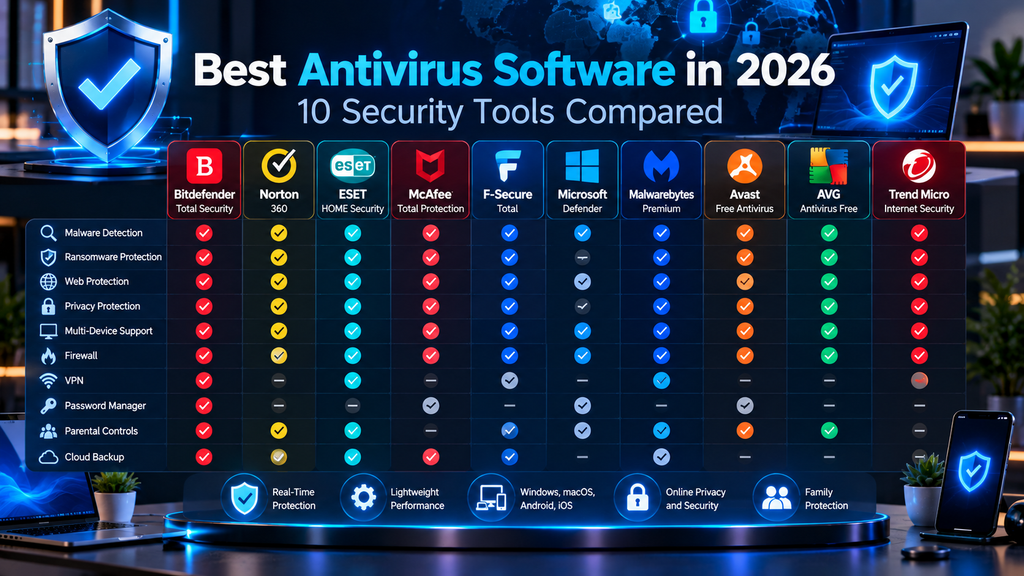
The table below summarizes the main differences.
| Antivirus | AV-TEST Protection | Performance | Main Approach | Free Option | Notable Features |
|---|---|---|---|---|---|
| Bitdefender Total Security | 6/6 | 6/6 | Comprehensive security suite | Yes — separate Bitdefender Antivirus Free available | Ransomware protection, behavioral detection, anti-phishing, vulnerability assessment |
| Norton 360 | 6/6 | 6/6 | All-in-one digital security | No full free antivirus | VPN, Cloud Backup (Windows), Password Manager, Dark Web Monitoring, Scam Protection |
| ESET HOME Security (Security Ultimate tested by AV-TEST) | 6/6 | 6/6 | Flexible, lightweight security | No full free version | LiveGuard, Ransomware Shield, exploit protection, Safe Banking |
| McAfee Total Protection | 6/6 | 6/6 | Multi-device security ecosystem | No full free antivirus | Scam Detector, VPN, identity monitoring, privacy tools |
| F-Secure Total | 6/6 | 6/6 | Security, privacy and scam protection | No full free antivirus | Banking Protection, VPN, identity monitoring, password management |
| Microsoft Defender Antivirus | 6/6 | 5.5/6 | Built-in Windows protection | Yes — included with Windows | Cloud protection, behavior monitoring, Controlled Folder Access |
| Malwarebytes Premium | 5.5/6* | 6/6* | Focused malware and threat protection | Free on-demand scanner | Exploit protection, ransomware defense, Browser Guard, Scam Guard |
| Avast Free Antivirus | 6/6 | 6/6 | Feature-rich free antivirus | Yes | Behavior Shield, ransomware protection, Web Guard, scam detection |
| AVG Antivirus Free | 6/6 | 6/6 | Straightforward free protection | Yes | Behavior Shield, ransomware protection, web and email protection |
| Trend Micro Internet Security | 5/6 | 6/6 | Web, phishing and financial protection | No permanent free version; trial availability may vary | Pay Guard, ransomware protection, phishing and scam defenses |
*Malwarebytes figures are from AV-TEST’s April 2026 evaluation because it was not included in the June 2026 AV-TEST Windows group.
These scores provide useful evidence, but they should not be interpreted as permanent rankings.
Antivirus engines are updated continuously, and independent laboratories test different collections of threats during each evaluation period.
AV-Comparatives’ July–August 2026 Real-World Protection Test evaluated current versions of many of these products using 200 live test cases based on malicious URLs found in the field, reflecting web-based infection vectors that users may encounter during everyday browsing.
For that reason, users should consider laboratory results together with features, pricing, system impact, usability, privacy, and device coverage.
Best Antivirus for Malware Protection
Several products in this comparison demonstrated strong malware protection in recent independent testing.
In AV-TEST’s June 2026 Windows evaluation, the following products received the maximum 6/6 protection score:
- Bitdefender Total Security
- Norton 360
- ESET Security Ultimate
- McAfee Total Protection
- F-Secure Total
- Microsoft Defender Antivirus
- Avast Free Antivirus
- AVG Antivirus Free
This means there is no strong evidence from that test alone that one of these products universally protects against every threat better than all the others.
The differences become more meaningful when looking beyond the headline protection score.
Bitdefender
Bitdefender is particularly attractive when malware protection needs to be combined with:
- Behavioral monitoring
- Ransomware defense
- Web attack prevention
- Phishing protection
- Vulnerability assessment
Its layered security architecture makes it suitable for users who want extensive protection without relying only on conventional signatures.
ESET
ESET combines strong recent malware-test results with technologies such as:
- LiveGuard cloud analysis
- Machine-learning detection
- Exploit Blocker
- Ransomware Shield
It can be particularly appealing to users who want detailed security controls without an excessively large collection of unrelated consumer utilities.
Microsoft Defender
Microsoft Defender is notable because its core malware protection achieved the same maximum AV-TEST protection score as several paid competitors in June 2026.
For careful Windows users, this demonstrates that purchasing third-party antivirus software is not automatically necessary simply to obtain capable malware detection.
Paid suites become more relevant when additional services are required.
Malwarebytes
Malwarebytes takes a somewhat different approach.
Although its April 2026 AV-TEST protection score was 5.5 rather than six, it remains particularly useful for:
- Malware remediation
- Potentially unwanted application detection
- Exploit prevention
- Suspicious website blocking
It also participates in AV-Comparatives’ current 2026 consumer test series.
Practical Recommendation
For malware protection, do not make a purchase decision based on a difference of a fraction of a percentage point in one laboratory test.
Instead, prioritize:
- Repeated strong independent results
- Automatic updates
- Real-time behavioral monitoring
- Low false-positive rates
- Reliable ransomware protection
- Good system performance
All of these factors matter when protecting a computer over months or years rather than during one laboratory snapshot.
Best Antivirus for Ransomware Protection
Ransomware protection requires more than identifying known malicious files.
Modern ransomware defenses may monitor how applications interact with documents and attempt to stop suspicious mass encryption before extensive damage occurs.
Several products in this guide provide dedicated ransomware technologies.
Bitdefender
Bitdefender combines ransomware defenses with its Advanced Threat Defense behavioral-monitoring system.
This allows protection to focus not only on the identity of a file but also on suspicious actions performed after execution.
Its broader security stack also includes web and phishing protections that may prevent ransomware from reaching the system in the first place.
ESET
ESET uses Ransomware Shield to monitor suspicious application behavior.
Higher-tier ESET products also include Ransomware Remediation, adding a recovery component designed to help restore affected files when an attack bypasses initial protection.
Microsoft Defender
Windows includes Controlled Folder Access, which can restrict untrusted applications from modifying files in protected folders.
The feature can add a useful ransomware defense layer without requiring a separate antivirus subscription.
However, users may need to enable and configure it manually.
Avast and AVG
Both Avast Free Antivirus and AVG Antivirus Free include ransomware-related protection even in their free offerings.
This makes them relevant for users seeking additional ransomware controls without immediately purchasing a premium suite.
The Most Important Ransomware Defense Is Still Backup
No antivirus product should be treated as a guaranteed ransomware solution.
Users should maintain backups that are:
- Separate from the main computer
- Protected from unauthorized modification
- Tested periodically
- Not permanently exposed to the same credentials as the primary device
For highly important data, a combination of cloud backup and offline or disconnected backup can provide stronger recovery options.
Antivirus can help stop ransomware.
A reliable backup provides a recovery path when prevention fails.
Best Antivirus for Low System Impact
Antivirus software continuously monitors files, applications, websites, and system behavior, so some performance overhead is unavoidable.
The goal is to keep that impact low enough that users rarely notice it.
In AV-TEST’s June 2026 evaluation, the following products received the maximum 6/6 performance score:
- Avast Free Antivirus
- AVG Antivirus Free
- Bitdefender Total Security
- ESET Security Ultimate
- F-Secure Total
- McAfee Total Protection
- Norton 360
- Trend Micro Internet Security
Microsoft Defender received 5.5/6 during the same evaluation.
Malwarebytes received 6/6 in the April 2026 AV-TEST evaluation.
ESET
ESET is particularly well known for emphasizing a relatively small system footprint.
This can make it attractive for:
- Workstations
- Gaming PCs
- Laptops
- Users who dislike intrusive security software
However, even a 6/6 performance score does not mean that no slowdown occurs.
Bitdefender
Bitdefender also performed strongly despite operating several protection layers simultaneously.
This demonstrates that a comprehensive security suite does not automatically require heavy system overhead.
Norton and McAfee
Both Norton and McAfee received maximum performance scores despite having comparatively large security ecosystems.
Users with modern hardware may therefore find the additional services have relatively little effect during ordinary use.
Microsoft Defender
Defender’s 5.5/6 result should be interpreted in context.
It received a full 6/6 performance result in earlier 2026 AV-TEST evaluations, showing that performance can change as Windows and antivirus components are updated.
Users should not replace Defender solely because of one half-point difference.
Older Computers
On an older or resource-constrained PC, trialing the software on the actual machine can be more useful than laboratory averages.
System impact can depend heavily on:
- CPU generation
- SSD versus hard drive
- Available RAM
- Installed applications
- Background services
- Scan configuration
Best Free Antivirus
Users do not necessarily need to pay for effective core malware protection.
Three particularly important no-cost options in this comparison are:
- Microsoft Defender Antivirus
- Avast Free Antivirus
- AVG Antivirus Free
Microsoft Defender Antivirus
Defender is the simplest option for most Windows users because it is already included with the operating system.
It provides:
- Real-time protection
- Cloud-delivered detection
- Behavioral monitoring
- Offline scanning
- PUA protection
- Ransomware-related controls
- Windows Security integration
There is no separate subscription and no additional antivirus program to install.
Avast Free Antivirus
Avast provides a larger visible collection of security features in its free product, including:
- File Shield
- Behavior Shield
- Web Guard
- Mail Shield
- Ransomware protection
- Network checks
- Scam-related protections
Its June 2026 AV-TEST result was 6/6/6.
The tradeoff is that the interface may promote additional paid Avast services.
AVG Antivirus Free
AVG provides a similarly capable free protection platform.
Its June 2026 AV-TEST result was also 6/6/6.
AVG can appeal to users who want:
- Real-time malware protection
- Behavioral monitoring
- Web protection
- Email scanning
- Ransomware protection
Like Avast, it also presents opportunities to upgrade to paid products.
Which Free Approach Makes Sense?
Microsoft Defender is particularly suitable when simplicity and Windows integration are priorities.
Avast Free and AVG Free are useful when users want additional visible antivirus tools and web-security controls.
All three can provide capable core protection when combined with good security practices.
Best Antivirus for Families and Multiple Devices
Protecting one Windows PC is very different from protecting an entire household.
Families may need security across:
- Windows PCs
- Macs
- Android phones
- iPhones
- Tablets
They may also value:
- Centralized management
- Parental controls
- VPN access
- Password management
- Identity monitoring
- Scam protection
Norton 360
Norton 360 is particularly family-oriented because supported plans can combine:
- Antivirus
- VPN
- Password Manager
- Cloud Backup
- Dark Web Monitoring
- Parental controls
- Scam Protection
This reduces the number of separate security subscriptions a household needs to manage.
McAfee Total Protection
McAfee also emphasizes household and multi-device protection.
Depending on the plan and region, its family ecosystem can include:
- Multi-device antivirus
- VPN
- Scam Detector
- Identity monitoring
- Privacy tools
- Protection profiles for multiple family members
Higher-tier family subscriptions can be useful in homes with many devices.
F-Secure Total
F-Secure offers a more focused combination of:
- Antivirus
- VPN
- Password management
- Identity monitoring
- Scam protection
- Banking protection
It may appeal to families particularly concerned about online banking, shopping fraud, and phishing.
Device Count Is Only Part of the Decision
A subscription advertising many devices is not automatically the better deal.
Before purchasing, check:
- Supported operating systems
- Which features work on each platform
- Number of family members
- Number of protected devices
- Renewal price
- Whether VPN usage has restrictions
- Whether parental controls work on the devices children actually use
A five-device plan with the right features may be more useful than an unlimited-device plan containing services the household never uses.
Choosing Between the Main Antivirus Approaches
Rather than searching for one product that is ideal for everyone, it is useful to divide antivirus software into several broad categories.
Built-In Protection
Microsoft Defender Antivirus
Suitable for users who want capable Windows protection without another subscription.
Free Third-Party Protection
Avast Free Antivirus
AVG Antivirus Free
Useful for users who want additional third-party security features without paying for a full suite.
Focused Security Products
ESET HOME Security
Malwarebytes Premium
Suitable for users who prioritize malware, exploit, ransomware, and endpoint protection without making identity and lifestyle services the central focus.
Comprehensive Security Suites
Bitdefender Total Security
Norton 360
McAfee Total Protection
Designed for users who want antivirus combined with a larger collection of security and privacy features.
Privacy, Banking and Scam-Focused Suites
F-Secure Total
Trend Micro Internet Security
Particularly relevant when phishing, fraudulent websites, online payments, banking, shopping, and scam protection are major concerns.
The right choice depends less on which product has the longest feature list and more on which protection layers match the user’s devices and actual risks.
Microsoft Defender vs. Paid Antivirus
Microsoft Defender Antivirus has improved substantially over the years and now provides a strong baseline level of malware protection for Windows users.
It is built directly into Windows 11 and supported Windows 10 installations, receives security-intelligence updates automatically, and integrates with other Windows security features such as:
- Windows Firewall
- SmartScreen
- Tamper Protection
- Controlled Folder Access
- App and browser controls
- Cloud-delivered protection
For many users, the most important question is therefore no longer:
“Is Microsoft Defender good enough to detect malware?”
A more useful question is:
“Do I need additional security features beyond what Windows already provides?”
What Microsoft Defender Already Provides
Microsoft Defender includes:
- Real-time malware scanning
- Behavioral monitoring
- Heuristic detection
- Cloud-delivered protection
- Machine-learning-based detection
- Potentially unwanted application protection
- Offline scanning
- Ransomware-related controls
Microsoft also integrates security across Windows rather than treating antivirus as an isolated application.
For example, the Windows Security app provides access to firewall, ransomware, account, browser, and device-security controls.
Defender Can Provide Strong Core Protection
Recent independent testing shows that Microsoft Defender can provide strong core malware protection.
In AV-TEST’s June 2026 Windows evaluation, Microsoft Defender Antivirus received:
- Protection: 6/6
- Performance: 5.5/6
- Usability: 6/6
This means that users do not automatically need to replace Defender simply because it is included with Windows.
A free built-in product can still provide effective malware protection.
Where Paid Antivirus Can Add Value
Paid antivirus products become more attractive when users need additional services.
Depending on the provider, paid suites may include:
- VPN
- Password manager
- Identity monitoring
- Dark-web monitoring
- Cloud backup
- Banking protection
- Shopping protection
- Scam detection
- Parental controls
- Multi-device management
- Data-broker removal
- Additional customer support
These services address risks that go beyond conventional malware detection.
Paid Antivirus Can Simplify Multi-Device Security
Microsoft Defender Antivirus itself is primarily part of Windows.
Households may also use:
- Macs
- Android devices
- iPhones
- Tablets
A third-party suite can provide one dashboard and one subscription covering several operating systems.
This may be easier to manage for families or users with many devices.
Paid Suites May Offer More Specialized Scam Protection
Modern security suites increasingly focus on social engineering.
Products such as Norton, McAfee, F-Secure, Malwarebytes, Avast, and Trend Micro offer tools intended to identify various forms of:
- Phishing
- Fraudulent websites
- Scam messages
- Suspicious links
- Fake shopping sites
Defender benefits from Microsoft’s broader SmartScreen and phishing-protection technologies, but some users may prefer the additional dedicated scam-analysis tools offered by third-party vendors.
Ransomware Protection
Defender includes Controlled Folder Access, which can prevent untrusted applications from modifying files in protected folders.
This can provide an important ransomware defense layer.
Some third-party products add additional technologies such as:
- Behavioral ransomware monitoring
- Automatic remediation
- File-recovery capabilities
- Protected backups
Whether these features justify a paid subscription depends on how valuable they are to the individual user.
Performance Differences
Third-party antivirus does not automatically mean slower performance.
Several paid products received maximum 6/6 performance scores in AV-TEST’s June 2026 evaluation.
Microsoft Defender received 5.5/6 during that particular test period.
However, Defender received full performance scores in some earlier 2026 test periods.
Performance therefore changes over time and should not be treated as a permanent ranking.
Privacy Differences
Both Defender and third-party antivirus products may use cloud-based analysis.
This means security-related data may be transmitted to the vendor for activities such as:
- Threat reputation checks
- Suspicious-file analysis
- Malware detection
- Security telemetry
Users should review the privacy policies and cloud-analysis settings of whichever product they choose.
A paid antivirus subscription does not automatically provide greater privacy.
Cost
Microsoft Defender has an obvious pricing advantage:
It is already included with Windows.
Third-party antivirus subscriptions create an additional annual cost.
Users should compare:
- First-year price
- Renewal price
- Device count
- Included services
- Features they will actually use
A low promotional price may be less attractive if renewal pricing increases significantly.
When Microsoft Defender May Be Enough
Defender can be a practical choice for users who:
- Keep Windows updated
- Use modern browsers
- Avoid untrusted software
- Use strong passwords or passkeys
- Enable multi-factor authentication
- Maintain regular backups
- Do not require bundled VPN or identity services
For these users, the built-in Windows security platform can provide a strong baseline without another subscription.
When Paid Antivirus May Make More Sense
A paid security suite may be more useful for users who want:
- Protection across many operating systems
- Family management
- Integrated VPN
- Password management
- Identity monitoring
- Cloud backup
- Dedicated banking protection
- Additional scam protection
- More extensive customer support
The decision should therefore be based on the complete security package rather than the assumption that paid antivirus automatically detects malware better than Microsoft Defender.
Antivirus vs. Internet Security Suites
The terms antivirus, internet security, and security suite are often used interchangeably in marketing.
However, they usually describe different levels of protection.
Traditional Antivirus
Traditional antivirus focuses primarily on identifying and removing malicious software.
Core functions may include:
- Virus detection
- Trojan detection
- Spyware protection
- Real-time scanning
- Malware removal
Modern antivirus products usually provide more than this, but malware detection remains the foundation.
Modern Antivirus
A modern antivirus product often adds technologies such as:
- Behavioral analysis
- Machine learning
- Cloud threat intelligence
- Ransomware protection
- Web filtering
- Phishing detection
This means the boundary between antivirus and internet security has become less clear.
Even some free antivirus products now include web and ransomware defenses that were previously associated mainly with paid suites.
Internet Security Suites
An internet security suite generally expands protection beyond malware detection.
Common additional features include:
- Firewall controls
- Anti-phishing protection
- Banking protection
- Shopping protection
- Webcam protection
- Network security
- Email protection
- Parental controls
The exact definition depends on the vendor.
There is no universal industry rule requiring every product labeled “Internet Security” to contain the same features.
Comprehensive Security Suites
Higher-tier products may extend even further into privacy and identity protection.
They may include:
- VPN
- Password manager
- Cloud backup
- Identity monitoring
- Dark-web alerts
- Data-broker removal
- Social-media privacy tools
- Scam detection
- Family safety features
At this point, the product becomes less like traditional antivirus and more like a complete consumer cybersecurity subscription.
More Features Do Not Automatically Mean Better Protection
A product with twenty extra features is not automatically better at blocking malware than a simpler product.
Independent testing demonstrates that free and built-in products can sometimes achieve the same maximum malware-protection scores as expensive suites.
The larger bundle mainly provides additional convenience and protection categories.
Avoid Paying Twice for the Same Tools
Users should review services they already have before buying a large security suite.
For example, someone may already use:
- A dedicated VPN
- A password manager
- Cloud backup
- Identity-monitoring services
- Parental-control software
Purchasing another bundle containing the same services may create unnecessary cost and complexity.
Security Suites Can Be Convenient
On the other hand, consolidating several security services into one subscription can simplify:
- Billing
- Device management
- Family administration
- Software installation
- Customer support
This can be valuable to users who prefer convenience over maintaining several specialist applications.
Specialist Tools vs. All-in-One Suites
Dedicated tools sometimes provide more advanced features than the equivalent component inside an antivirus suite.
For example:
- A specialist VPN may offer more protocol and privacy controls
- A dedicated password manager may provide more sharing and credential-management capabilities
- A dedicated backup provider may offer more storage and recovery options
An all-in-one security suite trades some specialization for convenience.
Which Approach Should You Choose?
Choose a simpler antivirus product if you primarily need:
- Malware protection
- Ransomware defense
- Web protection
- Minimal complexity
Consider a broader security suite if you also want:
- VPN
- Identity monitoring
- Password management
- Family controls
- Banking protection
- Backup
- Scam protection
The ideal solution is not necessarily the product containing the most features.
It is the one that covers the risks you actually face without unnecessary duplication.
Do You Still Need Antivirus in 2026?
Yes, malware protection is still necessary in 2026.
What has changed is that many users already have antivirus protection built into their operating system.
On Windows, Microsoft Defender Antivirus runs as part of the Windows Security platform and continuously monitors for malware and other threats.
This means the question is not whether users need malware protection.
They do.
The real question is whether they need an additional third-party antivirus product.
Malware Has Not Disappeared
Attackers still distribute:
- Ransomware
- Information stealers
- Password stealers
- Trojans
- Spyware
- Malicious browser extensions
- Downloaders
- Botnet malware
- Cryptominers
Modern antivirus remains an important defensive layer against these threats.
Attackers Increasingly Target Accounts
Many modern cyberattacks are designed to steal access rather than simply damage a computer.
Information-stealing malware may attempt to obtain:
- Passwords
- Browser cookies
- Authentication tokens
- Cryptocurrency wallets
- Autofill data
This can allow attackers to compromise online accounts even when they are less interested in the infected computer itself.
Phishing and Scams Are Also Major Threats
Not every cyberattack uses malware.
A user may voluntarily provide credentials or payment information to a convincing fraudulent website.
Antivirus and security suites increasingly include anti-phishing and scam protection because malware scanning alone cannot address every modern threat.
Antivirus Is Only One Security Layer
Users should not assume that installing antivirus makes other precautions unnecessary.
A more complete security strategy includes:
- Keeping software updated
- Using strong unique passwords
- Using passkeys where available
- Enabling multi-factor authentication
- Maintaining backups
- Using secure browsers
- Avoiding untrusted downloads
- Reviewing account alerts
- Verifying financial requests
CISA also recommends keeping antivirus and anti-malware tools updated as part of ransomware defense.
Updates Are Critical
Many successful attacks exploit vulnerabilities for which security patches already exist.
Users should enable automatic updates for:
- Windows
- Browsers
- Office applications
- Antivirus software
- Other frequently used programs
Antivirus should complement patching rather than replace it.
Backups Remain Essential
Ransomware protection can fail.
Hardware can also fail independently of malware.
Important files should therefore be backed up.
A strong backup strategy should avoid having every copy permanently exposed to the same computer or user account.
Windows Users Already Have a Baseline
Windows users should generally avoid running a computer with all malware protection disabled.
Fortunately, Defender provides built-in protection.
When a compatible third-party antivirus becomes active, Defender normally steps back.
If that antivirus is removed, Defender can reactivate automatically.
This reduces the chance that an ordinary Windows user will accidentally remain completely unprotected.
Mac Users Also Need Security Awareness
macOS includes its own security technologies, but Mac users can still encounter:
- Malware
- Adware
- Potentially unwanted applications
- Credential theft
- Malicious browser extensions
- Phishing
Whether a Mac user needs an additional antivirus application depends on risk, usage, and the protection already provided by the operating system.
Mobile Devices Face Different Threats
Mobile security works differently because Android and iOS restrict application behavior more aggressively than traditional desktop operating systems.
However, mobile users remain vulnerable to:
- Phishing
- Malicious applications
- Scam messages
- Credential theft
- Fraudulent links
Security products on mobile devices therefore often emphasize scam, web, privacy, and identity protection rather than traditional file scanning.
Business Users Have Different Requirements
A home computer and a business network should not be treated as equivalent security environments.
Organizations may need:
- Centralized endpoint management
- Endpoint Detection and Response
- Attack-surface reduction
- Security monitoring
- Application control
- Incident response
Businesses should therefore evaluate enterprise endpoint-security requirements rather than relying only on consumer antivirus products.
Antivirus Is Necessary, but Another Antivirus Subscription May Not Be
The clearest way to summarize the situation in 2026 is:
Every device needs effective security protection, but not every Windows user needs to purchase a separate antivirus subscription.
Microsoft Defender provides a strong built-in baseline.
Free products such as Avast and AVG provide additional alternatives.
Paid suites become useful when users want broader capabilities such as:
- Identity monitoring
- VPN
- Password management
- Banking protection
- Family controls
- Cloud backup
- Scam protection
The most effective security strategy combines endpoint protection with secure authentication, software updates, backups, and careful online behavior.
How to Choose the Right Antivirus
Choosing antivirus software in 2026 is less about finding a product with the longest feature list and more about matching the protection to your devices, habits, and actual security risks.
Several established antivirus products now achieve strong results in independent testing, so practical differences such as ransomware protection, system impact, privacy, device coverage, scam protection, and renewal pricing can become just as important as basic malware detection.
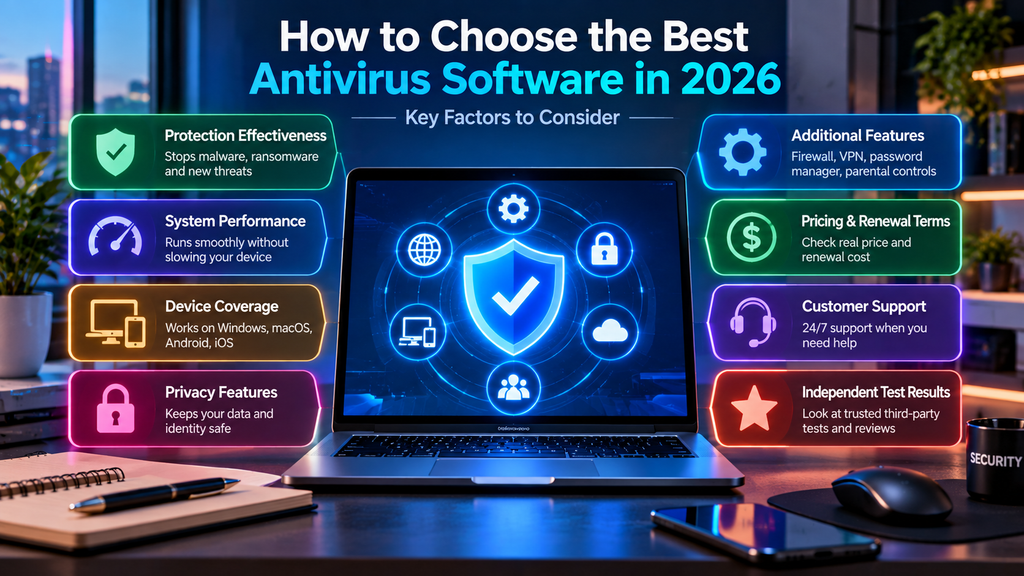
The following factors can help narrow the choice.
1. Start With the Protection You Already Have
Windows users already have Microsoft Defender Antivirus integrated into the operating system.
Before purchasing another product, consider whether the built-in protection already meets your needs.
For users who:
- Keep Windows updated
- Use a modern browser
- Avoid suspicious downloads
- Maintain backups
- Use strong authentication
- Do not need bundled VPN or identity services
Microsoft Defender may provide sufficient core antivirus protection.
A third-party product becomes more compelling when additional protection or convenience is required.
2. Look at Independent Testing
Do not rely entirely on vendor advertising.
Independent organizations such as AV-TEST and AV-Comparatives evaluate security software against current threats.
Useful measurements include:
- Real-world malware protection
- Widespread malware detection
- False positives
- System performance
- Protection consistency across multiple test periods
A product performing well across several evaluations provides more useful evidence than a single perfect result.
3. Do Not Judge Antivirus by Detection Percentage Alone
A security product can achieve excellent malware-detection results while differing substantially in other areas.
Consider:
- False alarms
- System slowdown
- Ransomware protection
- Web filtering
- Privacy
- User interface
- Device support
A difference between 99.9% and 100% in one laboratory period may be less important than whether a product consistently performs well over time.
4. Consider Ransomware Protection
Users storing important documents, photographs, work files, or financial records should pay particular attention to ransomware defenses.
Look for features such as:
- Behavioral ransomware monitoring
- Protected folders
- Unauthorized file-change blocking
- Recovery or remediation capabilities
However, ransomware protection should never replace backups.
Maintain at least one backup that cannot be easily modified by malware running on the main computer.
5. Evaluate Phishing and Scam Protection
Many modern attacks target people rather than software vulnerabilities.
A security suite can therefore provide value if it includes protections against:
- Phishing websites
- Fake online stores
- Fraudulent messages
- Malicious links
- Technical-support scams
- Impersonation attacks
This is especially relevant for users who perform frequent online banking or shopping.
6. Think About Your Online Banking and Shopping Habits
Some products include specialized tools for financial activity.
For example, certain suites provide:
- Banking protection
- Protected browser environments
- Fake-store detection
- Payment-site protection
These features may be useful to people who regularly access sensitive financial services from their computers.
Other users may not need them.
7. Check System Performance
Security software runs continuously in the background.
On modern computers, the performance difference between established products may be relatively small, but older or resource-constrained systems can be more sensitive.
Consider:
- Processor age
- Available RAM
- SSD versus traditional hard drive
- Number of background applications
- Frequency of intensive scans
Independent performance tests can provide guidance, but testing the product on your actual computer is often useful.
8. Decide Whether You Need a Free or Paid Product
Free antivirus software can provide strong malware protection.
Options such as:
- Microsoft Defender Antivirus
- Avast Free Antivirus
- AVG Antivirus Free
have demonstrated capable protection in independent testing.
Paid products are more appropriate when you want additional features such as:
- VPN
- Password management
- Identity monitoring
- Cloud backup
- Family controls
- Banking protection
- Expanded scam protection
Pay for features you will actually use rather than assuming that a higher price automatically provides better malware detection.
9. Count Your Devices
Before purchasing a subscription, count the devices you actually need to protect.
Consider:
- Windows PCs
- Macs
- Android phones
- iPhones
- Tablets
Then check how many devices the plan supports.
Also verify whether the features you want work on every platform.
A security suite may advertise support for several operating systems while offering different capabilities on each one.
10. Check Platform-Specific Features
Antivirus protection works differently across operating systems.
Windows typically allows the deepest endpoint-security integration.
macOS, Android, and iOS impose different technical restrictions.
For example, a feature available on Windows may not exist on an iPhone because iOS isolates applications more aggressively.
Always check the product page for the specific platform you intend to protect.
11. Review Privacy Practices
Antivirus applications can receive significant access to a device.
Modern products may use cloud services to analyze:
- Suspicious files
- URLs
- Application behavior
- Security telemetry
Review:
- Privacy policies
- Cloud-analysis settings
- Sample-submission controls
- Account requirements
- Data-retention practices
Security software protects sensitive systems, so vendor trust matters.
12. Check False-Positive Performance
An antivirus product that constantly blocks legitimate files can become difficult to use.
Excessive false alarms may cause users to:
- Restore unsafe files incorrectly
- Disable protection
- Ignore future warnings
Look for products that perform well in independent usability and false-positive testing.
13. Compare Introductory and Renewal Pricing
Many antivirus companies advertise substantial first-year discounts.
Always check what happens after the promotional period ends.
Compare:
- Initial price
- Renewal price
- Number of devices
- Included features
- Subscription duration
- Cancellation terms
The cheapest first-year offer may not be the least expensive option over several years.
14. Avoid Paying for Duplicate Services
Before purchasing a comprehensive suite, consider which security services you already use.
You may already have:
- A VPN
- A password manager
- Cloud backup
- Identity monitoring
- Parental controls
If so, an antivirus-only or smaller security package may provide better value.
15. Consider Ease of Use
Advanced users may appreciate detailed configuration options.
Other users may prefer software that works effectively with minimal interaction.
Look for an interface that makes important information easy to understand, including:
- Protection status
- Scan results
- Security alerts
- Update status
- Subscription information
Security software is more effective when users understand its warnings.
16. Think About Family Management
Households may benefit from features such as:
- Centralized device management
- Parental controls
- Family profiles
- Identity monitoring
- Scam protection
- Password sharing
Families should also consider whether every household member can easily use the security tools.
17. Keep Backups Separate From Antivirus
No antivirus product can guarantee complete protection.
Important data should be backed up separately.
A practical strategy can include:
- A cloud backup
- An external drive
- An offline or disconnected copy
This protects against threats beyond malware, including hardware failure, theft, and accidental deletion.
18. Do Not Run Multiple Full Antivirus Products Without a Reason
Running two full real-time antivirus engines simultaneously can sometimes create:
- Software conflicts
- Duplicate alerts
- Higher system load
- Scanning problems
- Reduced stability
Windows normally handles this by allowing a compatible third-party antivirus to become the primary provider while Microsoft Defender Antivirus steps back.
Use multiple security tools together only when their vendors explicitly support the configuration.
A Simple Decision Framework
For many users, the decision can be simplified:
Choose Microsoft Defender if:
You want capable built-in Windows protection without another subscription.
Consider Avast Free or AVG Free if:
You want a free third-party antivirus with additional visible web and ransomware security controls.
Consider ESET or Malwarebytes if:
You prefer a more focused security product with strong endpoint, malware, exploit, or ransomware protections.
Consider Bitdefender if:
You want a broad security suite with extensive malware, behavioral, ransomware, and web protection.
Consider Norton or McAfee if:
You want antivirus combined with a larger digital-security ecosystem such as VPN, identity monitoring, backup, or family features.
Consider F-Secure if:
Banking, shopping, scam, identity, and privacy protection are major priorities.
Consider Trend Micro if:
Your priorities include phishing, malicious websites, online payments, scams, and family web protection.
The right antivirus is the one that provides the protection you need without unnecessary cost or complexity.
Frequently Asked Questions About Antivirus Software
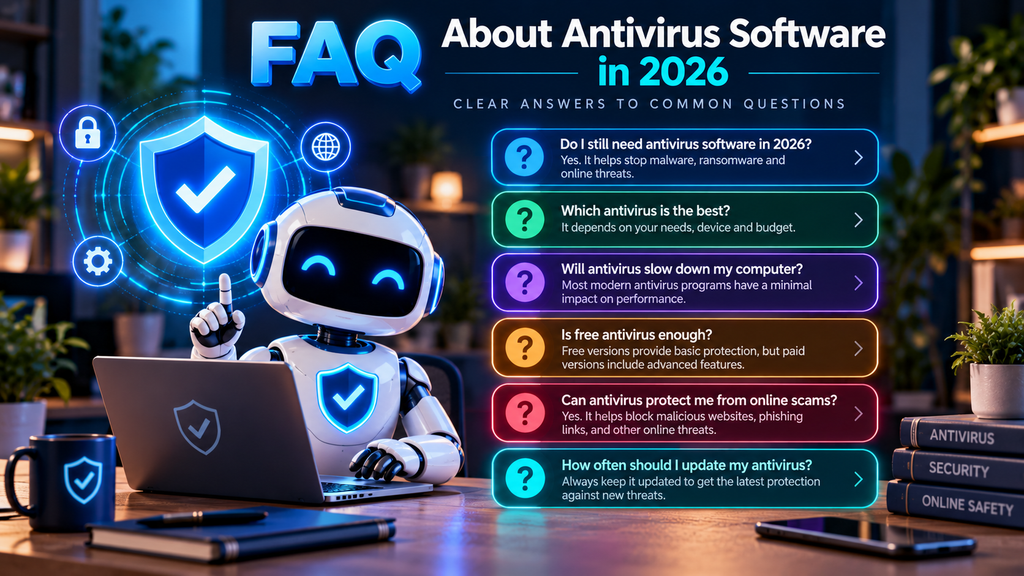
What is the best antivirus software in 2026?
There is no single antivirus product that is ideal for every user.
Several products achieved strong results in recent independent testing, including Bitdefender, Norton, ESET, McAfee, F-Secure, Microsoft Defender, Avast, and AVG.
The right choice depends on factors such as:
- Operating system
- Number of devices
- System performance
- Ransomware protection
- Privacy preferences
- Family requirements
- Additional features
- Budget
Users should compare repeated independent test results rather than relying on a single ranking.
Is Microsoft Defender good enough in 2026?
For many Windows users, yes.
Microsoft Defender Antivirus provides:
- Real-time malware protection
- Behavioral monitoring
- Cloud-delivered detection
- Heuristics
- Machine learning
- Ransomware-related controls
It received the maximum 6/6 protection score in AV-TEST’s June 2026 Windows evaluation.
Users may still prefer a paid suite if they want additional services such as VPN, identity monitoring, cloud backup, password management, family controls, or specialized scam protection.
Do I need antivirus if I use Windows 11?
You need active malware protection, but Windows 11 already includes Microsoft Defender Antivirus.
Therefore, you do not necessarily need to purchase another antivirus product.
The decision depends on whether Defender’s built-in features meet your needs.
Is free antivirus safe to use?
A reputable free antivirus can provide effective core malware protection.
Microsoft Defender, Avast Free Antivirus, and AVG Antivirus Free are examples of no-cost products with strong recent independent test results.
Users should download antivirus software only from the vendor’s official website or trusted operating-system distribution channels.
Is paid antivirus better than free antivirus?
Not automatically.
Paid products usually provide more features, but that does not necessarily mean dramatically better basic malware detection.
Paid subscriptions may add:
- VPN
- Identity monitoring
- Password management
- Cloud backup
- Banking protection
- Family controls
- Additional privacy tools
The value depends on whether you need those services.
Can antivirus stop ransomware?
Antivirus can substantially reduce ransomware risk, but no product can guarantee complete protection.
Modern ransomware defenses may use:
- Behavioral monitoring
- Protected folders
- Malicious-process blocking
- File remediation
Users should also maintain independent backups.
A backup provides a recovery option if prevention fails.
Can antivirus stop phishing?
Security software can block many known phishing sites and suspicious links.
However, phishing relies heavily on social engineering.
A newly created fraudulent website or convincing message may not always be detected immediately.
Users should still verify:
- Login pages
- Payment requests
- Unexpected account alerts
- Authentication requests
Technical protection and user awareness should work together.
Do I need antivirus if I never download suspicious files?
Yes, because threats are not limited to obviously suspicious downloads.
Users can encounter risks through:
- Compromised websites
- Malicious advertisements
- Email attachments
- Browser vulnerabilities
- Supply-chain compromises
- Fraudulent software updates
Safe browsing habits significantly reduce risk but do not replace endpoint protection.
Can I run two antivirus programs at the same time?
Running two full real-time antivirus applications simultaneously is generally unnecessary and may cause conflicts.
Potential problems include:
- Performance degradation
- Duplicate scanning
- False alerts
- Software instability
When a compatible third-party antivirus is installed on Windows, Microsoft Defender normally stops acting as the primary real-time antivirus.
Does antivirus slow down a computer?
All real-time security software uses some system resources.
The amount varies by product, hardware, and activity.
Independent laboratories measure performance impact during tasks such as:
- Web browsing
- File copying
- Application launches
- Software installation
Many established antivirus products now achieve strong performance results, but older computers may notice a greater difference.
Do Macs need antivirus?
macOS includes multiple built-in security technologies, but Macs are not immune to security threats.
Mac users can still encounter:
- Malware
- Adware
- Potentially unwanted programs
- Phishing
- Malicious browser extensions
- Credential theft
Whether additional antivirus software is necessary depends on usage and risk level.
Do Android phones need antivirus?
Android includes its own security protections, including application sandboxing and Google Play Protect on supported devices.
However, Android users can still encounter:
- Malicious applications
- Phishing
- Fraudulent links
- Scam messages
- Credential theft
Mobile security applications often focus heavily on web, scam, privacy, and identity protection.
Does an iPhone need antivirus?
Traditional desktop-style antivirus scanning is not possible on iOS in the same way it is on Windows because applications are heavily sandboxed.
Security applications on iPhone generally focus on areas such as:
- Phishing protection
- Scam detection
- Unsafe websites
- Identity monitoring
- Network privacy
Keeping iOS updated and installing applications through trusted channels remain important.
Is antivirus the same as a VPN?
No.
Antivirus protects the device against malicious software and other endpoint threats.
A VPN primarily encrypts network traffic between the device and the VPN server and changes the public IP address visible to websites.
They address different security and privacy risks.
A VPN does not replace antivirus, and antivirus does not replace a VPN.
Does antivirus protect passwords?
Antivirus can detect some password-stealing malware, but it cannot prevent every account compromise.
Users should also:
- Use unique passwords
- Use a password manager
- Enable multi-factor authentication
- Use passkeys when available
- Monitor account activity
Account security requires multiple layers.
How often should antivirus be updated?
Antivirus software should update automatically whenever possible.
Modern products continuously receive:
- Malware intelligence
- Detection rules
- Cloud reputation information
- Software updates
Turning off automatic security updates can reduce protection against newly discovered threats.
How often should I run a full antivirus scan?
Real-time protection handles much of the routine monitoring on modern antivirus products.
A full scan can still be useful:
- After installing antivirus for the first time
- When you suspect infection
- After unusual computer behavior
- After connecting an untrusted storage device
- As an occasional additional check
There is usually no need to perform a full scan every day if real-time protection is functioning correctly.
What should I do if antivirus detects malware?
If malware is detected:
- Allow the security software to quarantine or remove the threat.
- Restart the computer if requested.
- Update the antivirus.
- Run another scan.
- Install pending operating-system and application updates.
- Review important accounts for suspicious activity.
- Change compromised credentials from a trusted device if password theft is possible.
- Verify that important backups remain safe.
If the infection persists, additional remediation or professional technical assistance may be required.
Should I disable Microsoft Defender after installing another antivirus?
Normally, you do not need to manage this manually.
Windows can detect compatible third-party antivirus software.
When another antivirus becomes the primary provider, Microsoft Defender Antivirus normally turns off its primary active role automatically.
If the third-party antivirus is removed, Defender can reactivate.
What is the most important antivirus feature?
Reliable malware protection is the foundation.
However, a practical modern antivirus should also provide a reasonable balance of:
- Real-time protection
- Behavioral detection
- Low false positives
- Ransomware protection
- Web security
- Performance
Additional features are useful only when they match the user’s needs.
Are independent antivirus tests reliable?
Independent tests provide valuable comparative evidence, but no laboratory can reproduce every threat on the internet.
Test results represent:
- Specific product versions
- Specific dates
- Specific threat samples
- Defined testing methodologies
They should be used as evidence rather than guarantees.
The most useful approach is to examine results across several testing periods and, where possible, more than one independent testing organization.
Final Thoughts
The best antivirus software in 2026 is not necessarily the product with the largest feature list, the highest advertised discount, or the most aggressive marketing.
Modern consumer-security products have reached a point where several established options can provide strong core malware protection.
The more meaningful differences often involve:
- Ransomware defense
- Phishing and scam protection
- System performance
- False-positive rates
- Privacy
- Device support
- Ease of use
- Additional security services
- Long-term pricing
Bitdefender Total Security offers a broad set of malware, ransomware, behavioral, and web-protection technologies.
Norton 360 combines antivirus with services such as VPN, password management, backup, scam protection, and identity-related features.
ESET HOME Security emphasizes strong endpoint protection, detailed configuration, ransomware defenses, and relatively efficient operation.
McAfee Total Protection extends antivirus into a larger multi-device ecosystem with scam, privacy, identity, and family-security features.
F-Secure Total places particular emphasis on banking, shopping, scams, identity protection, and privacy alongside malware defense.
Microsoft Defender Antivirus demonstrates that capable core protection is already included with Windows and can be sufficient for many users.
Malwarebytes Premium remains focused on malware, exploit, ransomware, malicious-site protection, and remediation.
Avast Free Antivirus and AVG Antivirus Free show that users can obtain substantial real-time protection without purchasing an antivirus subscription.
Trend Micro Internet Security focuses strongly on web threats, phishing, ransomware, scams, and online financial activity.
No antivirus product should be treated as a complete cybersecurity strategy.
Strong protection also requires:
- Regular software updates
- Unique passwords or passkeys
- Multi-factor authentication
- Secure backups
- Careful browsing
- Account monitoring
- Phishing awareness
For many Windows users, Microsoft Defender provides a strong starting point.
For others, a third-party antivirus or comprehensive security suite can provide useful additional layers.
The goal should not be to install the greatest possible number of security products.
It should be to create a balanced security setup that protects your devices, accounts, and data without unnecessary complexity.
Sources and Further Reading
- AV-TEST — Windows 11 Home User Antivirus Test, June 2026
- AV-Comparatives — Real-World Protection Test, July–August 2026
- Bitdefender — Bitdefender Total Security
- Norton — Norton 360 Deluxe
- ESET — ESET Security Ultimate
- McAfee — McAfee Total Protection
- F-Secure — F-Secure Total
- Microsoft Learn — Windows Security: Virus and Threat Protection
- Microsoft Learn — Windows 11 Security: Controlled Folder Access and Exploit Protection
- Malwarebytes — Malwarebytes Premium Security
- Avast — Avast Free Antivirus
- AVG — AVG AntiVirus Free
- Trend Micro — Trend Micro Internet Security
- CISA — StopRansomware Guide






Comments 1