

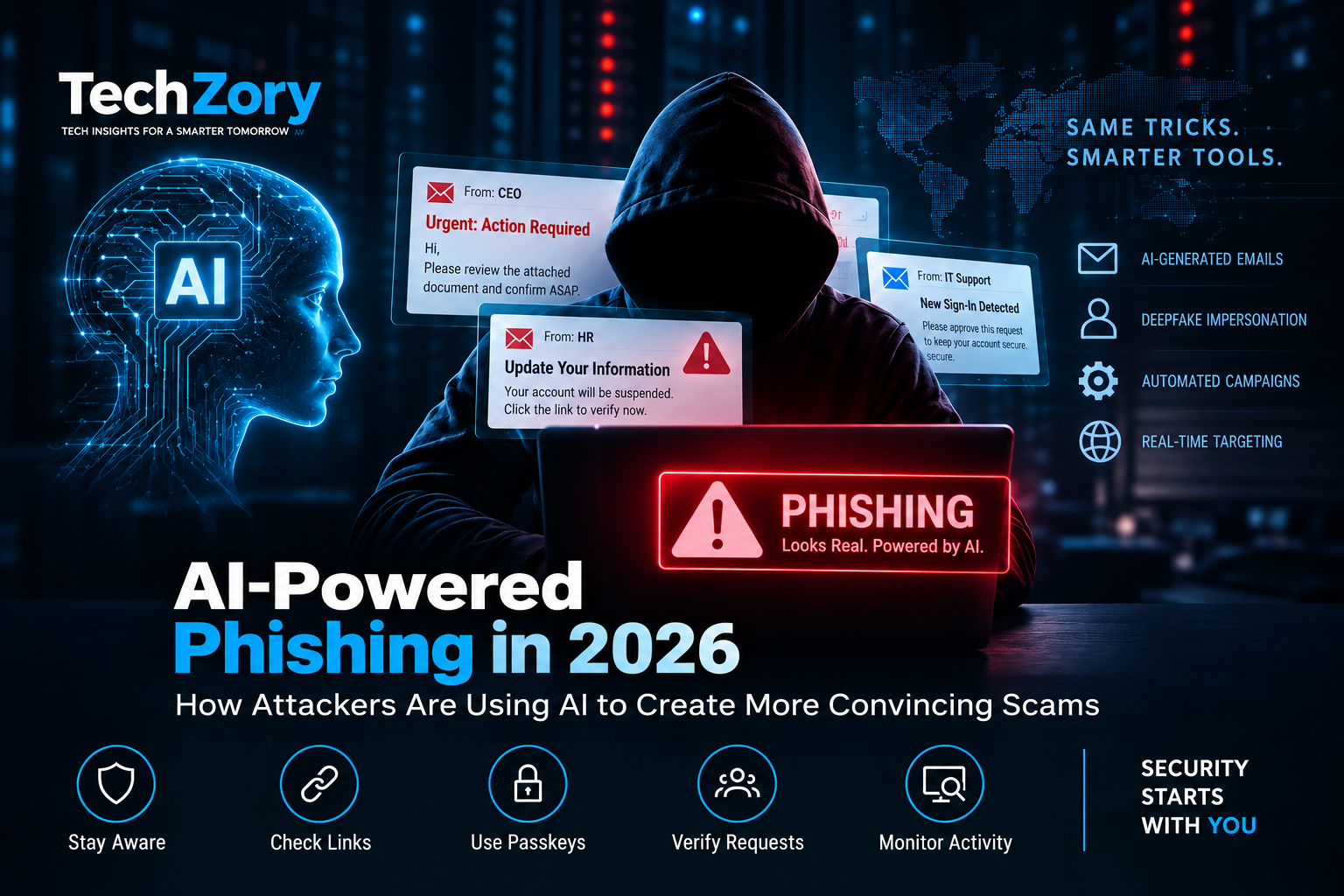
Phishing is not a new threat, but artificial intelligence is changing how quickly and convincingly phishing campaigns can be created, personalized, and scaled.
In 2026, attackers are increasingly using generative AI to craft realistic messages, adapt lures to specific job roles, automate reconnaissance, and support multi-stage campaigns designed to steal credentials or authentication tokens. Microsoft researchers have documented AI-enabled phishing operations that combine hyper-personalized emails with automated infrastructure, while Google Threat Intelligence has observed adversaries moving from basic AI prompting toward more automated and agentic attack workflows.
The result is a new generation of phishing attacks that can be harder to recognize using the traditional warning signs people were taught to look for. Poor grammar, generic greetings, and obviously suspicious wording are no longer reliable indicators when AI can produce polished, context-aware messages in seconds.
This guide explains how AI-powered phishing works in 2026, the techniques attackers are using, the warning signs individuals and organizations should watch for, and the practical steps that can reduce the risk of credential theft, account compromise, and social-engineering attacks.
What Is AI-Powered Phishing?
AI-powered phishing is a form of social engineering in which attackers use artificial intelligence to improve one or more stages of a phishing campaign. AI may be used to research targets, generate convincing messages, personalize lures, translate content, automate infrastructure, or adapt an attack based on how a victim responds.
The underlying objective is still familiar: persuade a person to reveal sensitive information, approve an authentication request, open a malicious file, or authorize access that benefits the attacker. What changes is the speed, scale, and level of personalization attackers can achieve.
Instead of sending the same poorly written message to thousands of people, an attacker can use publicly available information about a company, employee, job role, or business process to generate more believable messages. A finance employee might receive a fake invoice request, while another victim may receive a realistic document-sharing, voicemail, or account-verification lure.
AI can also support the technical side of phishing. Microsoft documented a 2026 campaign in which attackers combined generative AI with automated infrastructure and dynamic device-code generation, allowing phishing operations to become more personalized and scalable while attempting to evade traditional defenses.
AI does not make every phishing campaign sophisticated, but it lowers the effort required to create credible and targeted attacks. That makes context, authentication behavior, and verification increasingly important when evaluating suspicious messages.
How AI Is Changing Phishing Attacks
Artificial intelligence is changing phishing less by inventing completely new attack goals and more by improving the speed, personalization, and automation of techniques attackers already use.
One major change is message quality. Generative AI can produce polished emails in different tones, languages, and professional styles, making it easier for attackers to create convincing messages that resemble normal business communication.
A second change is personalization. Instead of relying only on generic templates, attackers can use publicly available information about a person or organization to create lures that match a victim’s role, industry, current projects, or expected business processes. Messages involving invoices, recruitment, document sharing, IT support, or executive requests can therefore appear more relevant and believable.
Automation is another important development. Microsoft observed a 2026 device-code phishing campaign that combined AI-generated personalized lures with automated infrastructure and dynamic authentication-code generation. Google Threat Intelligence has also reported that some threat actors are moving beyond basic AI prompting toward AI-enabled automation and agentic workflows across multiple stages of an attack.
AI also helps attackers operate at greater scale. Tasks such as reconnaissance, drafting messages, adapting content, translating lures, and preparing campaign infrastructure can be accelerated, allowing smaller groups to conduct operations that previously required more time and manual effort.
The practical consequence is that users can no longer rely only on obvious spelling mistakes or awkward language to identify phishing. Modern defenses increasingly need to focus on context, identity verification, authentication behavior, destination URLs, and whether a request makes sense within the normal workflow.
For a deeper look at autonomous AI systems, see our guide to AI agents in 2026.
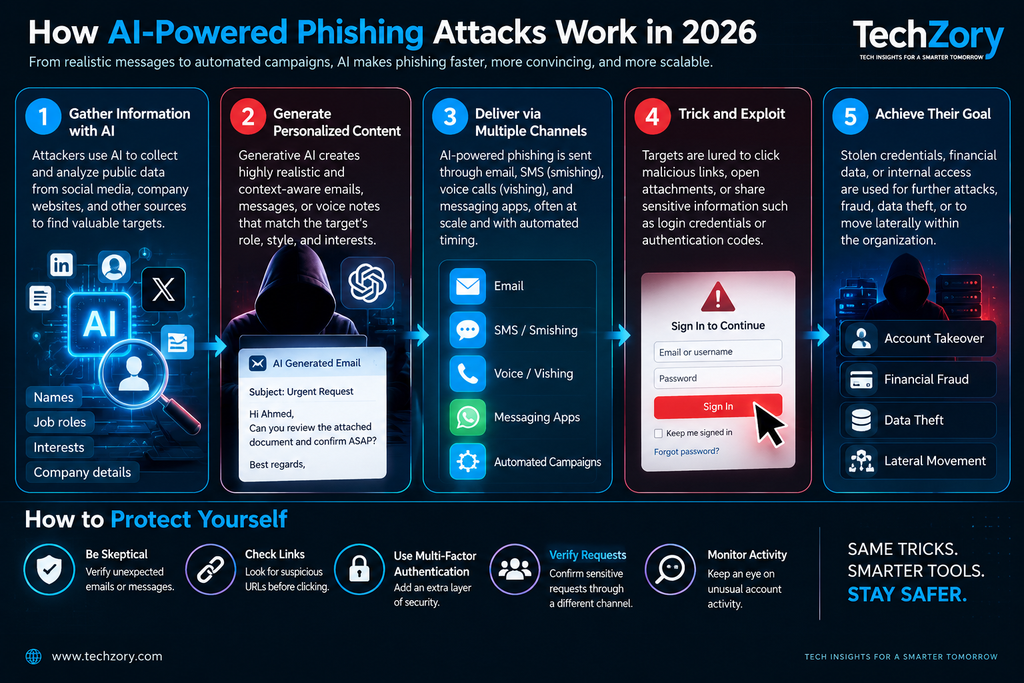
The Main Types of AI-Powered Phishing in 2026
1. AI-Generated Spear Phishing
Spear phishing targets specific individuals or organizations rather than sending the same message to a large, random audience. Artificial intelligence makes this type of attack easier to personalize at scale.
Attackers can combine information from company websites, professional profiles, public announcements, organizational directories, and previous breaches to generate messages that appear relevant to a victim’s job or current responsibilities. A finance employee may receive a convincing invoice request, while an executive assistant could receive a message that appears to reference a real business process or upcoming project.
Microsoft documented AI-enabled phishing campaigns in 2026 that used generative AI to create hyper-personalized lures aligned with victims’ roles, including themes such as invoices, requests for proposals, shared files, and manufacturing workflows. This level of customization can make malicious emails appear more like legitimate business communication.
The key defense is not to judge a message only by how professional it looks. Unexpected requests involving payments, credentials, documents, authentication, or sensitive information should be verified through a separate trusted channel.
2. Device Code Phishing
Device code phishing is a technique that abuses a legitimate authentication flow instead of directly asking a victim for a password.
In a typical attack, the victim receives a convincing message that leads to a page displaying a device code. The victim is then encouraged to visit a legitimate sign-in page and enter that code. If they complete the process, they may unknowingly authorize the attacker’s session, allowing the attacker to obtain valid access and refresh tokens without ever stealing the victim’s password.
Microsoft documented a large-scale AI-enabled device code phishing campaign in 2026 that used dynamic code generation and automated backend infrastructure. Instead of relying on a pre-generated code that could expire before the victim interacted with it, attackers generated a fresh device code when the victim reached the final stage of the phishing flow.
This made the attack more reliable and harder to recognize because parts of the authentication process occurred on legitimate Microsoft infrastructure. The campaign also used AI-generated personalized lures and automated reconnaissance to identify higher-value targets.
Users should treat unexpected requests to enter device codes, approve authentication prompts, or authorize unfamiliar applications with extreme caution. If a login request was not initiated intentionally, the safest response is to stop and verify the request through a trusted channel.
3. Business Email Compromise and Executive Impersonation
Business email compromise (BEC) attacks use social engineering to impersonate executives, suppliers, finance teams, or trusted business partners. Generative AI can make these attacks more convincing by helping attackers reproduce professional writing styles, create role-specific messages, and rapidly adapt a conversation as the victim responds.
A typical BEC attack may involve an urgent request to change bank details, approve a payment, purchase gift cards, send confidential documents, or bypass a normal business process. AI can help attackers tailor the tone and wording to match the victim’s role, organization, and expected workflow.
The most effective defense is process verification. Financial or sensitive requests should not be approved solely because an email appears professional or seems to come from a senior employee. Changes to payment instructions, account details, or high-value transactions should be confirmed through a separate trusted channel and follow established approval procedures.
Organizations can also reduce risk by enforcing multi-person approval for sensitive payments, training employees to recognize unusual requests, and using technical controls that flag suspicious login activity or impersonation attempts.
4. Voice and Video Deepfake Phishing
AI-generated voice and video are making impersonation attacks more convincing. Instead of relying only on email, attackers can use synthetic audio or deepfake video to pretend to be an executive, coworker, family member, government official, or other trusted person.
Microsoft has observed threat actors using real-time voice modulation, deepfake video overlays, and AI-generated voice cloning to support impersonation, vishing, and business email compromise campaigns. These techniques can make a fraudulent request appear more credible, especially when the attacker already knows details about the target or organization.
The FBI has also warned that AI-generated voice messages can closely imitate known contacts. In one campaign, malicious actors used AI-generated voices while impersonating senior U.S. officials in an attempt to establish trust and gain access to accounts or sensitive information.
The safest response is to verify unexpected requests through a second, trusted channel. If someone asks for money, credentials, authentication approval, or sensitive information during a voice or video call, contact that person using a known phone number or another established method instead of relying on the incoming communication alone.
Visual or audio imperfections can sometimes reveal a deepfake, but users should not depend on those clues alone. As synthetic media improves, independent verification becomes more reliable than trying to judge whether a voice or face “looks real.”
5. AI-Assisted Smishing and Vishing
Smishing uses text messages, while vishing uses voice calls or voice messages. Artificial intelligence can make both techniques more convincing by improving message quality, personalizing content, and generating realistic synthetic voices.
In AI-assisted smishing, attackers can rapidly create believable messages tailored to a target’s role, organization, or recent activity. These messages may include malicious links, requests to move the conversation to another platform, or prompts to verify an account or complete an urgent action.
AI-assisted vishing can be even more persuasive because attackers may use voice cloning or real-time voice modification to impersonate executives, colleagues, public figures, or personal contacts. Microsoft has documented threat actors using AI-generated voice cloning and real-time voice modulation to support impersonation, vishing, and business email compromise campaigns.
The FBI has also warned about campaigns in which malicious actors used both text messages and AI-generated voice messages while impersonating trusted officials. In these cases, the goal was often to establish trust before directing victims to malicious links, alternate messaging platforms, or requests for sensitive information.
Users should independently verify unexpected text or voice requests, especially when they involve credentials, authentication codes, money, or confidential data. A familiar-sounding voice or professionally written message should not be treated as proof of identity.
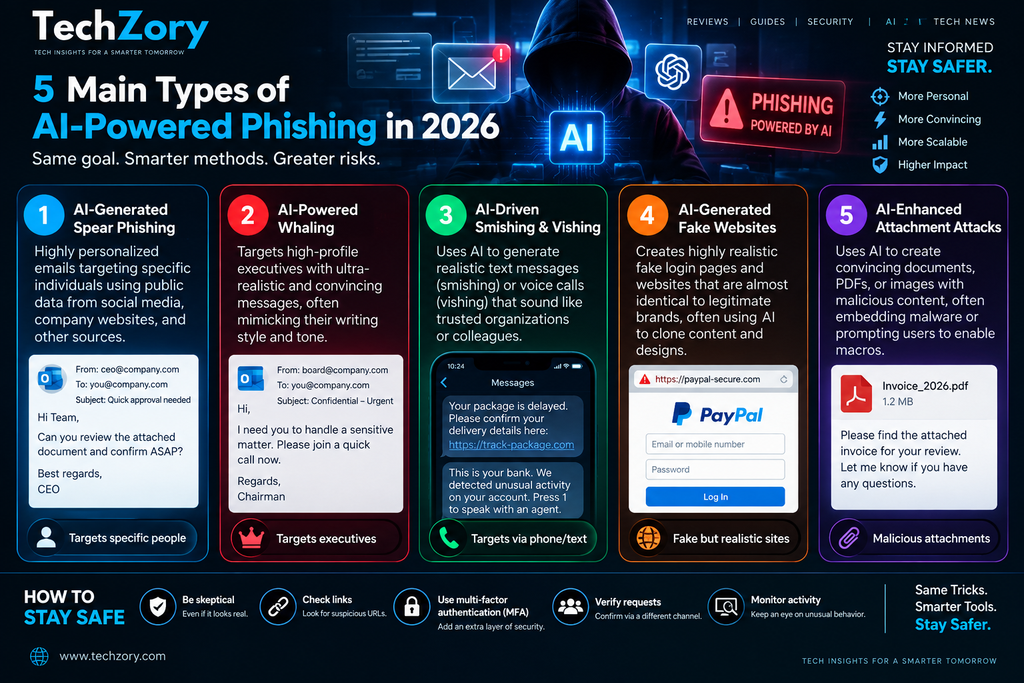
Why AI-Powered Phishing Is Harder to Detect
AI-powered phishing is harder to detect because many of the warning signs users traditionally relied on are becoming less reliable. Generative AI can produce polished language, adapt tone to a specific role, translate messages into multiple languages, and personalize content using publicly available information.
Microsoft reported in 2026 that AI-assisted phishing campaigns in its observations were achieving much higher click-through rates than more traditional campaigns, which the company attributed to improved precision, localization, and role-specific messaging rather than simply higher message volume.
Attackers are also combining convincing messages with legitimate authentication flows, trusted cloud services, and automated infrastructure. This means a phishing attempt may no longer depend on an obviously fake login page or a poorly written email. In some campaigns, victims can be directed to real authentication services while still unknowingly authorizing access for an attacker.
Another challenge is speed. Google Threat Intelligence reported that some adversaries are moving from basic AI prompting toward more automated and agentic workflows, reducing the time between reconnaissance, campaign setup, credential harvesting, and follow-on activity.
As a result, detecting phishing increasingly requires more than checking grammar or visual appearance. Users and security teams need to evaluate context, identity, authentication behavior, requested actions, destination URLs, and whether the communication fits the expected business process.
1. Better Language and Personalization
Generative AI allows attackers to create phishing messages that are cleaner, more natural, and more relevant to the target than many traditional phishing emails.
Instead of sending the same generic message to thousands of recipients, an attacker can tailor wording to a person’s job role, industry, language, or business context. A finance employee may receive a payment-related lure, while a technical employee may receive a fake system alert or document-sharing request.
AI can also help attackers imitate common business communication styles, reduce spelling and grammar errors, and quickly produce multiple versions of the same message. This makes it less reliable to judge whether an email is legitimate based only on writing quality.
The safest approach is to verify the request itself: Does it match a normal process? Was the message expected? Is the sender asking for credentials, money, authentication approval, or sensitive information? Those contextual checks are becoming more important than simply looking for awkward wording.
2. Faster Reconnaissance and Targeting
AI can help attackers process large amounts of publicly available information much faster than manual research alone. Company websites, professional profiles, job listings, social media posts, breach data, and public documents can all provide clues about an organization’s structure, employees, suppliers, and business processes.
Generative AI can summarize this information, identify potentially valuable targets, and help attackers create role-specific phishing lures. This means reconnaissance that once required significant manual effort can be accelerated and scaled across many potential victims.
The increased speed of reconnaissance also shortens the time between identifying a target and launching a convincing campaign. Combined with automation, attackers can move more quickly from information gathering to personalized messaging, credential theft, and follow-on access.
Organizations can reduce exposure by limiting unnecessary public information, reviewing what employees publish about internal systems or processes, and training staff to treat highly personalized messages with the same caution as generic phishing attempts.
3. More Convincing Authentication Flows
Some modern phishing attacks are harder to recognize because they abuse legitimate authentication processes instead of relying entirely on obviously fake login pages.
Device code phishing is a good example. A victim may be directed to a real sign-in page and asked to enter a valid device code. If the request was initiated by an attacker, completing that legitimate authentication flow can still authorize access for the attacker.
This creates a dangerous situation: the web address may look correct, the sign-in page may genuinely belong to Microsoft or another trusted provider, and the authentication process itself may appear normal. The malicious part is the context in which the victim was persuaded to authorize the request.
That is why users should verify how an authentication request started, not just whether the login page looks legitimate. Unexpected device codes, unfamiliar application approvals, unusual consent prompts, and authentication requests that were not personally initiated should all be treated as warning signs.
4. Greater Scale Through Automation
Automation allows attackers to run phishing campaigns faster and with less manual effort. AI can help generate messages, personalize content, identify targets, prepare campaign infrastructure, and adapt lures across many recipients or organizations.
This means attackers can combine personalization with scale. Instead of choosing between a generic mass campaign and a highly targeted manual attack, AI-assisted workflows can make it easier to create large numbers of messages that still appear customized to individual roles or business contexts.
Google Threat Intelligence has reported that some threat actors are moving from basic AI prompting toward more automated and agentic workflows. Microsoft has also documented AI-enabled phishing operations that combine personalized lures with automated backend infrastructure.
The security challenge is that faster campaign creation can reduce the time defenders have to recognize and respond to new phishing techniques. Organizations therefore need layered defenses that combine user awareness, identity protection, email security, behavioral monitoring, and rapid incident response.
How to Recognize AI-Powered Phishing
AI-powered phishing can look polished and professional, so detection increasingly depends on context rather than obvious mistakes.
Watch for unexpected requests involving passwords, authentication codes, device approvals, payments, sensitive files, or urgent account actions. A message may look legitimate but still be suspicious if the request itself is unusual.
Check the sender carefully. Attackers may use lookalike domains, compromised accounts, or display names that appear familiar. Do not rely on the visible sender name alone.
Pay attention to authentication behavior. Unexpected device codes, consent prompts, unfamiliar application approvals, or multi-factor authentication requests can indicate an attempt to hijack a session or authorize attacker access.
Be cautious with links and attachments, even when the message appears personalized. Hover over links when possible, verify the destination domain, and avoid opening unexpected files until the sender is confirmed through a trusted channel.
Most importantly, verify high-risk requests independently. If a message asks for money, credentials, account changes, or sensitive information, contact the supposed sender using a known phone number, official website, or previously trusted communication channel.
1. Unexpected Urgency or Pressure
Phishing messages often try to create urgency so the victim acts before verifying the request. AI can make this pressure feel more believable by tailoring the message to a real business situation, role, or ongoing activity.
Be cautious when a message demands immediate action, especially if it involves payments, account verification, password resets, device approvals, or confidential information. Phrases such as “urgent,” “final notice,” “act now,” or “your account will be suspended” should trigger additional verification rather than faster action.
The safest response is to slow the process down. Verify the request through a separate trusted channel and confirm that the sender, request, and timing all make sense before taking any action.
2. Unusual Authentication Requests
Unexpected authentication requests are a major warning sign in modern phishing attacks. A user may be asked to enter a device code, approve a sign-in request, authorize an unfamiliar application, or confirm an authentication prompt that they did not initiate.
These requests can be especially deceptive because the victim may be redirected to a legitimate sign-in page. Microsoft has documented device code phishing campaigns in which victims entered attacker-controlled codes on official Microsoft authentication pages, unknowingly authorizing the attacker’s session.
Users should be cautious whenever an authentication request appears unexpectedly or arrives through an email, message, or link from an unfamiliar source. If you did not personally start the sign-in process, do not approve it until the request has been independently verified.
Organizations can reduce this risk by limiting device code authentication where it is not needed, monitoring unusual sign-in behavior, and using phishing-resistant authentication methods such as passkeys or FIDO-based security keys.
3. Requests to Bypass Normal Business Procedures
Phishing attacks often succeed by convincing victims to ignore or bypass normal business controls. A message may ask an employee to skip a payment approval step, use a personal account, send sensitive information directly, or complete an unusual request “just this once.”
AI can make these messages more persuasive by adapting the wording to the victim’s role, company structure, or current business context. That makes process discipline especially important.
Employees should be cautious whenever a request conflicts with established procedures, even if it appears to come from a senior executive, trusted supplier, or familiar colleague. High-risk actions should follow the same verification and approval process regardless of urgency or who appears to be asking.
Organizations can reduce risk by clearly documenting sensitive workflows, requiring multiple approvals for high-value actions, and encouraging employees to question requests that fall outside normal procedures.
4. Suspicious Links, Domains, and Redirects
Phishing links are becoming harder to judge at a glance because attackers can combine professional-looking messages with domains that closely resemble legitimate websites.
Before clicking a link, check the destination carefully. Look for misspelled company names, unusual subdomains, unexpected country-code domains, extra words, or small character changes that make a malicious address appear familiar.
Attackers may also use shortened URLs or multiple redirects to hide the final destination. A link that begins on one domain can eventually send the victim to a completely different site designed to steal credentials or authentication information.
When a message asks you to sign in, verify an account, make a payment, or view a sensitive document, it is usually safer to open the organization’s official website directly or use a trusted bookmark instead of following the link in the message.
A polished email does not make the destination trustworthy. Always evaluate the actual domain and the context of the request before entering credentials or approving access.
5. Requests for Sensitive Information
Requests for sensitive information should always be treated with caution, especially when they arrive unexpectedly. Phishing messages may ask for passwords, one-time codes, account details, personal information, payment data, internal documents, or confidential business information.
AI can make these requests appear more legitimate by adapting the wording to a specific role, project, or business process. A message may look professional and reference real company details, but that does not prove the request is genuine.
Legitimate organizations generally do not ask users to reveal passwords or authentication codes through email or messaging platforms. If a request involves confidential data, verify the sender and purpose through a separate trusted channel before responding.
The safest rule is simple: the more sensitive the information, the stronger the verification process should be before sharing it.
How to Protect Yourself from AI-Powered Phishing
1. Verify Unexpected Requests Through a Separate Channel
The most effective defense against sophisticated phishing is independent verification.
If an email, text message, voice call, or video request asks you to send money, approve access, share sensitive information, or complete an unusual account action, do not rely on the incoming message alone.
Contact the person or organization using a phone number, official website, or communication channel you already trust. Do not use contact details provided inside the suspicious message.
This simple step can defeat many forms of AI-powered impersonation because the attacker may be able to imitate a voice, writing style, or identity, but they usually cannot control every trusted communication channel associated with the real person or organization.
2. Use Phishing-Resistant Authentication
Strong authentication can significantly reduce the damage caused by phishing, especially when it is designed to resist credential theft and approval manipulation.
Traditional passwords and one-time codes can still be captured or abused in some phishing scenarios. Phishing-resistant methods such as passkeys and FIDO-based security keys are harder for attackers to reuse because authentication is tied more closely to the legitimate service and device.
Organizations should also review which authentication methods are allowed, disable legacy or unnecessary sign-in flows where possible, and monitor unusual authentication activity such as unfamiliar devices, unexpected device-code requests, or repeated approval prompts.
Users should never approve a sign-in request they did not initiate. If an authentication prompt appears unexpectedly, stop and verify the situation before taking any action.
3. Use Multi-Layered Email and Identity Security
No single security control can stop every phishing attack, especially as attackers combine AI-generated content with compromised accounts, legitimate cloud services, and new authentication techniques.
Organizations should use multiple layers of protection, including email filtering, domain authentication, identity monitoring, endpoint security, suspicious-login detection, and behavioral analytics. These controls can help identify malicious messages, unusual sign-in activity, and compromised accounts before an attack spreads further.
Email authentication standards such as SPF, DKIM, and DMARC can reduce some forms of domain spoofing, while identity-security tools can detect abnormal sign-in patterns, unfamiliar devices, impossible travel, or unusual access requests.
Layered security is especially important because a message may appear legitimate even when the surrounding behavior is suspicious. Combining message analysis with identity and access signals gives defenders a better chance of detecting modern phishing campaigns.
4. Train Users to Verify Context, Not Just Grammar
Traditional phishing awareness often focused on warning signs such as spelling mistakes, awkward grammar, or obviously suspicious formatting. Those clues can still matter, but they are becoming less reliable as generative AI produces cleaner and more natural messages.
Security training should therefore focus more on context and behavior. Users should ask whether the request is expected, whether it matches normal business procedures, and whether the sender is asking for something sensitive, urgent, or unusual.
Employees should also learn to recognize authentication-related warning signs, such as unexpected device codes, unfamiliar application approvals, repeated multi-factor authentication prompts, or requests to bypass established processes.
The goal is to build a verification mindset. A message should not be trusted simply because it is well written, personalized, or appears to come from a familiar person.
5. Report Suspicious Messages Quickly
Reporting suspicious messages quickly can reduce the impact of a phishing campaign, especially when the same attack is targeting multiple people inside an organization.
Users should report unexpected emails, texts, calls, or authentication requests through the organization’s approved security or IT channel. Early reporting gives defenders more time to block malicious domains, disable compromised accounts, investigate suspicious sign-ins, and warn other potential targets.
If credentials or authentication approvals may already have been exposed, the incident should be treated urgently. Passwords may need to be changed, active sessions revoked, suspicious applications removed, and account activity reviewed.
The faster a suspicious message is reported, the better the chance of containing the attack before it spreads further.
What Organizations Should Do in 2026
Organizations need to assume that phishing messages can now look polished, personalized, and technically convincing. Security strategies should therefore focus less on spotting obvious mistakes and more on reducing the impact of successful social engineering.
First, strengthen identity protection. Use phishing-resistant authentication where possible, monitor unusual sign-ins, restrict unnecessary device-code flows, and enforce least-privilege access so a compromised account cannot immediately reach sensitive systems.
Second, improve email and domain security. Configure SPF, DKIM, and DMARC correctly, monitor for lookalike domains, and use filtering systems that analyze both message content and sender behavior.
Third, protect high-risk business processes. Payment changes, bank-detail updates, account recovery, access approvals, and sensitive data transfers should require independent verification and, where appropriate, multiple approvals.
Finally, prepare for fast incident response. Employees should know how to report suspicious messages, and security teams should be able to revoke sessions, disable compromised accounts, block malicious infrastructure, and investigate affected users quickly.
The goal is not to eliminate every phishing attempt. It is to make successful attacks harder to execute, easier to detect, and less damaging when they occur.
Frequently Asked Questions
What is AI-powered phishing?
AI-powered phishing is a social-engineering attack in which criminals use artificial intelligence to improve tasks such as researching targets, generating convincing messages, personalizing lures, translating content, or automating parts of the attack. The goal is usually to steal credentials, obtain unauthorized access, capture sensitive information, or persuade a victim to perform a harmful action.
How is AI-powered phishing different from traditional phishing?
Traditional phishing often relies on generic templates and broad targeting, while AI-powered phishing can be more personalized, polished, and automated. Attackers can use AI to tailor messages to a victim’s role, language, organization, or business context, making the attack appear more credible and harder to identify using simple warning signs such as poor grammar.
Can AI create phishing emails automatically?
Yes. Generative AI can be used to draft phishing emails, personalize messages, translate content, and adapt wording for different targets. However, the level of automation varies between campaigns. Some attackers still use AI only as a writing tool, while others combine it with automated reconnaissance, infrastructure, and multi-stage attack workflows.
Can AI-powered phishing bypass multi-factor authentication?
AI-powered phishing does not automatically defeat multi-factor authentication, but attackers can sometimes abuse authentication workflows through techniques such as device code phishing, session theft, consent phishing, or repeated approval requests. Phishing-resistant authentication methods such as passkeys and FIDO-based security keys can provide stronger protection against these attacks.
How can I protect myself from AI-powered phishing?
The best protection is to verify unexpected requests independently, avoid approving authentication prompts you did not initiate, use phishing-resistant authentication such as passkeys where available, check links and domains carefully, and never share passwords or security codes through email or messaging platforms. Organizations should also combine email security, identity monitoring, user training, and rapid incident response.
Are passkeys safer than passwords against phishing?
Yes. Passkeys are designed to be phishing-resistant because they are bound to the legitimate website or service and do not require users to type a reusable password that can be captured by a fake login page.
They are generally safer than passwords and many traditional one-time-code methods, but they are not a complete defense against every form of social engineering. Attackers can still try to manipulate users into approving malicious requests or abusing legitimate authentication flows, so strong verification and account monitoring remain important.
Final Thoughts
AI is not replacing traditional phishing techniques so much as making them faster, more personalized, and easier to scale.
Attackers can now use generative AI to research targets, produce professional messages, imitate trusted people, automate parts of phishing infrastructure, and support more complex attack workflows. At the same time, techniques such as device code phishing show that even legitimate authentication systems can be abused when users are manipulated into authorizing the wrong session.
The strongest defense is therefore not simply learning to recognize poorly written emails. Individuals and organizations need to verify unexpected requests, use phishing-resistant authentication, protect sensitive business processes, monitor identity activity, and respond quickly when suspicious behavior appears.
As AI capabilities continue to evolve, phishing attacks will likely continue evolving with them. Security strategies must evolve as well—combining technology, strong authentication, clear procedures, and human verification to make successful social engineering more difficult.
The key lesson for 2026 is simple: a message can look professional, personalized, and completely legitimate and still be malicious. Trust should come from verification, not appearance.
Sources and Further Reading
- Microsoft Security — Inside an AI-Enabled Device Code Phishing Campaign — April 2026
- Microsoft Threat Intelligence — AI as Tradecraft: How Threat Actors Operationalize AI — March 2026
- Google Threat Intelligence Group — From Prompting to Autonomy: The Evolution of Adversarial AI — September 2026
- Microsoft Security — Threat Actor Abuse of AI Accelerates from Tool to Cyberattack Surface — April 2026
- FBI — Senior U.S. Officials Impersonated in Malicious Messaging Campaign — May 2025





Comments 2